
BELLCOME VTM.4S083.BLBTL Door Entry System Terminals User Manual
- June 16, 2024
- BELLCOME
Table of Contents
 USER MANUAL
Door entry system terminals
VTM.4S083.BLBTL Door Entry System Terminals
smart 4.3” VIDEO VTM.4S083.BLB(W)TL
4,3” LCD, TFT, 480 x 3(RGB) x 272
ABS case + Secured Glass
180x125x21 mm| 0.4 kg
IP31| ºC … + 45ºC
Operating voltage: 11 … 14 Vd.c.
Stand-by current: 15 mAd.c.
Operating current: 240 mAd.c.
advanced 7” VIDEO VTA.7S903.BLB(W)04
7” LCD, TFT, 800 x 3(RGB) x 480
ABS case + Secured Glass
162x227x20 mm| 0.8 kg
IP31| ºC … + 45ºC
Operating voltage: 11 … 14 Vd.c.
Stand-by current: 12 mAd.c.
Operating current: 300 mAd.c.
Safety instructions

Cables
Standard 4 Wire
TCYY – 2x2x0.5-24 AWG (max. 30m);
TCYY – 3x2x0.5-24 AWG (max. 50m);
TCYY – 4x2x0.5-24 AWG (max. 50m);
4 x 0.5 mm² (max. 60m);
4 x 0.75 mm² (max. 100m);

UTP/FTP cat5e (AWG24) / cat6 (AWG23)

1. White-Orange
2. Orange
3. White-Green
4. Blue| 5. White-Blue
6. Green
7. White-Brown
8. Brown
---|---
Installation
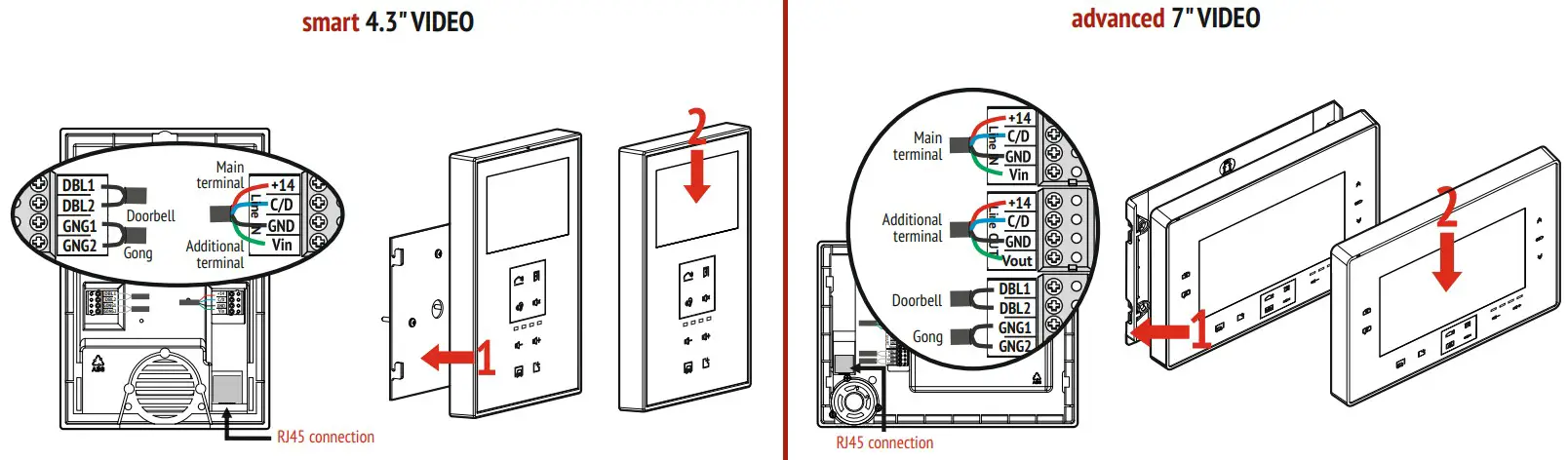
Programming
The terminals are programmed from the factory with Address 1 = number of
the first terminal in the system.
In multi-family systems, the terminals will be programmed with the number
(address) of each family:
| 0 | The system is set under tension. |
|---|---|
| 1 | Long press the PROG button from the SCU central unit. |
| 2 | At the terminal, long press the key – long beep. |
| 3 | Short touch of the key: |
2 touches = Address 2 – 2 beeps
3 touches = Address 3 – 3 beeps
…
n touches = Address n – n beeps
4| After completion, briefly press the PROG button from the SCU central unit.
Use
| Answering the call = starting the hands-free conversation
---|---
| Access granting
| Audio-video monitoring
| Mute
 | Talk volume adjustment
| Auxiliary commands – AUX1, AUX2
| Intercommunication
| Picture taking
| Menu access, scrolling and settings: video image, time-date, view/delete
pictures
Settings
Factory settings:
- Ringtone: 1 (out of 5)
- Call duration: 2 calls
- Call volume: level 3 (out of 4)
| Long press the two keys simultaneously – long beep = settings mode
activated.
---|---
| Ringtone setting: touch the key successively to listen to the 5 versions.
The last played ringtone remains stored.
| Call duration setting: touch the key successively, to select 1/2/3 calls or
1 min.
The last played version remains stored.
| Call volume setting: short touch the keys, to get the desired volume between
1 and 4.
The last played version remains stored.
Outdoor panels
| LEDs signaling status during use: call – talk – access granting
---|---
| Call key and the name of the family
| RFID reader for the access cards
Warranty
- A 24-month warranty is granted, according to the existing legislation, based on the purchase document.
- Warranty is granted for non-conformity and/or hidden defects.
- Warranty is NOT granted for:
incorrect installation and/ or operation, non-compliant with this manual; broken glass, blows, mechanical shocks; theft, fire, floods, natural disasters; unprotected products during renovation activities; the RFID access cards (tags), which are considered consumables.
MADE in EU by:
ELECTRA s.r.l
Parc Industrial Miroslava
Str. Principala 33, 707307, Jud. Iași – RO
+40 232 214.370
sales@electra.ro
www.electra.ro
SUPPORT
ELECTRA Building Communications GmbH
Gadnergasse 71, Stockwerk 1, Büro Top 132
1110 Wien – AT
+43 1 810 20 99
support@bellcome.com
www.bellcome.com
06.2023 INS.VTM(A)03.BLYTL
References
Read User Manual Online (PDF format)
Read User Manual Online (PDF format) >>