
Shenzhen Hailiwang Technology T11 Dog Training Collar User Manual
- June 5, 2024
- Shenzhen Hailiwang Technology
Table of Contents
Shenzhen Hailiwang Technology T11 Dog Training Collar User Manual

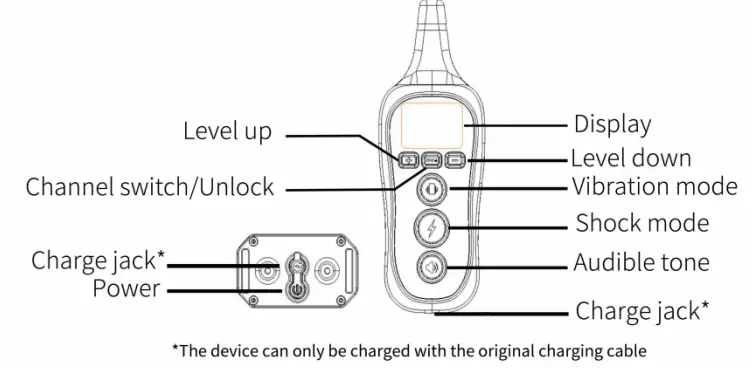
Display
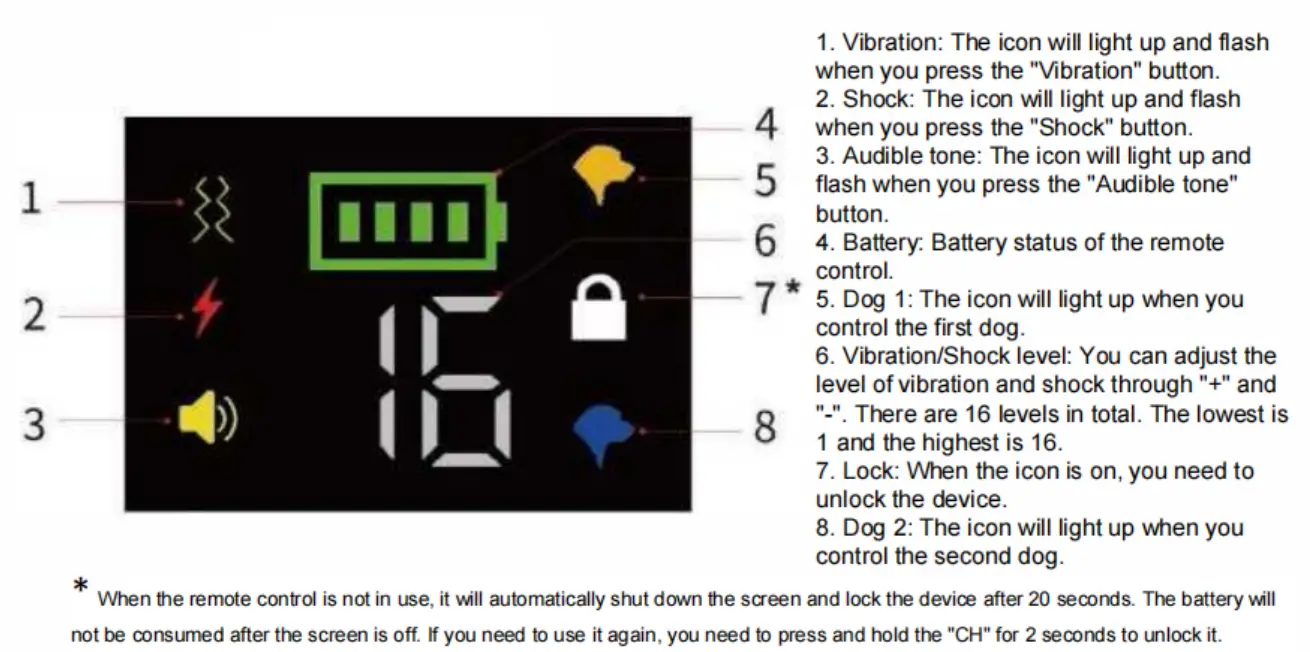
Instructions
-
Press any key to wake up the remote control, the lock icon lights up. At this time, press and hold the “CH” button for 2s to unlock the device.
-
Turn on the collar receiver: press the power button on the collar, if it emits “beep”, it means the device is turned on, if it emits “beep-beep”, it is turned off.
-
Switch dog collar: Click the “CH” button to switch dog 1 or dog 2.
-
Pairing: The remote control can control one or two collars. If you have a dog, please refer to the first item below. If you have two dogs, please refer to the second item below:
(DVV hen either icon of dog 1 or dog 2 is lit, press and hold the power button of the collar until it flashes with a white light, then click the “Audible tone” button, if the collar flashes with a purple light and emits “beep”, it means the pairing was successful. @ Pair the first dog collar: When the icon of dog 1 is on, press and hold the power button of the collar until it flashes with a white light, then click the “Audible tone” button, if the collar flashes with a purple light and emits “beep”, it means the pairing was successful. To switch the second dog collar: press the “CH”, when the icon of dog 2 is lit, follow the same operation again to match the second collar.
(Note: Our remote control can only control the collars of this model, and cannot control the collars of other models and the collars sold by others). -
Shock: Press the “Shock” button, and the collar receiver will start shock mode.
-
Vibration: Press the “Vibration” button and the collar receiver will start vibration mode.
-
Vibration/Shock level: You can use “+” or “-” to adjust the level of vibration and shock.
-
Audible tone: Press the “Audible tone” button and the collar receiver will start beeping.
Safety Information
Warning 1:
The product is not suitable for aggressive dogs. Aggressive fierce dogs may
cause serious harm or even death to their owners and others. If you are not
sure whether the product is suitable for your dog, please consult a
professional veterinarian or certified trainer.
Warning 2:
Please read and follow the instructions in the manual. The fit of the collar
is very important. A collar that is too loose or too tight around your pet’s
neck can cause skin damage, such as redness and swelling or even pressure
sores. Therefore, please note that when the collar is not in use, you need to
remove it and turn it off in time. It is recommended that pets wear the
product for no more than 4 hours at a time and no more than 8 hours a day.
Warning 3:
Dog training is a long-term and gradual process. In this process, please keep
patience and full of love, and guide your dog’s behaviour correctly. During
use, be sure to use the shock function with caution. When you want to use the
shock function, please make sure that your dog is within your sight.
• When using shock mode for the first lime, do not start training pets from high-level shock. You need to start at the lowest level and gradually increase upwards. When your pet reacts to shock, such as shaking head, licking lips, and tightening the neck muscles, it is the appropriate shock level for your pet. The level of shock can be slightly increased or decreased according to the training situation. When the dog is highly distracted or overly naughty, a higher level of shock level is required .
Battery Status:
When the remote control is turned on, the remote control can work continuously for 30 days, and the standby time can be up to 60 days. When the collar receiver is turned on, it can work continuously for 5-7 days, and the standby time is up to 60 days. If the battery icon on the display keeps flashing red, it reminds the user to charge in time. The charging time of the remote control and the collar receiver are both 1.5 hours, and the fully charged icon is green.
Packing List:
- l x Remote control
- 1 x Receiver
- l x Lanyard
- 2 x Charging cable
- l x Sets of short contact points with caps
- l x Sets of long contact points with caps
- l x Test light
- l x Manual
User Notice
- The product may have power loss during transportation, so please fully charge the product after receiving it, and then you can use rt. When it is not in use, please it off in time to save power and extend the use time.
- Mien wearing a collar for your pet, you need to adjust the length of the strap. A finger must be placed inside the collar. And the contact points of the receiver need to be in contact with your pet’s skin. Please wear silicone caps to reduce the damage to your pet’s skin.
- Mien your pet wears an dollar for the first time, it may not get used to the product. In order to prevent your pet from being frightened, do not use other functions at the first time, you can glide your pet to get used to the collar. Wart for your pet to get used to wearing the collar before starting training for other functions. II is not recommended to use the shock mode directly when training your pet for the first time.
- The collar is IP68 waterproof design, so there is no need to worry about the product being damaged by water.
- When the collar is out of power, the red light will start to flash. Then you need to charge it until the green light turns on.
- When there is no obstructions, the remote can control up to “1600Ft”. The actual control distance depends on your environment. Under normal circumstances, the more open the place, the farther the control distance.
- If the collar receiver is used for 6-8 hours a day, it can be used for 4-7 days. Since the collar receiver needs to be kept waiting for work at all times when it is on standby, there will be a loss of battery power. After the dog training is completed, in order to save power, please press the receiver’s power button to tum off the receiver. After you turn it off, it will emit “‘beep-beep”, which means that the receiver is turned off.
(The remote control does not need to be turned off, it will automatically shut down after the screen is off and enter the power-saving mode.)

Read User Manual Online (PDF format)
Read User Manual Online (PDF format) >>