
FUTOPIA GLOBAL NU14U3 Notebook PC User Guide
- June 13, 2024
- FUTOPIA GLOBAL
Table of Contents
FUTOPIA NU14U3 Notebook PC
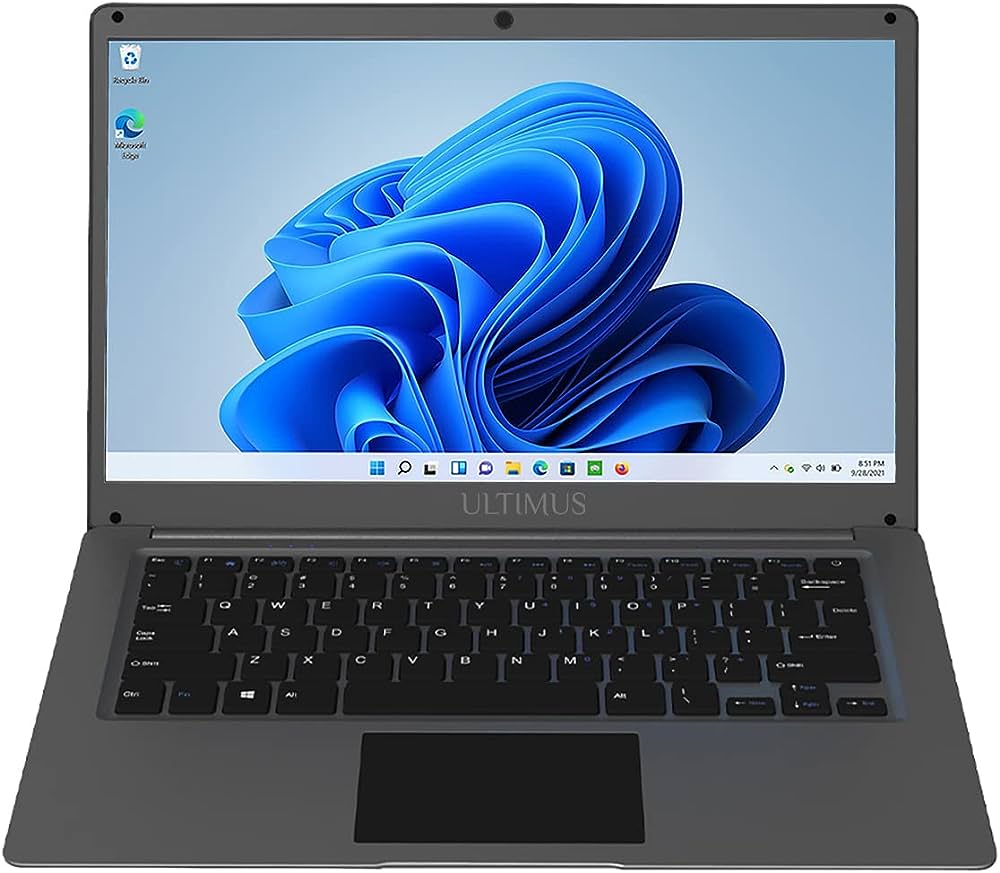
Product Information
- Product Name: NU14U3
- Website: www.futopia-global.com
- Operating System: WINDOWS 11 Home
- Storage: 128 GB SSD
- Display Size: 35.81 cm (14.1)
- Resolution: 1366 x 768 HD
- Wireless Connectivity: WiFi IEEE 802.11 /b/g/n, BT 4.2
- USB Ports: 2 x USB2.0, 1x USB3.0
- Lan Port: 1x RJ45
- Card Slot: 1 x Micro SD Card Slot
- Speakers: 2 x 1W Speakers
- Battery Type: Rechargeable Li-ion battery
- Power Adapter: DC IN 12V/2A
- Support Website: support.futopia-global.com
Product Usage Instructions
- Make sure the device is charged by connecting the power adapter (DC IN 12V/2A) to the device.
- Press the power button to turn on the device.
- Once the device is powered on, you can log in using the provided operating system, WINDOWS 11 Home.
- To connect to a wireless network, go to the settings and select the desired network from the available options. Enter the password if required.
- If you want to transfer files or connect external devices, you can use the USB ports. There are 2 x USB2.0 ports and 1x USB3.0 port available.
- If you need to connect to a wired network, use the RJ45 Lan port.
- To expand the storage capacity, you can insert a Micro SD card into the provided card slot.
- The device has built-in speakers. Adjust the volume according to your preference.
Please visit support.futopia-global.com
Know your product
- 1. Power button
- 2. Camera
- 3. Touchpad
- 4. Keyboard
- 5. Indicators: Power indicator/ Caps Lock indicator/ Numlock indicator
- 6. Microphone
- 7. Charging indicator
- 8. DC charging jack
- 9. USB3.0
- 10. Mini HDMI
- 11. USB 2.0
- 12. RJ45
- 13. Headphone Jack
- 14. Micro SD Card Slot
- 15. Speakers

Important! Read!
Before using your Notebook PC for the first time, make sure it is completely charged. Please attach the included AC adapter to your Notebook PC when it goes below 20% charge for optimal performance.
Safety Notices
WARNING
Disassembling the cabinet is not recommended. This device does not have any
parts that can be replaced by the customer. Service should be delegated to
qualified staff.
CAUTIONS
- The equipment and AC adapter must not be subjected to dripping or splashing, and no liquid-filled objects, such as vases, should be placed on top of the device.
- Never use the Notebook PC/ Laptop PC in a setting where the temperature is too high or too low, and never expose the Notebook PC/ Laptop PC to direct sunlight ora damp environment. The Notebook PC/ Laptop PC and accessories should be kept at a temperature oto·cto 35•c.
- Always allow enough room around the gadget for airflow. Do not use or place the gadget on a soft surface like a bed or a cushion, as this could cause itto overheat.
- When charging, please place the Notebook PC / Laptop PC in an environment that has a normal room temperature and good ventilation. It is recommended to charge the Notebook PC in an environment with a temperature that ranges from s•c … 35• please ensure to use only the adapter offered by the manufacturer. Using an unauthorized adapter may cause danger and violate the authorization of the notebook PC and the Warrantied article. The maximum operating ambient temperature of the equipment declared by the manufacturer is 35-degree C.
IMPORTANT
- The AC adapter shall be installed near the equipment and shall be easily accessible. Unplug from the wall outlet during a storm.
- No naked flame sources such as lighted candles should be placed on the device. Do not pinch, bend, or put heavy or sharp objects on its electrical cord.
- Do not use the device while driving a car or doing any other activities in which loss of concentration could lead to potential harm to self or others.
- Excessive sound pressure from earphones and headphones can cause hearing loss.
Battery safety
-
This device contains a built-in battery, improper use of which may result in an explosion. Do not heat, open, puncture, mutilate, or dispose of the product in
a fire. Do not leave the device in directsunlightfor an extended period of time, which could cause melting or battery damage. -
The battery in this device is not user-replaceable and should only be replaced by Futopia Global or its authorized service provider.
-
CAUTION: RISK OF EXPLOSION IF BATTERY IS REPLACED BY AN INCORRECT TYPE. DISPOSE OF USED BATTERIES ACCORDING TO THE INSTRUCTIONS.
| Intel® Celeron® N4020 | |
|---|---|
| 128 GB SSD | |
| Size : 35.81 cm (14.1) |
Resolution : 1366 x 768 HD
| WiFi IEEE 802.11 /b/g/n BT 4.2
|
| 2 x USB2.0
1x USB3.0
1x RJ45 Lan port
1 x Micro SD Card Slot
|
| 2 x 1W Speakers
|
| WINDOWS 11 Home
| Rechargeable Li-ion battery Power Adapter (DC IN 12V/2A)
Please visit support.futopia-global.com
References
Read User Manual Online (PDF format)
Read User Manual Online (PDF format) >>