
Shenzhen Tianmaren Technology AL03 Wireless Car Charger User Manual
- June 9, 2024
- Shenzhen Tianmaren Technology
Table of Contents
Shenzhen Tianmaren Technology AL03 Wireless Car Charger
Thank you for choosing Lamicall
We sincerely hope that you are happy with your purchase. We are committed to both your satisfaction and our products, therefore if you have any questions, please feel free to contact us. It will always be a pleasure to serve you.
support@lamicall.com
www.lamicall.com
@lamicall
@lamicall_official
@LamicallDirect
Warranty
Lamicall offers a 12-month warranty for this product. If you encounter any
problem, please contact Lamicall Support at
support@lamicall.com for a solution. You will
receive a reply within 24 hours.
To ensure the problem can be solved promptly, please include following
necessary information in your email.
Order Number
Customer Name
Phone Number
Product Name
Date of Purchase
Address
- Please read this manual carefully before using this product.
- We are not liable for any injury, damage, loss, accident, or other undesirable consequences caused by improper use of this product.
Product Specification
| Product Name | Wireless Car Charge |
|---|---|
| Model No. | AL03 |
| Material | PU/ Aluminum Alloy/Plastic/PU/ |
| Size | 100140155mm |
| Weight | 224g |
| Working temperature | 0∼40°C |
| Storage temperature | 40-90°C |
| Compatibility | MagSafe and third-party wireless charging (the snap adapter is |
for bare machine use or the thickness of the mobile phone case is less than
0.7mm)
Precautions for wireless charging| Use bare phone or the phone case thickness
less than 0.7mm is required/
Wireless charging may not work after installing the adapter| ALL LOCK CASE
Phone 12,iPhone 12 Pro, iPhone 12 Pro Max,iPhone 13,iPhone 13 Pro, iPhone 13 Pro Max, iPhone 14,iPhone 14 Pro, iPhone 14 Pro Max,iPhone 14 Plus)
ALL LOCK Snap Adapter
iPhone 8, iPhone 8 Plus, iPhone X; iPhone XS, iPhone XS MAX, iPhone 11 XR; iPhone 11, iPhone 11 Pro, iPhone 11 Pro Max; iPhone 12, iPhone 12 Pro, iPhone 12 Pro Max ; iPhone 13, iPhone 13 Pro, iPhone 13 Pro Max; iPhone 14, iPhone 14 Pro, iPhone 14 Plus, iPhone 14 Pro Max; Pixel 3a, Pixel 3a XL; Pixel 4 XL, Pixel 4, Pixel 4a; Pixel 5, Pixel 4a 5G, Pixel Sa; Pixel 6, Pixel 6 Pro, Pixel 6a; Pixel 7, Pixel 7 Pro; Galaxy S22+, GalaxyS22; GalaxyS21+, GalaxyS21; GalaxyS20+, GalaxyS20; Galaxy Note20, Galaxy Note10+, Galaxy Note10; Galaxy S10+, Galaxy S10, Galaxy S10e; Galaxy Note9, Galaxy S9+, Galaxy S9; Galaxy S8+, Galaxy S8, Galaxy S7
- Other models can be used if the following conditions are met
- Cannot interfere with the phone camera
- The wireless charging area of the mobile phone cannot have any metal and magnetic materials, otherwise, it will affect the charging power low or even cut off
- May interfere with pacemakers
Packing List
- Mount Main Body
- Dash/Console Mount
- Air Vent Mount
- User Manual
Parts Name

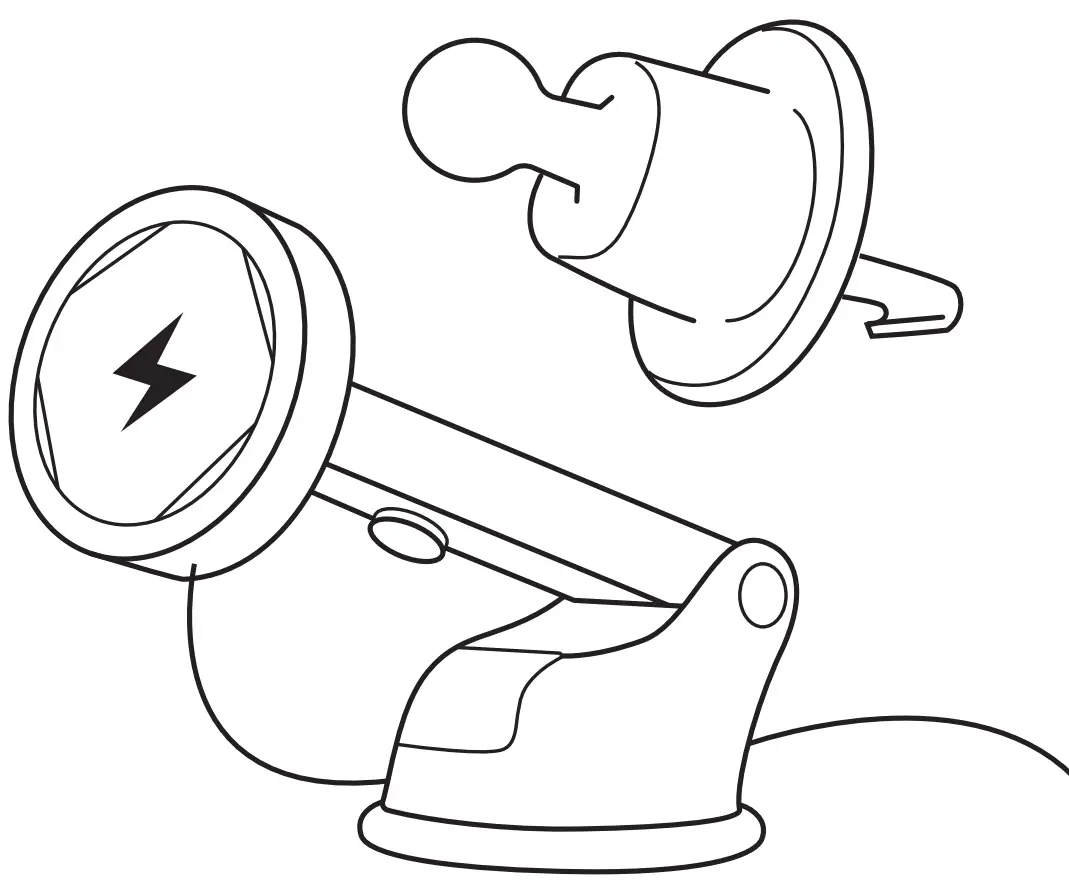
① Air Vent Mount
② Wireless Charging Mount Main Body
③ Telescopic Rod
④ Suction Cup Locking Lever
⑤ Dashboard Mount Base
⑥ Suction Cup
How to use
Dashboard/Console Mount
❶ Clean the position that needs to be pasted
❷ Peel off the adhesive protection paper

❸ Place the dashboard mount base and press the suction cup locking lever

❹ Adjust the length of the telescopic rod to a proper length and then lock it

❺ Adjust the angle of the mount and tighten the joint ball nut
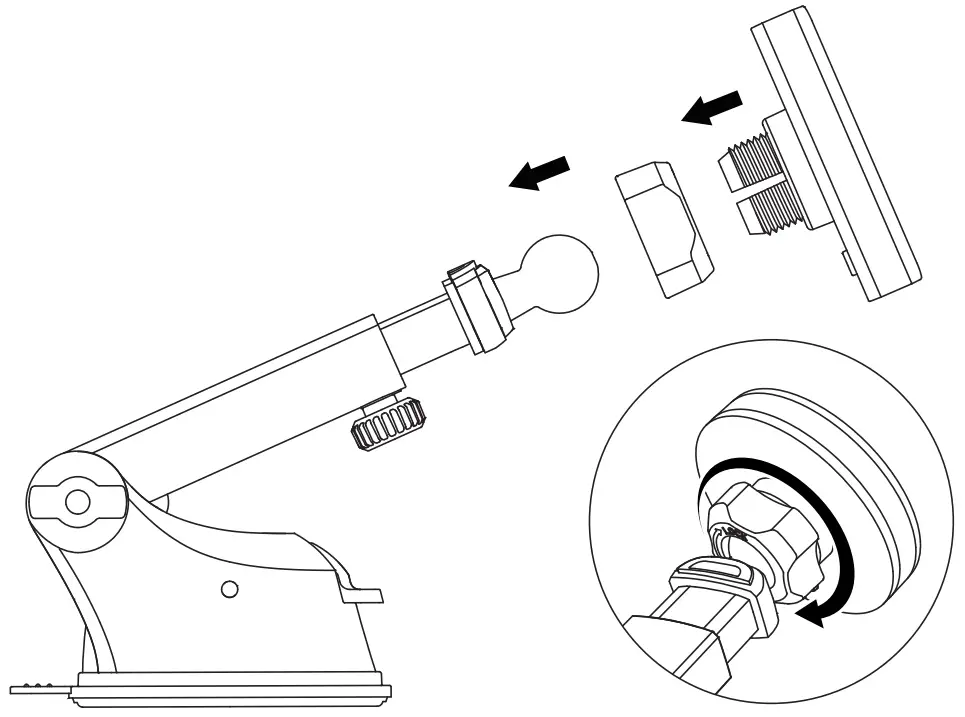
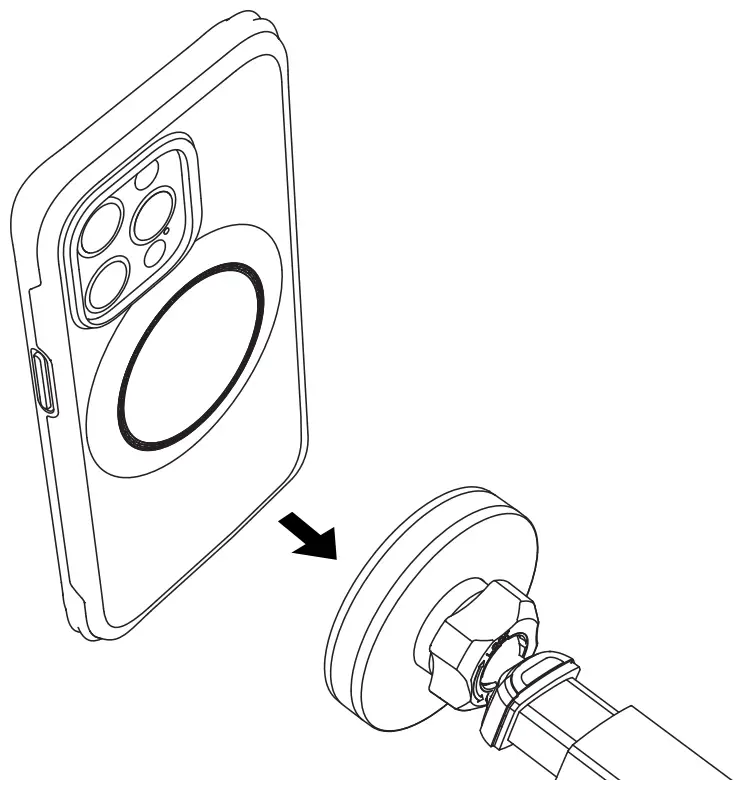
❻ Attach the phone, and it will be automatically aligned and locked
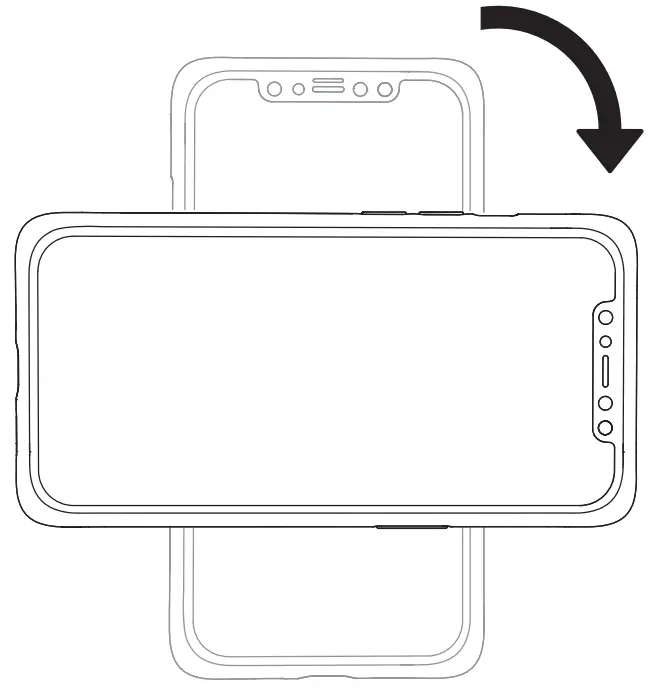
❼ Rotate the phone to 45 ° to remove it

❽ The phone can be switched horizontally and vertically
Air Vent Mount
❶ Adjust the angle of the mount and tighten the joint ball nut
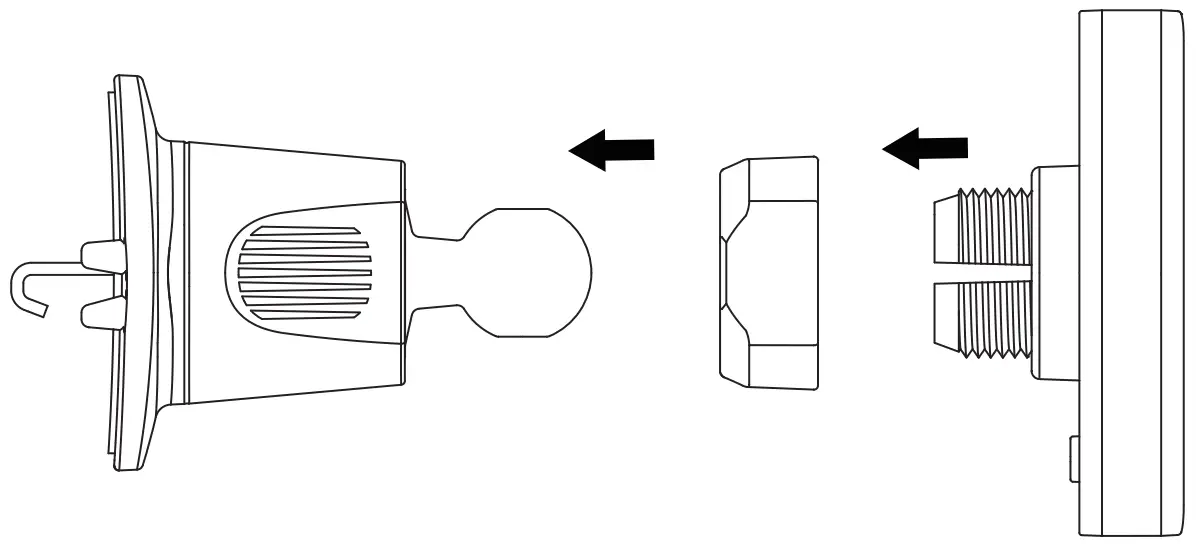
❷ Release the air vent hook by twisting the nu
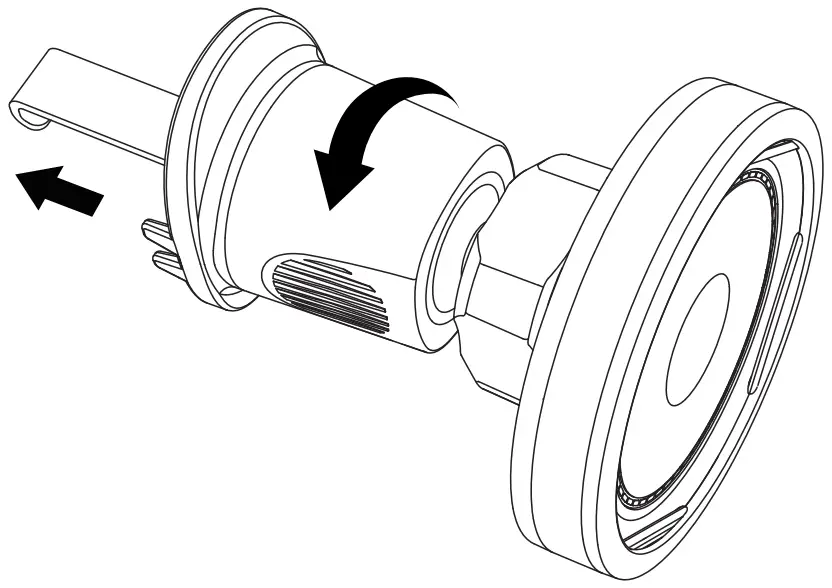
❸ Insert the hook into the vent and clasp it to the vent blades
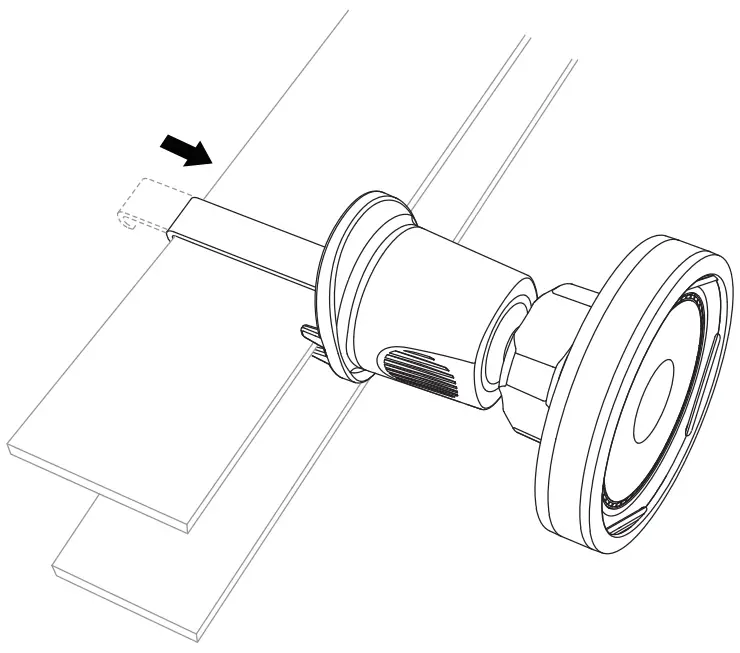
❹ Tighten the nut to secure the hook
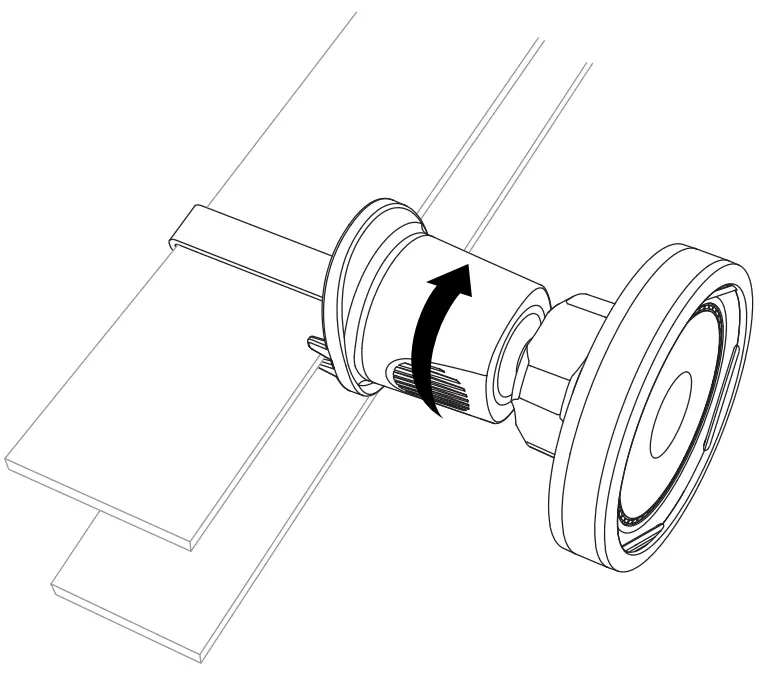
FCC Statement
Changes or modifications not expressly approved by the party responsible for
compliance could void the user’s authority to operate the equipment.
This equipment has been tested and found to comply with the limits for a Class
B digital device, pursuant to Part 15 of the FCC Rules. These limits are
designed to provide reasonable protection against harmful interference in a
residential installation. This equipment generates uses and can radiate radio
frequency energy and, if not installed and used in accordance with the
instructions, may cause harmful interference to radio communications.
However, there is no guarantee that interference will not occur in a
particular installation. If this equipment does cause harmful interference to
radio or television reception, which can be determined by turning the
equipment off and on, the user is encouraged to try to correct the
interference by one or more of the following measures:
- Reorient or relocate the receiving antenna.
- Increase the separation between the equipment and receiver.
- Connect the equipment into an outlet on a circuit different from that to which the receiver is connected.
- Consult the dealer or an experienced radio/TV technician for help
This device complies with part 15 of the FCC rules. Operation is subject to
the following two conditions (l)this device may not cause harmful
interference, and (2) this device must accept any interference received,
including interference that may cause undesired operation.
This equipment complies with FCC radiation exposure limits set forth for an
uncontrolled environment. This equipment should be installed and operated with
minimum distance 20cm between the radiator & your body.
IC Statement
This device contains license-exempt transmitter(s)/receiver(s) that comply
with
Innovation, Science and Economic Development Canada’ s license-exempt RSS(s).
Operation is subject to the following two conditions:
(1) This device may not cause interference.
(2) This device must accept any interference, including interference that may
cause undesired operation of the device.
The term “IC: “before the certification/registration number only signifies
that the Industry Canada technical specifications were met.
This product meets the applicable Industry Canada technical specifications.


Read User Manual Online (PDF format)
Read User Manual Online (PDF format) >>