
AVOCITES BTF200Z 300W Electronic focusing film spotlight User Manual
- June 9, 2024
- AVOCITES
Table of Contents
 BTF200Z 300W Electronic focusing film spotlight
USER MANUAL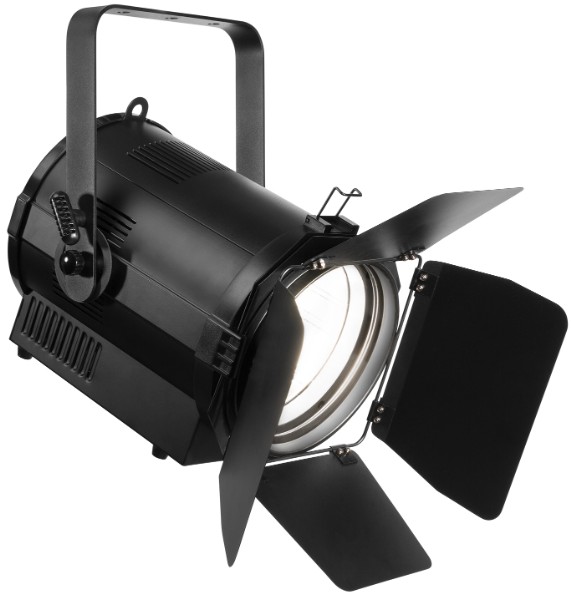
BTF200Z 300W Electronic focusing film spotlight
INSTRUCTION
Thank for having chosen a 300W Electronic focusing film spotlight. You will
see you have a powerful and versatile device. you led studio spot 300w light
Unpack your Delivery includes Gobo frame: IPC USER MANUAL: IPC
DESCRIPTIONOF THE DEVICE.
Profile
With the idea of energy saving and environment protection, the device use low power loss and extremely high efficiency led. The device housing cover is made of used the high strength heat resistance engineering plastics, with beautiful shape and new smooth lines. The designing and manufacturing is in compliance with the IEC standard. The device is suitable in the large-scale theatrical performance, the theater, the performance hall, the bar, nightclub and so on. The product conforms to the international standard DMX512 agreement completely, the device can be controlled in signal, and also be controlled in units. many
Specification
• LED: 1 x 300W COB LED.
• Power supply: ACIO0V-250V, 50HZ/60HZ
• Power consumption: 350W
• Control channels: 3 DMX channels
• Color temperature: 3000k or 5600k choose one
• High quality optical system
• Electronic focus 15-55 degrees
• Net weight: 8.9kg
• Gross weight: 11.3kg
• Size:270300470CM
• Explicit: Greater than 93
Safety warning
-
Warning:
■ Every person involved with the installation, operation and maintenance of this device has to be qualified.
■ User must follow the instructions of this manual.
■ Unqualified person can not open the housing cover and operate the device, or the dealer will not accept liability for any resulting defects or problems.
■ The device against rain and moisture. -
Warning notes:
■ Power Supply: ACIO0V-250V, 5011Z/6011Z.
Make sure the power switch is off, the power plug, outlet and the earth
■ connection is in well condition before connecting the device with the mains.
■ Please use qualified power plug and outlet. Never connect the power cord of this device with other electrical equipment.
■ During move and installation, make sure the device not crashed with metal parts and other tough materials.
■ Always disconnect from the mains, when the device is on installation and dismantled.
■ The minimum distance between light-output the illuminated surface must be more than 50cm.
■ The device must only be installed on a non-flammable surface. In order to safeguard sufficient ventilation, leave 50cm of free space around the device. Please note that heat-sensitive objects may be deformed and damaged by the emitted heat.
■ During the operation the housing becomes hot! Don’t operate the device for 15 minutes after switching off.
■ The maximum ambient temperature Ta=45°C must never be exceeded. The maximum housing temperature Tb=80°C must never be exceeded.
■ For indoors use.
■ Replace any visible cracked protective shield, filters and lens.
■ The protective shield, filters and lens will require weekly cleaning as smoke “fluid tends to building up residues, reducing the light” output very quickly.
INSTALLATION
-
Installation
■ When installation, keep the device far away the heat sensitive objects and explosives sensitive objects, leave at least 50CM of free space around the device.
■ When the device put on horizontal place, the device must be placed directly on the place, and device must be secured with a mounting holder.
■ When rigging the devices on the truss and the head face to the floor. Screw one clamp each via a M 12 screw and nut onto the mounting holder. Insert the quick-lock fasteners of the first mounting holder into the respective holes on the bottom of the device. Tighten the quick-lock fasteners fully clockwise. Install the second mounting holder. And the safety rope must be used at same time.
■ Please use qualified safety-rope, which can hold at lease 10 times the weight of the fixture. You must only use safety-ropes with quick links with screw cap. Pull the safety-rope through the hole on the bottom of the base and over the trussing system etc. Insert the end in the quick link and tighten the fixation screw. A safety rope which already hold the strain of a crash or which is defective must not be used again. -
Dmx512 connection
■ Please use xlr-xlr wires connect the dmx output the controller with the dmx input of the first device, and connect the dmx output of the first device with the dmx input of the second device, always connect one output with the input of the next device until all devices are connected.
■ Please use qualified xlr-xlr dmx cables. -
Connection with mains
The person involved with the connection power must be qualified, and has the electrical engineering certificate. Connect the device to the mains with the power plug. The carts has to bc connected. Power consumption 300w, input supply AC 100V-250V, 50HZ/60HZ. power -
Replace fuse
■ Before replacing the fuse, unplug mains lead.
■ Procedure:
Step1: Unscrew the fuse holder on the rearpanel with a fitting screwdriver from the housing (anti-clockwise).
Step2: Remove the old fusc from the fusc holder.
Step3: Install the new fuse in the fuse holder.
Step4: Replacing the fuse holder in the housing and fix it.
OPERATION
-
Description of Illy keys
■ MENU;
■ UP;
■ DOWN;
■ ENTER -
Menu
| NO. | Display | Functions Instructions |
|---|---|---|
| 1 | DM X-3CH D:001 | 3CH Address code, (001-512) |
B. C keys add or subtract the address code value
2| DMX-2CH D:001| 2CH Address (001 512) code.
B. C keys add or subtract the address code value
3| Pulse D:[0991| Strobe, (00-99)
B. C Modify strobe speed
Colors arc controlled by (color selection).
4| Voice Running| Colorful voice control changes
5| Color W D:255| White color selection. (000-255)
B. C Modify the color selection if you turn it to 000 (Pulse) strobe will not
shine white
6| Focus
[000]| Motor position, (000-255)
B. C Modify the motor position
7| [000]RR [000]FF| R Manual knob dimming
F Manual electronic focusing
3. DMX Channel
Channel| Data| Functions
---|---|---
1| 000-255| Master Dimmer
2| 000-255| Master Strobe
3| 000-255| DMX zoom
APPENDIX
Problem and solution
Caution:
- Unqualified person involved with installation, operation and maintenance of this device is prohibited.
- If any above mentioned problem happened, or unknown problem happened, please contact the manufacturer or distributor for assistance.
| problem | reason | resolution |
|---|---|---|
| Device not work | NO power | ACIOOV-250V, 50H7J60HZ Check the power connection, |
and make sure
device connect the mains in well condition.
Check if switch is on Check if the fuse is good
Led bub if off| | Replacing led bulb
Replacing led driver board
Replacing temperature switch
Fans not work| Fans damaged| Replacing fans
Read User Manual Online (PDF format)
Read User Manual Online (PDF format) >>