
ISSOMI C3001 Portable Power Station User Guide
- June 6, 2024
- ISSOMI
Table of Contents

ISSOMI C3001 Portable Power Station
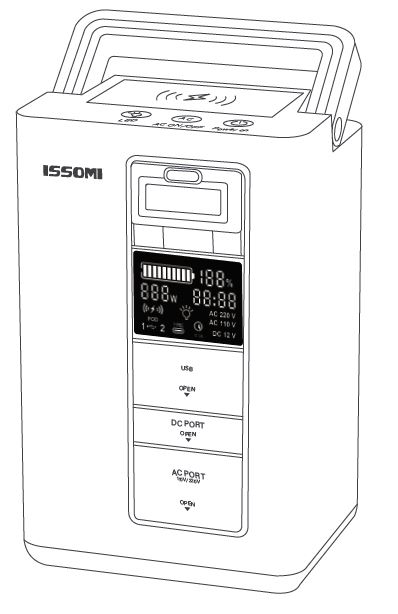
Before using or storing your ISSOMI Portable Power Station, please plug it into a suitable power outlet until it is fully charged.
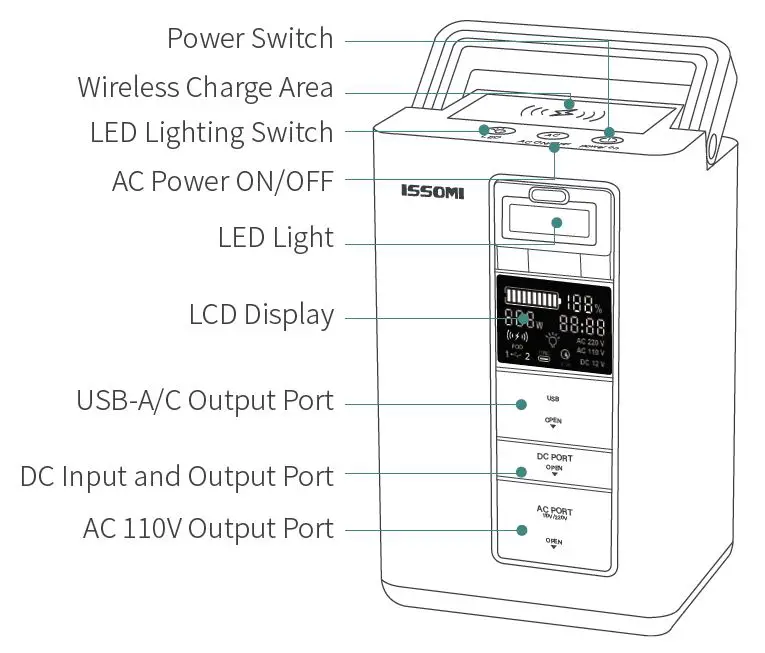
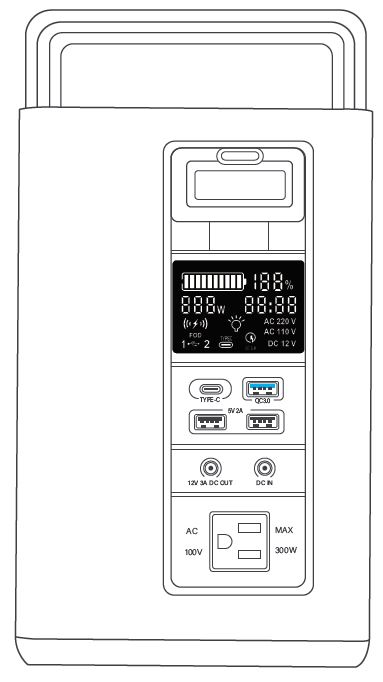
PARTS LIST
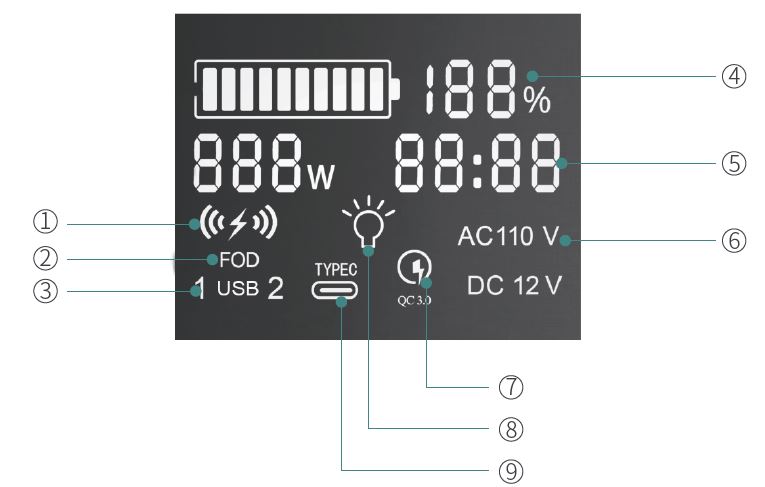
- Wireless charging working indicator
- Wireless Malfunction Light
- USB Indicator
- Battery capacity percentage
- Operating power & Remaining sustainable use time
- AC/DC Working Indicator
- QC 3.0 Working Indicator
- LED Working Indicator
- Type-C Working Indicator
- Thank you for purchasing our multi-function portable generator. Before using this unit, please read the user manual carefully and refer to it as needed.
- Please read this “Safety Request” carefully before use our product.
Note: In order to prevent harm to the user and other people, and damage to property, you must follow the precautions as follows.
SAFETY REQUEST
DANGER WARNING: This product is only for domestic use in United Stated. Please refrain from using it overseas. Using it at a voltage other than the specified power supply voltage may cause an accident, injury, or malfunction.
- Do not cover the power station with a cloth or bedding while charging. (It may cause overheating, damage, or fire.) Don’t immerse it in water or rain for a long time. In addition, do not use it when
- wet. Otherwise, it may cause a short circuit, electric shock or malfunction. (There is a risk of failure, short circuit, or fire.)
- Do not disassemble or modify the product without the guidance of professionals. Otherwise, it may cause a malfunction. (There is a risk of short circuit or fire.)
Please check the rated voltage and current value of your device. And be careful not to exceed the AC rating of this product. Be careful of overload. (This may cause overheating, over-current or damage.)
SAFETY INSTRUCTIONS
Read the following instruction to ensure safe usage
WARNING
- Do not insert, remove or operate various cords with wet hands. (It may cause electric shock.)
- When the power station is not in use, be sure to remove various cords. (It may cause fire or electric shock.)
- Be careful not to let children (under age 8) to operate this product. (It may cause an accident, injury or malfunction.)
- Do not damage, forcibly bend, or fracture various cords. (If the cord is damaged, stop using it immediately. Continued use may cause fire or electric shock.)
- Do not place flammable items or items that are easily deformed by heat on this product. (It may cause fire or injury.)
- If you experience any abnormalities such as unstable operation, smoke, or strange odor during use, stop using the product at once, and contact us immediately by email.
CAUTION
- When connecting the device to be used to this product, carefully read the instruction manual of each device, and connect according to the instructions.
- When cleaning, please make sure the power station is turned off and remove various cords.
- Do not fully discharge the battery of the product multiple times. It will reduce the performance and life of the battery and may make the battery unable to charge.
- Even if you are not using it, check it at least every three months to make sure it is fully charged. If the battery is not fully charged, it will not be able to perform to its full potential.
- When charging, if charging is not completed even if the specified charging time is significantly exceeded, stop charging immediately.
ATTENTION
- Please refer to the actual product specification before you use the product.
- This product has built-in high-quality lithium-ion battery, please use it at room temperature. Do not store or use it near high temperature (exceeding 65°C) or in a strong sunlight to avoid hazards such as disasters.
- Please use the original charger in the package to charge the device. Any charger with a nominal charging voltage exceeding 16.8V will cause irreversible damage to the product itself.
- Please don’t squeeze, hit or drop the product vigorously to avoid danger.
- If you find that the outer shell of this product is seriously damaged or deformed, please stop using it at once and contact manufacturer for advice.
- Even if you are not using it, check it at least every three months to make sure it is fully charged. If the battery is not fully charged, it will not be able to perform to its full potential.
SPECIFICATIONS
This product is a multi-function portable generator, it provides a variety of
PD, USB, DC and AC(110 V) output ports. All PD, DC, USB sockets are plug-and-
play, making your life more convenient.
This product adapt advanced core technology and supports PD, QC 3.0, Qi
wireless charging and fast charging protocols for a variety of digital
products, which can quickly recharge your devices.
PRODUCT SPECIFICATIONS
| Model | C3001 |
|---|---|
| Waterproof level | IP63 |
| Battery Capacity | 296 Wh/ 80000 mAh |
| Battery Type | Lithium ion Battery |
| Recharge time | AC adaptor (58.8W): 7-8 hrs/ Solar panel (90W): 6-7 hrs/ Car |
charger (24W): 10-12 hrs
Wireless charging| Input:DC 16.8V 3.5A Output:5W,7.5W,10W,15W MAX
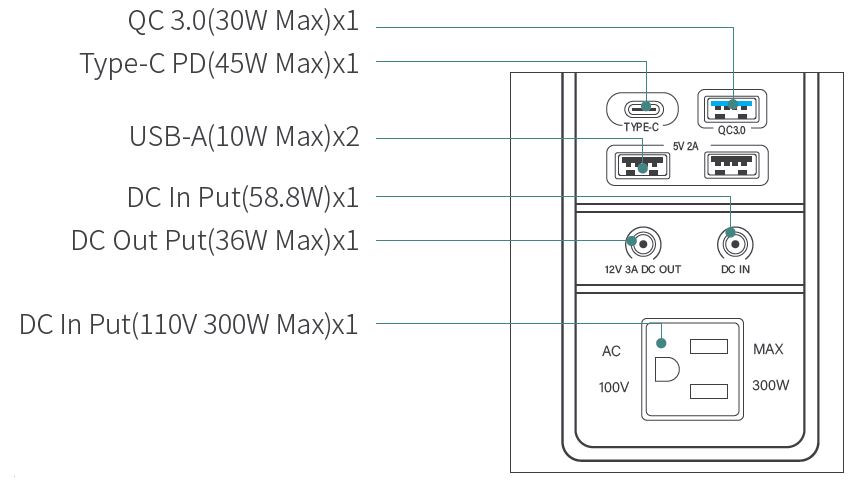
Output ports| Type-C PD x 1: 45W Max/ QC3.0 x 1: 30W Max/ USB-A x 2: 10W Max/
DC x 1: 12V 36W Max/ AC x 1: 110V 300W Max (Pure Sine Wave)
LED| 3 modes : Low(1W) Medium(2W) High(3W)
Cycle life| >500times
Weight| 8.4 lb
Size| 11.29.17.3 inch
PRODUCT USE GUIDANCE
Before using the product, please turn on the power switch to light up the LCD display, you can check the power of the device, the remaining power percentage and the current power available time. It should be noted that you need to press and hold the AC button for 2 seconds to use the AC output function. At the same time, all other USB, DC ports and are plug and play. This battery has an energy saving function, it will automatically shut down if there is no output for more than 3 minutes.
Turn on/off the Power
- Press the power button to turn on.
- No any load for 3minutes, the power station will automatically shut down.
- If you need to shut down manually, please hold down the LED button and AC button at the same time for 5 seconds.
Wireless Charging
- You need to turn on the power switch first
- It can be used when the phone is placed correctly
LED Lighting
- Turn on the power first
- Long press the LED button for 3s to turn on/off the LED light.
- Short press the light button to adjust the brightness mode of the LED light. Low→Medium→High
USB/DC Interface
Turn on the power switch first, then all USB & DC sockets are plug and play.
AC Output Turn on/off
Long press the AC button for 3s to enable or close the AC socket.
Note: For safety reasons, the AC power socket will automatically shut
down after 3minutes of no-load standby and when the load power is less than
5W.
AC Standby Function
This function not only prevents the AC power from automatically shutting
down, but also supports AC to power devices below 5W.
- Please turn on the AC button first,then press LED light button twice shortly.
- After hearing “Di” sound, “AC 110V” will blink on the digital screen. The AC Standby Function is ready to use.
- Long press the AC button for 3s to turn off the AC socket.
Note: The AC standby function only can manually shut off. If not, the AC power function will always be on working status until running out the battery power.
PRODUCT FUNCTIONS
WIRELESS CHARGING FUNCTION
Please place your mobile phone (with wireless charging function) in the
wireless charging area on the top, the battery will automatically match, if
the connection is successful, the wireless charging indicator will display.
When metal-bearing objects are placed in the area of wireless charging, the
battery will be detected as FOD state. At the same time, the wireless charging
will not output externally for automatic protection. After removing the met-
al-bearing objects, the wireless charging will automatically resume (the alarm
indicator of “FOD” automatically goes off).
LED LIGHT
- The LED light adopts three brightness modes designs, you can adjust it according to your needs.
- Press and hold the LED button for 3s to turn on/off the LED light, the LED indicator on the display will show/disappear, the default brightness is the lowest level.
- LED light is a cyclic switching mode, please press the LED button to adjust the “low, medium and high” bright ness modes.
AC OUTPUT FUNCTION
-
When you need to turn on/off the AC output function, please press and hold the AC button for 3s, the AC power icon on the display screen will be displayed/disappear.
Please check whether your devices match to the output voltage of this product, and then insert the AC socket
(Please note that the maximum output power of AC output power is 300W continuously, and the maximum is 500W in an instant). -
AC overload alarm prompt, when the AC load power exceeds 350W, and more than 15 seconds, the AC output port will automatically protect and cut off the output.
-
AC automatic standby function, when you turn on the AC output function without plugging in any appliance within 1 minute, the AC output will be automatically turned off after 1 minute, the whole machine will automatically shut down after 3 minutes. After enabling the AC socket, press the LED button twice in succession, then you will hear a “beep” and the AC 110V on the LCD display is flashing, which indicates that the AC standby function has been turned on. At this time, even if the power station is not connected to any equipment used, it will not automatically shut down.
USB/DC OUTPUT
- The USB output port is plug-and-play, please insert the electrical product into the corresponding interface to automatically recognize and automatically output power.
- Type-CPD outputs 36W according to the demand of the equipment standard (PD protocol matches the corresponding fast charging protocol), and supports up to 45W output.
- The output power of QC 3.0 is based on the demand of the equipment. QC3.0 supports up to 30W output.
- The DC port output voltage is 12V and the maximum power is 36W. When the power is too high, it will be automatically protected. The output can be automatically recovered after the high load is removed.
- Please Note: The indicator of the corresponding plug port will be automatically displayed on the display screen when each port works.
DC INPUT PORT
The input of the charging port(the nominal voltage is 16.8V 3.5A) please
use the charger provided with this product. When the battery is charging, the
capacity bar of the display flashes in sequence and the LED charging indicator
on the charger after the battery is fully charged The lamp will turn green,
please refer to the technical description for charging parameters.
LOW BATTERY ALARM
When the remaining battery is less than 20%, the buzzer will prompt “Beep”
for 1 second, stop for 2 seconds. And it will prompt for 5 consecutive times.
COMMON FAULTS AND TROUBLESHOOTING METHODS
| Common error | Cause of issue | Problem-solving method |
|---|---|---|
| The FOD lamp is shown on the display. | Wireless charging output failure |
protection. There are metal products in the wireless charging area.Wireless
charging overheat protection.| Remove the wireless charging product and check
the device for short circuits.Check if there are any belongings in the
wireless charging area, and remove the metal objects to recover automatically.
When the AC switch is turned on, the AC110 or 220V indicator is displayed on
the display, but it will automatically turn off soon. The AC output port stops
output. If the“ERR”signal sign blink on the digital screen, please refer to
the next page table.| When the AC starts, the display shows AC11 OV as the
indicator icon. If there is no electrical appliance connected to the AC within
1 minute, it means that the electrical equipment is not turned on. When AC
starts, the display shows AC110V as the indicator light on the icon, and the
electric equipment is also turned on but the power of the electric
equipment.perform automatic overpower protection. 3. When the battery charge
is 20% lower, the AC cannot output.| 1. When the AC output indicator on the
display screen is displayed, if the battery of the powered device is not
inserted within 1 minute, the automatic energy saving mode will be
automatically turned on. If you want to continue to connect the battery, you
need to turn on the AC power output switch again.
2. The AC output is too high power protection, please confirm whether the power of the connected equipment is greater than 300W. if the power exceeds 300w. the electric equipment will not Work for a long time.
3. Please charge the battery in time for normal use.
“Beep” alarm sounds when in use.| When the capacity of the battery is less
than 20%, the alarm prompt will be issued at intervals of “beep”. At this
time, you need to pay attention to save the relevant electrical equipment
informa- tion to avoid automatic shutdown and data loss.| Low battery reminder
please charge the device n time.
The battery emits a “beep”audible alarm and the AC icon on the display keeps
flashing.| When the capacity of the battery is less than 20%, the alarm prompt
will be issued at intervals of “beep”. At this time, you need to pay attention
to save the relevant electrical equipment informa- tion to avoid automatic
shutdown and data loss.| It is the battery mode of working. Please press and
hold the AC power output switch for 3 seconds to exit the UPS mode.
After unplugging the electrical equipment, the display remains at the same
power as the load for more than 30 seconds.| The display program has the fault
with unknown randomness.| Please press the AC power output switch, and restart
the battery to restore the normal display.
Common error| Cause of issue| Problem-solving method
---|---|---
“ERR1”signal sign blinks on the digital screen and with alarm.|
It’s AC Inverter overload protection. When the continuous load power of the portable power station is over 350W, the inverter will automatically protect and stop the AC inverter output.
| Please do not use overpowered load, and reboot AC button again.
“ERR2”signal sign blinks on the digital screen and with alarm.| It’s AC
inverter output short circuit protection. When a short circuit occurs at the
output of the portable power station AC inverter, the inverter will
automatically protect and stop the AC inverter output.| Please check whether
your load is short-circuited, and remove the load and reboot the AC button
again.
“ERR3”signal sign blinks on the digital screen and with alarm.| When the AC
inverter output over-temperature protection, the portable power station
inverter will automatically protect and stop the AC inverter output| Please
wait until the temperature drops to room tempera- ture before rebooting the AC
function
WARRANTY
- The warranty period of this product is 12 months from the date of purchase.
- The specifications of this product are subject to change without notice. Please note.
- The production and sale of this product may be discontinued due to the discontinuation of the electronic parts used.
PLEASE NOTE
If you suspect a malfunction of this product, please let us know the
following information.
- Order number and product model number
- Failure status (please explain in as much detail as possible.)
- For any questions or inquiries regarding malfunctions, please contact us.
This device complies with Part 15 of the FCC Rules. Operation is subject to the following two conditions: (1) this device may not cause harmful interference, and (2) this device must accept any interference received, including interference that may cause undesired operation
NOTE: This equipment has been tested and found to comply with the limits
for a Class B digital device, pursuant to Part 15 of the FCC Rules. These
limits are designed to provide reasonable protection against harmful
interference in a residential installation. This equipment generates, uses and
can radiate radio frequency energy and, if not installed and used in
accordance with the instructions, may cause harmful interference to radio
communications. However, there is no guarantee that interference will not
occur in a particular installation.
If this equipment does cause harmful interference to radio or television
reception, which can be determined by turning the equipment off and on, the
user is encouraged to try to correct the interference by one or more of the
following measures:
- Reorient or relocate the receiving antenna.
- Increase the separation between the equipment and receiver.
- Connect the equipment into an outlet on a circuit different from that to which the receiver is connected.
- Consult the dealer or an experienced radio/TV technician for help.
Warning: changes or modifications not expressly approved by the party responsible for compliance could void the user’s authority to operate the equipment
Radiation Exposure Statement
This equipment complies with FCC radiation exposure limits set forth for an
uncontrolled environment.
This equipment should be installed and operated with minimum distance 20cm
between the radiator and your body.
Read User Manual Online (PDF format)
Read User Manual Online (PDF format) >>