
Shenzhen Baishihao Electronic Technology MI-3021 Outdoor Bullet Camera User Guide
- June 6, 2024
- Shenzhen Baishihao Electronic Technology
Table of Contents
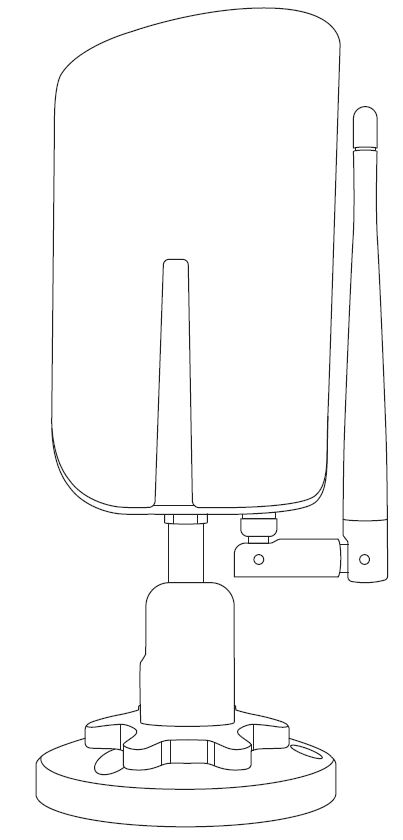
- Shenzhen Baishihao Electronic Technology MI-3021 Outdoor Bullet Camera
- FCC
- RF Specification
- What’s In The Box
- Camera Structure
- Insert Micro SD Card
- Read Before Installing
- Set Up with SafeMiraie App
- Installation
- Status Light
- Protect Plan
- References
- Read User Manual Online (PDF format)
- Download This Manual (PDF format)
Shenzhen Baishihao Electronic Technology MI-3021 Outdoor Bullet Camera
FCC
This device complies with part 15 of the FCC Rules. Operation is subject to the condition that this device does not cause harmful interference
- this device may not cause harmful interference
- this device must accept any interference received, including interference that may cause undesired operation.
Any changes or modifications not expressly approved by the party responsible for compliance could void the user’s authority to operate the equipment.
NOTE: This equipment has been tested and found to comply with the limits
for a Class B digital device, pursuant to Part 15 of the FCC Rules. These
limits are designed to provide reasonable protection against harmful
interference in a residential installation. This equipment generates, uses and
can radiate radio frequency energy and, if not installed and used in
accordance with the instructions, may cause harmful interference to radio
communications. However, there is no guarantee that interference will not
occur in a particular installation.
If this equipment does cause harmful interference to radio or television
reception,
which can be determined by turning the equipment off and on, the user is
encouraged to try to correct the interference by one or more of the following
measures:
- Reorient or relocate the receiving antenna.
- Increase the separation between the equipment and receiver.
- Connect the equipment into an outlet on a circuit different from that to which the receiver is connected.
- Consult the dealer or an experienced radio/TV technician for help.
The antennas used for this transmitter must be installed to provide a
separation distance of at least 20 cm from all persons and must not be co-
located for operating in conjunction with any other antenna or transmitter.
FCC ID: 2AZO6MI-3021
CE RED
This product can be used across EU member states.
RF Specification
| Function | Operation Frequency | Max RF Output Power | Limit |
|---|
Wi-Fi
| 802.11b/g/n(20MHz):
2412~2472MHz;
802.11n(40MHz):2422~246
2MHzt
| ****
13.75 dBm
| ****
20 dBm
EU Declaration of Conformity
We,
Shenzhen Baishihao Electronic Technology Co., Ltd. (Room 202, No. 6, 5th
Alley, Xiangjiaotang New Village, Xiangjiaotang Community, Bantian Street,
Longgang District, Shenzhen
District,Shenzhen,China,518057) hereby declares that this Outdoor Bullet Cam
is in compliance with the essential requirements and other relevant provisions
of Directive 2014/53/EU. According to Article 10(2) of Directive 2014/53/EU,
the Outdoor Bullet Cam can be used in Europe without restriction.
Warning
- Adapter shall be installed near the equipment and shall be easily accessible.
- Operation temperature:-10~50℃.
- The plug considered as disconnect device of adapter.
- Accessories information:
- Adapter JF012WR-1200100VH
Input: 100-240V~50/60Hz 0.35A
Output: 12V1.0A
We,
According to Article 10(2) of Directive 2014/53/EU, the MI-3021 can be used in
Europe without restriction.
The full text of the EU declaration DOC is available at the following:
Visit the Web site https://www.mpwsafe.com
What’s In The Box
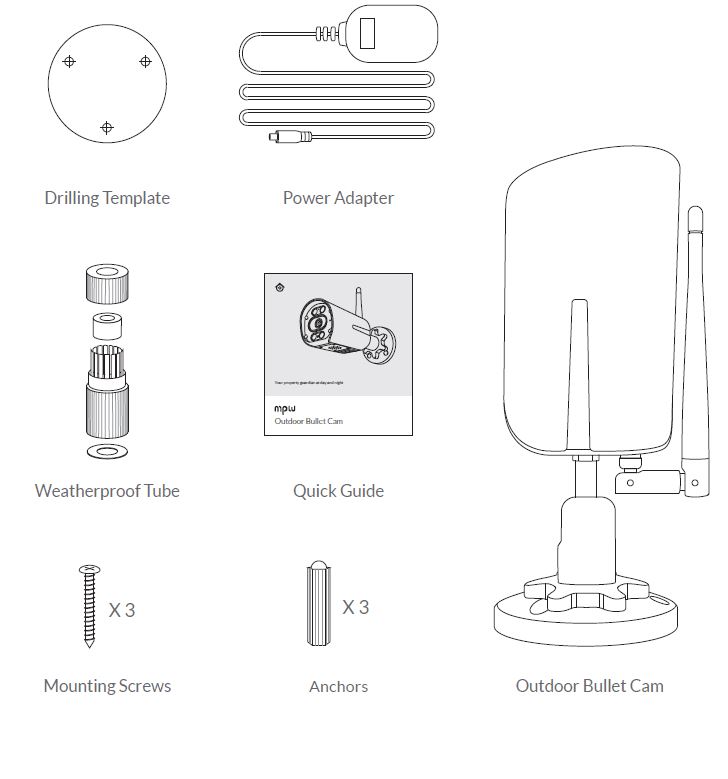
Camera Structure
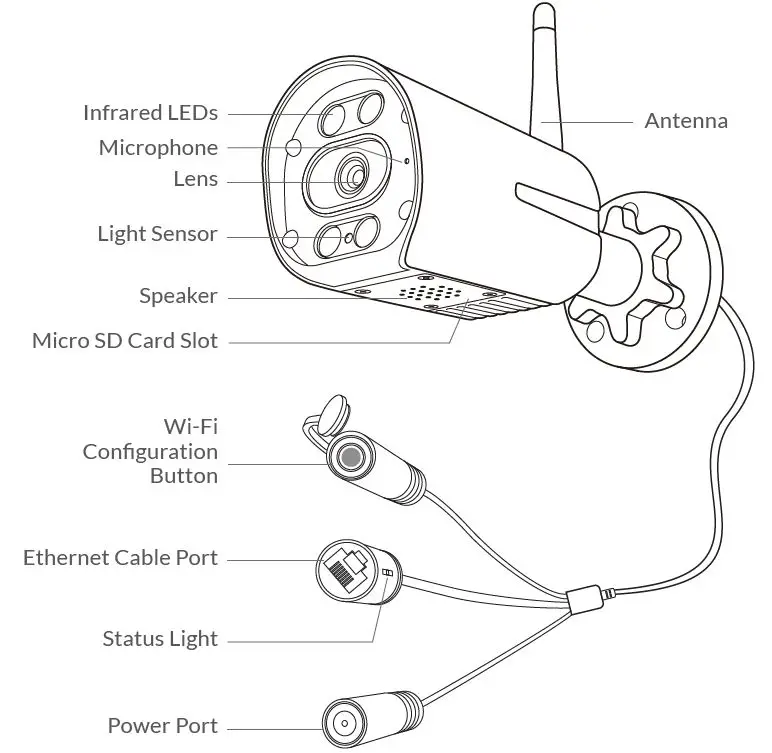
Insert Micro SD Card
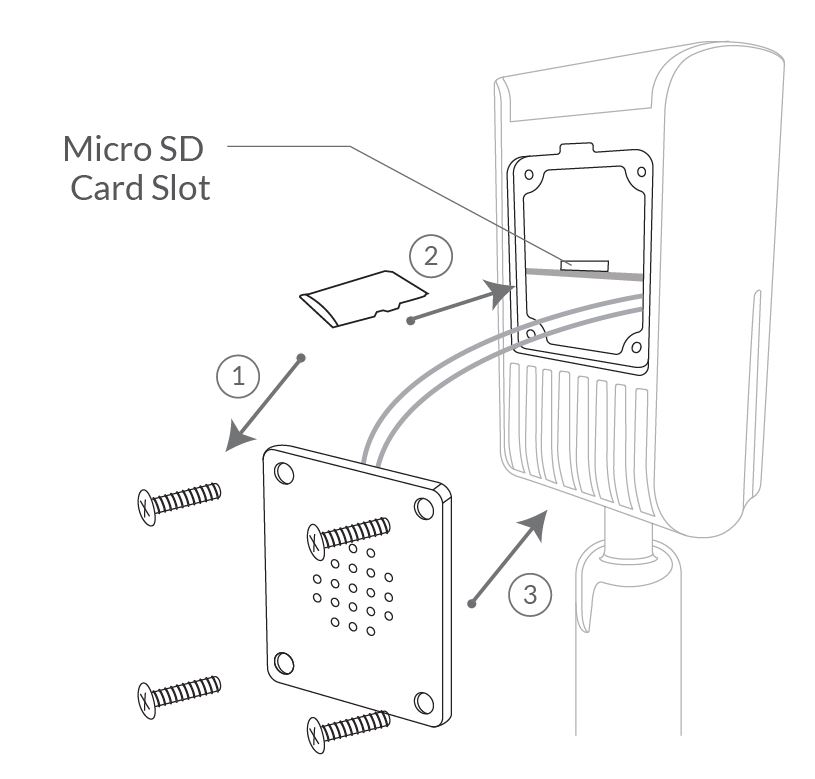
This camera comes with a built-in card slot which supports up to 128GB Micro SD card. Once you insert the storage card, the camera will automatically start to record and store videos on the storage card. You can view those videos in the ‘Replay’ page by clicking the ‘Replay’ button in the ‘Homepage’.
- Step 1: Loosen the screws. Take off the cover gently since wires are attaching to it.
- Step 2: Insert Micro SD card. Make sure you insert it in the correct direction.
- Step 3: Put the cover back and tighten the screws.
Read Before Installing
- Keep the Outdoor Bullet Cam and all accessories out of reach of children and pets.
- Power supply voltage that is required to operate Outdoor Bullet Cam should be DC12V (≥1000mA).
- The product can only be used in proper temperature and humidity: Operating temperature: -10°C – 50°C (14°F-122°F) Operating humidity: 0-95%.
- Please do not expose the camera lens to direct sunlight.
- Please do not install the camera to the place that is likely struck by lightning.
Note:
- This camera only works with 2.4GHz Wi-Fi.
- Strong lights may interfere with the ability to scan the QR code.
- Avoid placing the device behind furniture or near microwaves. Try to keep it within range of your Wi-Fi signal.
Set Up with SafeMiraie App

Download the SafeMiraie App from App Store or Google Play. Follow the in-app instruction to complete the entire set up process.
Installation
Check following things before you starting to drill holes on your wall:
- This camera has been successfully added to your Safemiraie App and is able to stream video.
- Have planned the cable route. Measured the length of the power cable and ethernet cable (if you plan to use ethernet connection) you will need.
Step 1:
Find a good installation spot.
- We recommend installing the Outdoor Bullet Cam just 7-10 feet (2-3 meter) above the ground for a better two-way audio experience.
- There is a power outlet nearby.
- Test whether Outdoor Bullet Cam can stream video smoothly at the spot.
- Make sure nothing blocks the camera’s sight.
Step 2:
Before you start to drill, make sure you know the locations of wall-in pipes
and electrical wires. (If you are not comfortable with drilling holes, please
consult with a licensed electrician)
① Use the provided drilling template to mark the position of holes on your
wall. Use drill bit (15/64″, 6mm) to drill three holes.
② Install anchors to hold screws.
Skip ①② if you are installing camera on wood.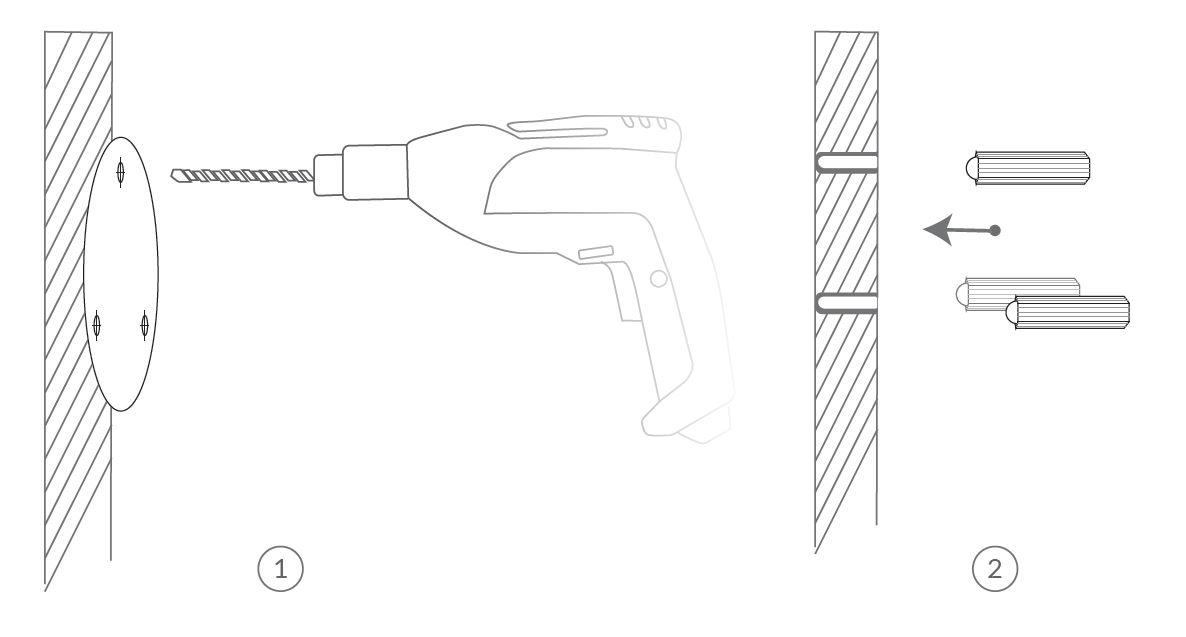 ③Tighten the provided screws to secure the
camera.
③Tighten the provided screws to secure the
camera.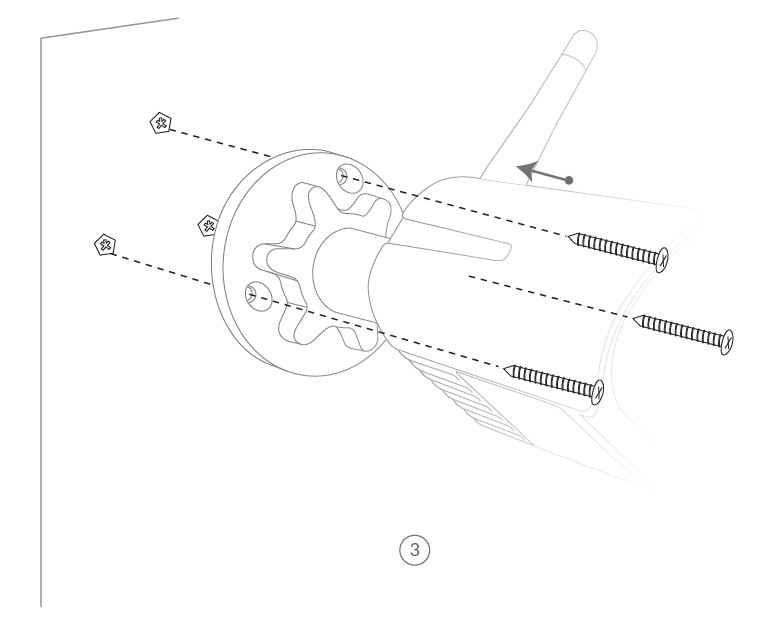
Step 3 (Wired Connection):
Read this step if you are using wired connection, otherwise skip this step.
A weatherproof tube is needed for Ethernet Cable to avoid leaking water into
Ethernet Cable Port.
Make sure the cable works. Insert the cable into the weatherproof tube, and
then connect it to the Ethernet cable port of your Camera.
Things you need:
Ethernet Cable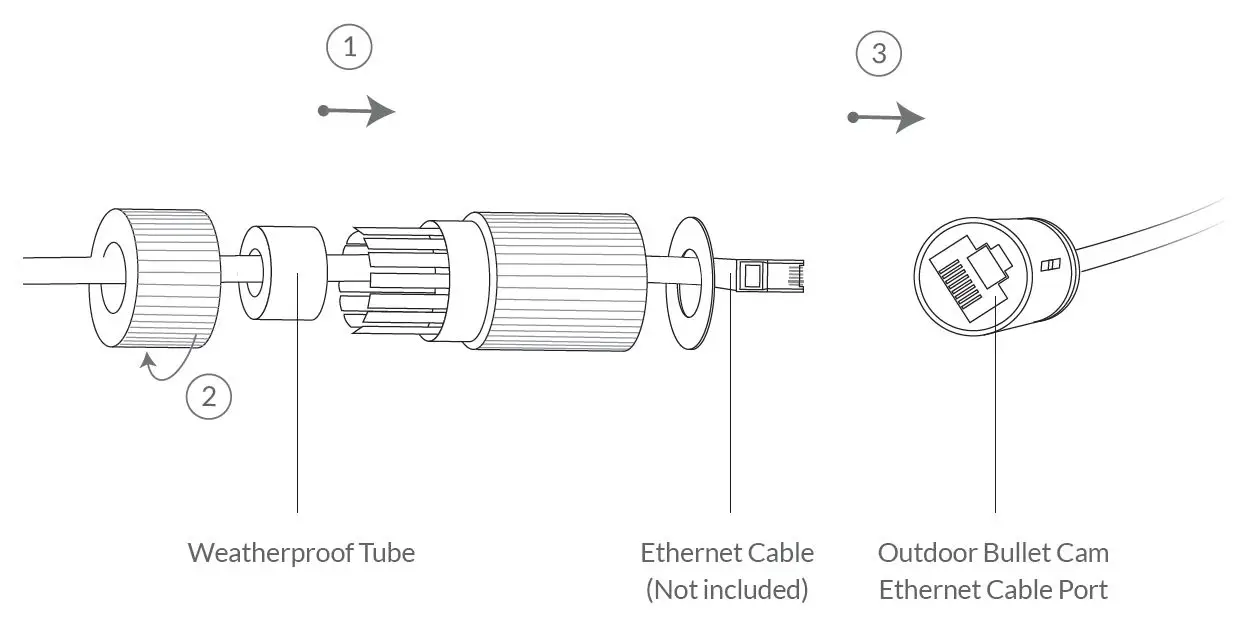 Step
4:
Step
4:
Screw the plastic flange-nut counterclockwise over the base of the camera,
point the camera to your designate direction, then screw the plastic the
plastic flange-nut.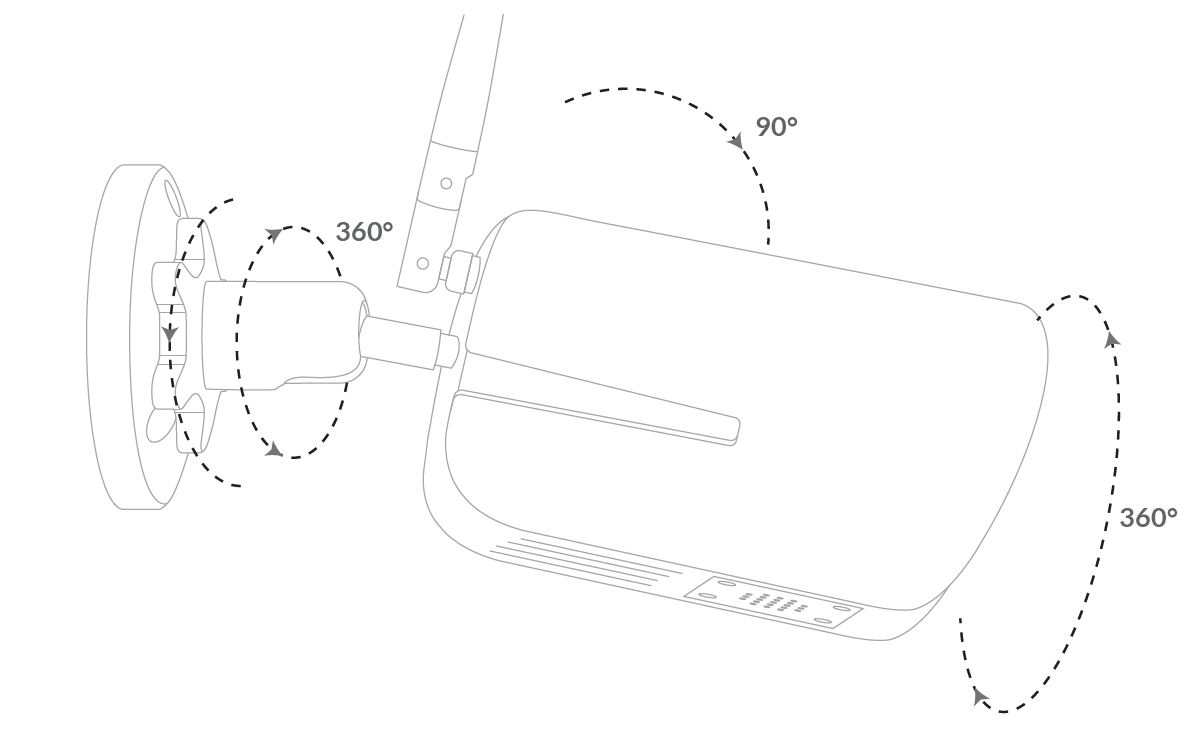
Status Light
This camera uses status light to communicate.
Status Light Description
Solid Green
| ****
Online
---|---
Rapidly Flashing green
| ****
Wi-Fi Configuration Mode
None
| ****
Offline
Protect Plan
Protect Plan provides optional advanced features for home security, and supports multiple devices.
- Continuous Video Recording: Records what’s happening for 24/7 and saves everything in the background, you can replay to catch anything you missed.
- Event Video Recording: Automatically records a video clip when a motion is detected, and push it to your phone instantly.
- Human Detection: Get alerted when human are detected. No more bothered by normal alerts, and won’t miss important things.
 Visit my.safemiraie.com to learn more.
Feel free to contact us for additional help
support@mpwsafe.com
Room 202, No. 6, 5th Alley, Xiangjiaotang New Village, Xiangjiaotang
Community, Bantian Street,
Longgang District, Shenzhen, China, 518057
Shenzhen Baishihao Electronic Technology Co., Ltd.
support@mpwsafe.com
www.mpwsafe.com
References
Read User Manual Online (PDF format)
Read User Manual Online (PDF format) >>