
VAULTEKSAFE LifePod X Micro Weatherproof Electronic Lockbox User Guide
- June 1, 2024
- VAULTEKSAFE
Table of Contents
- VAULTEKSAFE LifePod X Micro Weatherproof Electronic Lockbox
- Important Usage Notes
- Box Contents
- Get to Know Your Vaultek® LifePod® X
- LED Indicators
- Using the Steel Security Cable
- Basic Operation
- Product Registration
- Battery Installation
- Master Code Programming
- Troubleshooting
- Limited Warranty (Terms and Conditions)
- Read User Manual Online (PDF format)
- Download This Manual (PDF format)

VAULTEKSAFE LifePod X Micro Weatherproof Electronic Lockbox
Important Usage Notes
Locking
Step 1 Shut the lid and the close compression latch.
Step 2 Press and hold lock icon for 3 seconds.
Unlocking
Step 1 Tap the lock pad to wake the unit.
Step 2 Unlock with master code.
Step 3 Undo the compression latch.
Do not forget your master code. Once you engage the built-in lock system you
will be unable to unlock LifePod<t X without the master code.
If the lid does not open when unlocked, A) Close the side compression latch
and unlock the unit again to free the lock mechanism. B) Due to LifePod’s
airtight seal and pressure changes when shipping the lid can stick and be
difficult to open. Release the pressure by opening the side micro-USS cover
(Figure 10 on page 01) and the lid can freely open.
Box Contents
- Vaultek” LifePod® X
- Steel Security Cable
- Owner’s Manual
For setup, tutorials, and FAQs visit www.vaulteksafe.com/support/ and select your model.
Warnings
- Do not forget your master code. Once you engage the built-in lock system you will be unable to unlock LifePod® X without the master code.
- IMPORTANT! LifePod® X will float when loaded with weight up to 1.2lb.
- IMPORTANT! LifePod® X can be submerged to 1 foot for up to 30 minutes.
- DO NOT expose to extreme heat or cold. Battery power may be affected. Acceptable operation range is -14 ‘f to 120’f.
To ensure proper weather sealing:
- ALWAYS check that the rubber gasket is free of debris before closing the lid.
- ALWAYS check that the side compression latch is fully engaged and closed.
- ALWAYS check that the side rubber cover is closed tightly.
Disclaimers : Neither seller nor manufacturer shall be liable for any injury, loss or damage, direct or consequential. arising out of the use of, or the inability to use. the Vaultek'” LifePod'” X. The user shall determine the suitability of the Vaultek• life Pod'” X before the intended use and user assumes all risk and liability whatsoever in connection therewith.
Get to Know Your Vaultek® LifePod® X
The Vaultek” life Pod” Xis a pin access portable lockbox. It can be secured using the side compression latch to protect the interior from environmental factors such as water, with the added option of securely locking the unit with the keypad. It’s high impact polymer and portable design makes it ideal to transport and protect valuables and personal items. Powered by a AA battery (not included), LifePod” combines security with convenient access.
- Capacitive l<eypad
- Side Compression Latch
- Anti-Impact Latch
- Apple Air Tag Pocket
- Lid Organizer
- Steel Security Cable Mount
- Battery Cover
- Program Button
- Removable Tray
- Micro-USB Cover and Pressure Release Valve
Specs! LifePod” X will float when loaded with weight up to 1.21b.
Specs! LifePod” X can be submerged to 1 foot for up to 30 minutes.
Specs! LifePod” X has an acceptable operation range is -14 ·f to 12o·f.

LED Indicators
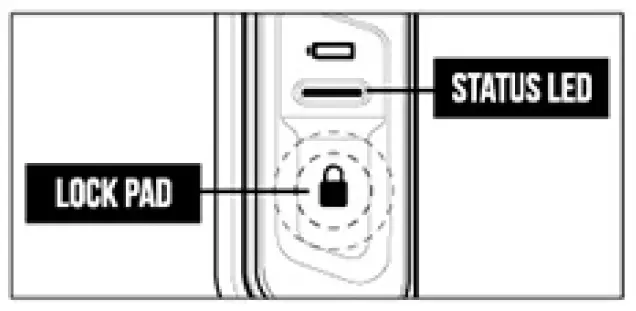
LifePod® X’s capacitive keypad has multiple LEDs built in to provide various feedback. The LEDs will illuminate as needed when the unit is awake. To wake the unit, tap the Lock Pad.

- Battery Indicator: When the unit is awake, the battery indicator will light either GREEN or RED. GREEN indicates the battery has sufficient power. and RED indicates the battery is in need of replacement. When the light is flashing RED and you hear several rapid beeps that indicates that the battery is very low. This continues every 5 minutes until the battery is replaced.
- Status LED: The status LED will provide feedback on various commands. It will light GREEN when correct codes are entered and RED when an incorrect code is entered, providing indication that keypad tampering has occurred.
- Lock Pad: The lock pad illuminates RED only when the unit has been locked using the keypad. and requires the use of the master code to unlock it. When locked. and the unit is awake. the lock icon will be solid RED.
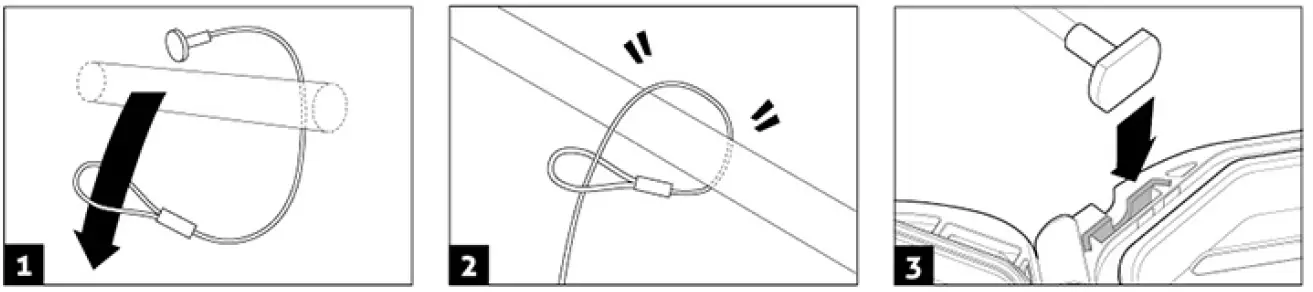
Using the Steel Security Cable
Included is a steel security cable to secure the LifePod® X to a fixed object.
Step 1 First wrap the looped end of the security cable around an object of
your choice.
Step 2 Pull the adapter piece through the loop, and cinch tight.
Step 3 Place the adapter piece in its slot in the Life Pod® X, and close the
lid.
Basic Operation
Locking
With a AA battery installed, you can now lock your LifePod® X. Unique to
LifePod® Xis a built-in lock system to engage for added security.
Step 1 Shut the lid and the close compression latch.
Step 2 Press and hold lock pad icon for 3 seconds.
Do not forget your master code. Once you engage the built-in lock system you
will be unable to unlock LifePod® X without the master code.
IMPORTANT! Before locking your Life Pod®, always be sure the side
compression latch is closed first. This will ensure the locking mechanism
engages properly.
Security Sleep Mode: Activates when (6) consecutive incorrect keypad
entries are entered. LifePod” will not accept any entries for four minutes. If
a key is pressed during this time, the status LED will flash RED and the alarm
beeps.
Unlocking
With a AA battery installed, you can now unlock your LifePod® X. Unique to
LifePod® X is a capacitive numeric keypad with built-in proximity sensor.
Step 1 Tap the lock pad icon to wake the unit.
Step 2 Unlock with master code. (Default master code is 1-2-3-4)
Step 3 Undo the compression latch.
IMPORTANT! Do not undo the side compression latch until the unit has been
unlocked with the correct master code first. Undoing the compression latch
first may cause binding on the lock mechanism and the unit will not unlock.
If the lid does not open when unlocked, A) Close the side compression latch
and unlock the unit again to free the lock mechanism. B) Due to LifePod’s
airtight seal and pressure changes when shipping the lid can stick and be
difficult to open. Release the pressure by opening the side micro-USB cover
(Figure 10 on page 01) and the lid can freely open.
Product Registration
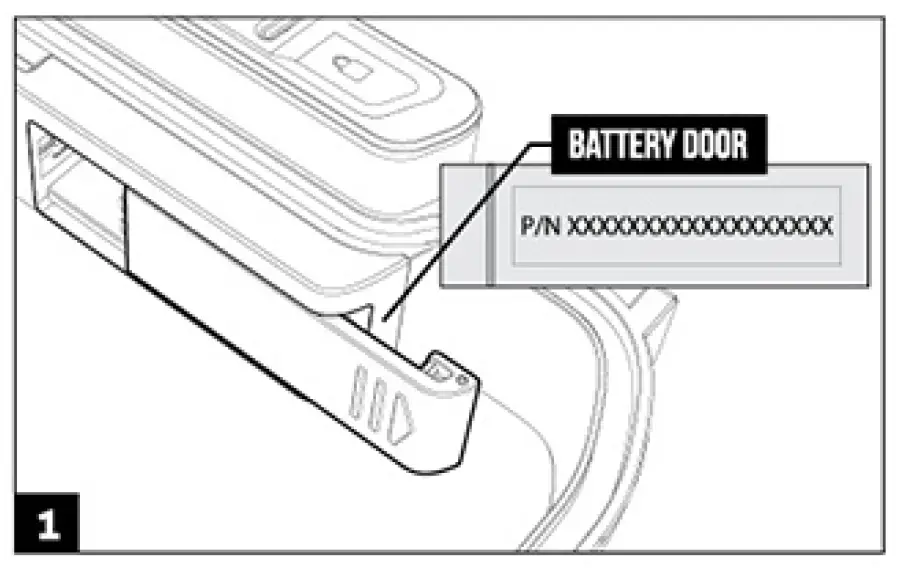
Vaultek”‘ strongly encourages you to register your LifePod”‘ X as soon as you receive it. Registration provides many benefits including two year warranty, and technical support. Your Vaultek”‘ LifePod”‘ X has a unique product number on the inside of the battery door. You will need those numbers to register your new unit.
Step 1 Locate your product number. It is printed on the first page of this
user manual and on the back of the battery door.
Step 2 Please visit the Vaultek”‘ website at vaulteksafe.com and click Support
then click Registration from the available options.
Step 3 Enter the required information in the form and click submit.
Battery Installation
LifePod”‘ Xis powered by a AA battery (not included). With a AA battery
installed. you can unlock and lock your LifePod”‘X.
Battery Tips!
- We recommend using a brand name battery like Duracell or Energizer.
- Under normal use the battery can last up to one year.
- In the event the battery dies you can plug LifePod”‘ X into a power source using a micro-USB cable and open the unit by master code. Reference Using the Micro-USB Port on page 11.
Step 1 Undo the side compression latch to open your life Pod® X. Locate the
battery door on the front wall and remove by sliding open (Figure 1 on page
07).
Step 2 Be sure to snap the battery in the correct orientation. Plus side on
the right. When the battery is snapped in you will hear a short welcome tone
and the keypad will light up.
Troubleshooting! If you snap the battery in and the keypad is flashing then your battery is likely low. Replace the battery with a new AA battery. We recommend Duracell or Energizer.
Master Code Programming
First time users should change the default code as soon as possible to prevent
unauthorized access when using the lock.
Code Requirement Tips!
- The default master code is 1-2-3-4.
- Your code can be a minimum of 4 digits. or as long as 8 digits.
- Two keys can not be pressed simultaneously.
- Programming a new code will overwrite your previous code.
Do not forget your master code. Once you engage the built-in lock system you
will be unable to unlock LifePod® X without the master code.
IMPORTANT! The PROGRAM button will not function when locked. Be sure the
LifePod® X latch is in the unlocked position.
Troubleshooting! If you make a mistake start over with step 1.
- Step 1 First open the unit and tap the Lock Pad to wake the unit up. When the keypad lights up, your LifePod® Xis awake and ready for programming.
- Step 2 While LifePod® Xis awake press and hold the PROGRAM button for 3 seconds until ALL keys (1-4) turn solid RED.
- Step 3 Enter your new code.
- Step 4 Immediately press and hold the PROGRAM button a second time for 3 seconds until ALL keys (1-4) turn solid RED.
- Step 5 Enter your new code a second time.
- Step 6 Immediately press and hold the PROGRAM button a third time for 3 seconds. The Status LED will flash GREEN and LifePod® will beep to confirm the code change is successful.

Control Sound
By default, the sound is ON.
To toggle the sound ON/OFF you need to wake up LifePod
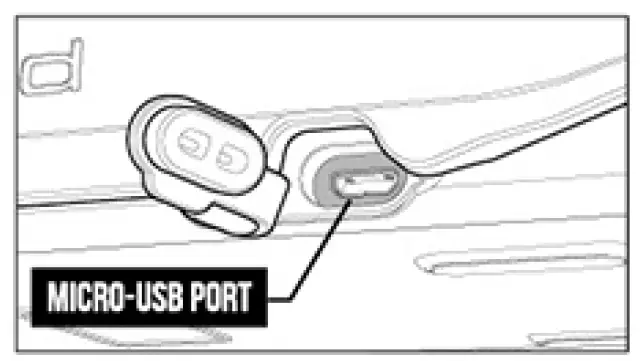
Using the Micro-USS Port
In the event the battery dies while traveling, you can power on the unit using
the backup micro-USB port.
Simply open the side protective rubber cover and plug in a micro-USB cable
(not included) into the port. While the cable is plugged into an external
power source, LifePod
Customer Support
If you have a question or need help with your Vaultek”‘ Life Pod® X, we
encourage you to visit
www.vaulteksafe.com/support/ or email
our support team at support@vaulteksafe.com
Troubleshooting
Lid is not opening: Due to LifePod’s airtight seal and pressure changes
when shipping the lid can stick and be difficult to open. If the lid does not
open, release the pressure by opening the side micro-USB cover and the lid can
freely open.
Keypad is Flashing RED: The battery is likely bad. Test the normal
function by removing the battery and plugging in a micro-USB cable to the
micro-USS port. If the unit resumes normal function then the installed battery
is bad. We recommend a Duracell or Energizer battery.
FCC This device complies with part 15 of the FCC rules. Operation is subject
to the following two conditions: (l)this device may not cause harmful
interference, and (2)this device must accept any interference received,
including interference that may cause undesired operation.
NOTE : The manufacturer is not responsible for any radio or TV
interference caused by unauthorized modifications or changes to this equipment
Such modifications or changes could void the user’s authority to operate the
equipment
Limited Warranty (Terms and Conditions)
VAULTEK IS COMMITTED TO PROVIDING PRODUCTS OF HIGH QUALITY AND VALUE AND MAKES
EVERY EFFORT TO ENSURE ITS PRODUCTS ARE FREE OF DEFECTS.
Vaultek”‘ guarantees your LifePod” X will be free of defects in materials or
workmanship for a period of one year from the date of original purchase from
an authorized dealer and two years with product registration.
The warranty is only valid for the original purchaser and not transferable. This warranty is only valid for products purchased and operated In the U.S. This warranty does not cover abuse. misuse. use in any manner for which is not designed. neglected. modification. damage inadvertently caused by the user, accidents and/or tampering.
If service is needed Vaultek”‘ X will at its option. exchange or repair without charge for parts or labor. Upon authorization of warranty service. customers are responsible for securely packaging product.
Additionally. customers are responsible for costs of shipping to and from
Vaultek”‘X service center.
If the claimed defect cannot be identified or reproduced. customers will be
held responsible for the costs incurred. Please have the following information
available before you begin a claim with Vaultek”‘X:
- Purchaser’s name. mailing address. email address. and a phone number.
- Copy of receipt or on line order number (if purchased directly from us or Amazon)
- Authorized Dealer Name (if applicable)
- Detailed description of the problem
NEITHER SELLER NOR MANUFACTURER SHALL BE LIABLE FOR ANY INJURY. LOSS OR DAMAGE. DIRECT OR CONSEQUENTIAL. ARISING OUT Of THE USE OF. OR THE INABILITY TO USE THE VAULTEK* LIFEPOD”X.
Read User Manual Online (PDF format)
Read User Manual Online (PDF format) >>