
ganopterygon A8 Wireless Earbuds Bluetooth Headphones User Manual
- June 14, 2024
- ganopterygon
Table of Contents

ganopterygon A8 Wireless Earbuds Bluetooth Headphones
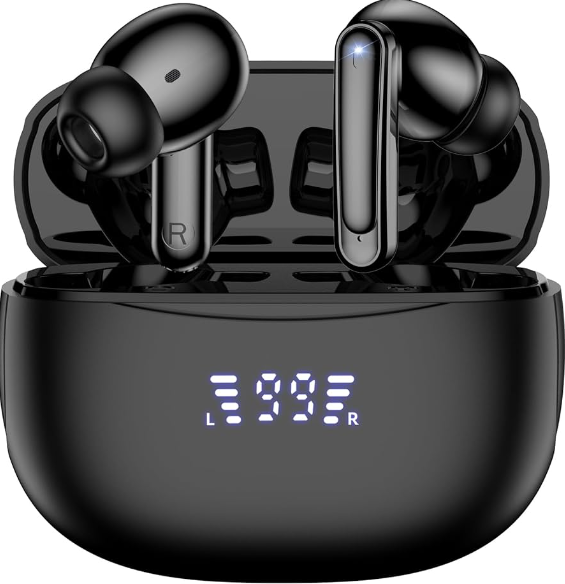
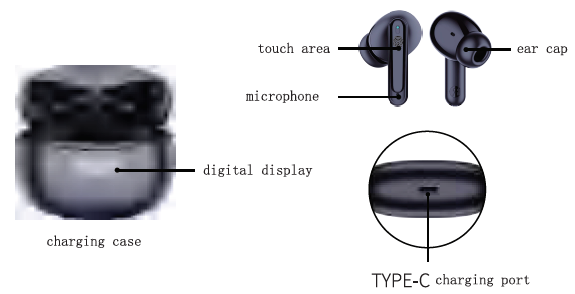
Product overview
Battery status and charging
On/Off
- The headset is in the box, open the cover of the charging box, the headset will automatically turn on
- The headset is outside the box, in the off state, press and • hold the function button for 3 seconds to turn it on
- Put it in the cradle, close the lid, turn off
- In the power-on state, press and hold for 5S to turn off
- Low battery, automatic shutdown of unconnected devices
Bluetooth connection
- Turn on the device, search for “A8″‘, select connect
- Turn on for the first time, automatically enter the Bluetooth pairing state
- Turn it on again, the headset will automatically reconnect to the last device, and the headset will automatically enter the pairing mode after the reconnection fails.
Touch function
- Pause playback Double-click the left/right function key
- next track Triple-click the right function key
- previous piece Triple-click the left function key
- volume Up Click the right eat function key
- volume down Click the left ear function key
- voice assistant Left/right long press the function key for 3 seconds
- Answer/hang up a call Double-click any function key
- reject the call Long press any function key for 2S
- cancel dial Double-click any function key during dishing
Note : If the left wad right earphones are not paired, take out the earphones, double-click the touch button left and right quickly, after the earphones are paired: the blue light flashes,
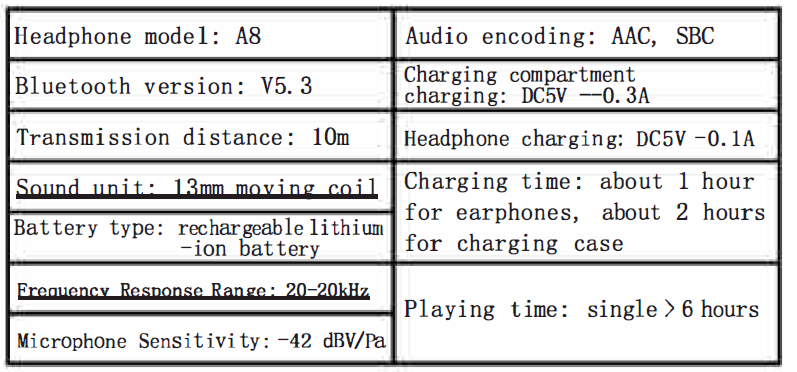
Basic parameters
Maintenance and care
- When not in use, please put the earphones back in the charging case to prevent loss and charge the earphones in time.
- Before cleaning and maintenance, stop using this device, close all applications, and disconnect all connections or cables Lo other devices.
- Wipe the device or its accessories with a clean, dry soft cloth If the product with lithium battery is not used for a long time, please make sure to charge it at least once every three months.
- Keep the device and its accessories dry.
- Do not use external heating devices such as microwaves or hair dryers to dry it.
- Do not place the device and its accessories in areas where the te11perature is too high or too low, otherwise it may cause the device to tialfunction, catch fire or explode.
- Do not use harsh che11i ca1s, c1eani ng agents or strong detergents to clean the device or its accessories.
- Do not keep magnetic stripe cards (such as bank cards, telephone cards, etc.) in contact with this device for a long time, otherwise the magnetic stripe cards may be damaged by the magnetic field.
- Do not disassemble or modify the device and its accessories without authorization, otherwise the device and accessories will not be covered by the company’s warranty. If the device fails, please contact the authorized service center.
Safety instructions
- Read and follow the precautions below before using and operating the equipment to ensure optimum performance and to avoid dangerous or illegal situations.
Electronic equipment
- Do not use this device in places where it is expressly prohibited to use wireless devices, otherwise it. will interfere with other electronic devices or cause other dangers.
Impacts on Medical Devices
- In medical and healthcare facilities where the use of wireless devices is prohibited, please follow the regulations of the facility and turn off the equipment,
- The radio waves generated by the device may interfere with the proper functioning of implanted medical devices or personal medical devices, such as pacemakers, cochlear implants, hearing aids, etc. If you use these medical devices, check with their manufacturer for restrictions on use of this device.
- When using this device, please keep a distance of al least 15 cm from implanted medical devices (such as pacemakers, cochlear i111plants, etc.).
Hearing protection
- When you use the headset to listen to or call, it is to use the minimum volume required for the music or call to avoid hearing damage, Prolonged exposure to high volume levels may cause permanent hearing damage .
Traffic safety
- Exposure to high volume while driving can be distracting and lead to an accident. Please abide by the relevant regulations of the country or region where you are located, and do not use this product while driving,
Children’s Health
- This device and its accessories may contain small parts, please keep the device and its accessories out of the reach of children. Children can inadvertently damage the device and its accessories, or swallow small parts that could cause choking or other hazards.
- This device is not a toy and children should use the device under adult supervision.
Battery safety
- Do not disassemble or modify the battery, insert foreign objects, or inners it in water or other liquids to avoid battery leakage, overheating, fire or explosion.
- Do not drop, crush or puncture the battery. Avoid exposing the battery to high external stress, which can cause interna1 short circuits and overheating. This device has a non-removable built-in battery.
- Do not replace the battery yourself to avoid damage to the battery or the device. The battery should only be replaced by an authorized service center.
- Batteries (battery packs or assembled batteries) must not be exposed to excessive heat such as sunlight, fire or similar.
- Dispose of used batteries according to local instructions.
365 Days Free return Amazon return window was closed? Amazon service can’t solve your problem?
- Dont worry.
- Contact our tech, our after-sales team will definitely help you sol vc the problem (E-mail: usstorc_vip@l63.com) If you are not satisfied, we will send you a replacement or assist you a full refund Quick-response pro customer service stand by you to enjoy full satisfaction of all.
Read User Manual Online (PDF format)
Read User Manual Online (PDF format) >>