
SHACK MASTER Power 600 Compact Desktop Power Supply Instruction Manual
- August 19, 2024
- SHACK MASTER
Table of Contents
- SHACK MASTER Power 600 Compact Desktop Power Supply
- Specifications
- Product Information
- Product Usage Instructions
- Introduction
- Product Registration
- Specifications
- Part Names & Functions
- Installation
- First Power-Up
- Operation Display control
- Intelligent Protection System
- Service Functions
- Customizing device settings
- Precautions
- Frequently Asked Questions
- References
- Read User Manual Online (PDF format)
- Download This Manual (PDF format)
SHACK MASTER Power 600 Compact Desktop Power Supply

Specifications
- Rated power : 600W
- Rated current : 40A
- Output voltage : 13.8V (12-15V Software adjustable)
- Ripple (maximum): 200mVp-p
- Input AC voltage : 80V to 264V
- Input AC frequency : 47Hz to 63Hz
- AC current (maximum): 6.4A @ 115VAC | 3.2A @ 230VAC
- Inrush current (maximum) : 40A @ 115VAC; 80A @ 230VAC
- USB Charging Ports : 5V/2.5A, 9V/2.5A, 12V/2.5A
- Overvoltage protection : Yes
- Overtemperature protection : Yes
- Overcurrent protection : Yes
- Short circuit protection : Yes
- EMC : EN IEC 61000-6-3:2021; EN IEC 61000-6-1:2019
- Dimension : 172mm x 55mm x 185mm
- Weight : 1.1kg
- Acoustic noise : ~21 dBa
Product Information
The ShackmasterTM Power 600 DC Power Supply is a high-quality DC power supply designed to provide a stable output voltage of 13.8V, suitable for various applications including HF and VHF transceivers, amateur radio accessories, preamplifiers, telecom equipment, laboratory equipment, PoE systems, mechanical & electrical equipment, and more.
Key Features
- Space-saving design
- Low acoustic noise
- 80 to 264 Volts Mains Range
- Compact and lightweight
- Intelligent Protection System
- Perfect for expeditions
- Precise longlife RTC onboard
- Automatic cooling system
- Customizable screen
- Consumption Logger
Product Usage Instructions
Initial Setup:
Before connecting any devices, ensure that the power supply is placed on a
stable surface with proper ventilation.
Connecting Devices:
Use appropriate cables to connect your devices to the power supply, ensuring
correct polarity and secure connections. Powering On:
Press the power button on the power supply to turn it on. Monitor the output
voltage to ensure it matches your device requirements. Adjusting Voltage:
If needed, adjust the output voltage within the software-adjustable range to
suit your specific device requirements. Safety Precautions:
Avoid overloading the power supply beyond its rated capacity and always unplug
it when not in use. Maintenance:
Regularly clean the exterior of the power supply and ensure proper airflow for
efficient cooling.
Introduction
Congratulations on purchasing our Shackmaster Power 600 40А|13.8V Power Supply
Rig Expert Ukraine Ltd. is pleased that you have chosen one of our products,
and we will endeavor to provide you with the information and support you need
to enjoy your purchase for many years. We urge you to read all of the
following materials before you start operating your new power supply
This wonderful power supply is designed to suit your needs as it:
- Ensures consistent and reliable power supply to your devices and maximizes the life of overload-sensitive devices.
- Protects your equipment from overcurrent, overvoltage, and overheating.
- Minimizes electromagnetic interference and acoustic noise
- Ensures ergonomics of your workspace due to vertical or horizontal installation
- Provides power for demanding tasks and power-intensive setups.
- Offers a variety of ports for connecting various gears.
- Charges devices, connects peripherals, or powers USB-compatible gadgets.
- Monitors voltage, current, and power consumption in real-time
- Lets you log and analyze consumption data.
- Runs flawlessly in DXpeditions thanks to its tolerance to gasoline generators, wide operating temperature range and internal power consumption logger
Shackmaster Power 600 Power Supply is the High-Quality DC power supply designed to ensure stable 13.8V voltage for the following use for:


Product Registration
Registration brings benefits.
You will get significant benefits with RigExpert Club:
- Additional 1 year replacement warranty from RigExpertCare
- Product software updates by email
- Special promotions and offers
- Chance to win a gift certificate
To take part in a new support program you should use inside the box the RigExpert Club card. To join the club you just have to register your new device:
- Scan the QR-code on the Club card with a smartphone/tablet > You can see a Registration form > Fill it down > You will get a notification: «Congratulations! You have joined the RigExpert Club»
Safety Considerations
- The Shackmaster Power 600 Power Supply is a Safety Class I unit.
- The grounding lead (yellow with 2 green stripes) of the power cable must be connected to the station’s grounding system for safe operation.
- The power supply is designed to meet international safety standards and complies with CE safety and electromagnetic compatibility requirements, as well as FCC regulations. This operating manual contains a number of precautions and warnings that
- MUST BE FOLLOWED BY THE USER to ensure the safe operation of the power supply. Use the AC cable delivered with this unit. Computer power cords with C13 connectors are compatible as well.
Specifications
| Parameter | Specification |
|---|---|
| Rated Power | 600W |
| Rated Current | 40A |
| Output Voltage | 13.8V (12-15V Software adjustable) |
| Ripple (Maximum) | 200mVp-p |
| Input AC Voltage | 80V to 264V |
| Input AC Frequency | 47Hz to 63Hz |
| AC Current (Maximum) | 6.4A @ 115VAC |
| Inrush Current (Maximum) | 40A @ 115VAC; 80A @ 230VAC |
| USB Charging Ports | *3 5V/2.5A, 9V/2.5A, 12V/2.5A |
| Overvoltage Protection | Yes |
| Overtemperature Protection | Yes |
| Overcurrent Protection | Yes |
| Short Circuit Protection | Yes |
| Working Temperature Range | -20°C to +70°C |
| Storage Temperature Range | -40°C to +85°C |
| EMC | EN IEC 61000-6-3:2021; EN IEC 61000-6-1:2019 |
| Dimension | 172mm x 55mm x 185mm |
| Weight | 1.1kg |
| Acoustic Noise | ~21 dBa |


Output Dorating VS Input Voltage
- Support: DCP 5V 2.5A
- Support: BC1.2, Apple, Samsung
- Support Qualcomm: QC2.0, QC3.0
- Support MTK: PE+1.1 and MTK PE+2.0
- Support Huawei Fast Charge : FCP and SCP
- Support Samsung fast charge : AFC
- Support Spreadtrum fast charge : SFCP
- Support USB PD 2.0 : 5V/2.4A, 9V/2.4A, 12V/2.3A (not support 15V/2A, 20V/2A, PD3.0)
Part Names & Functions
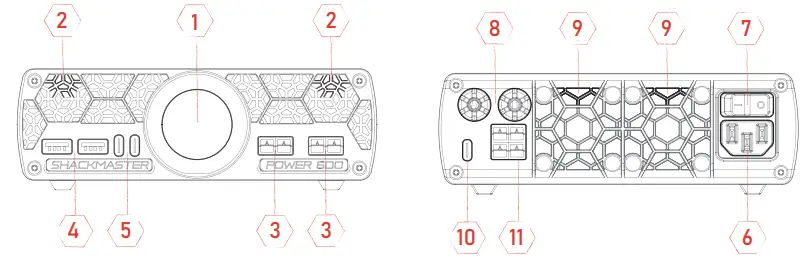
- 240×240 Color TFT LCD with Capacitive Touch Panel
- Cooling System Intake
- 45A Anderson Powerpole Connectors
- USB A Charging Ports
- USB Type-C Charging Ports
- Mains Power Entry
- Mains Line Switch
- 30A Binding Post
- Fan Outlet (Exhaust)
- Type-C PC Communication
- 45A Anderson Powerpole Connectors
Confirm Package Content
- Shackmaster Power 600 Power Supply
- AC power cable
- User manual
- USB cable for computer control
- Four silicon feet
THE MANUFACTURER CAN CHANGE THE CONTENTS WITHOUT FURTHER NOTICE.
Installation
Before plugging the Shackmasterm Power 600 Power Supply into an AC outlet, make sure that the mains voltage is within the 80 to 264V AC range. For user convenience this power supply can be placed horizontally or vertically on the special stands as shown on the picture.

Two USB Type A and two USB Type C connectors are at the bottom-left corner of
the front panel and can be used for charging.
The Anderson Powerpole Connectors are at the bottom-left corner.
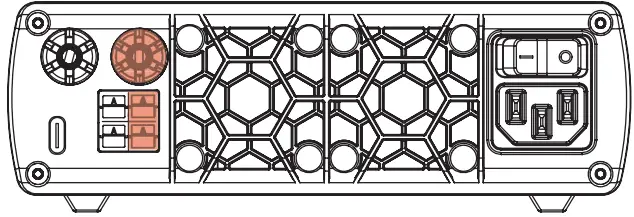
The loads can be connected also to Anderson Powerpole connectors at the rear panel. There are additional connectors at the rear panel of the power supply:
- one USB Type C connector for PC connection
- 1x Binding 13.8V post
Anderson Powerpole and Binding posts are color coded as: Red – + (plus 13.8V), Black – – (minus 13.8V)
It is recommended to connect the load to the binding posts by Fork spade terminals. The main power switch is at the right-top corner of the rear panel.
First Power-Up
Before you perform the first power-up, make sure your setup complies with the safety requirements outlined below.
WARNING
General safety precautions below must be followed in each phase of the
power supply operation. In case of failure to follow these precautions or
specific warnings in other parts of the manual is considered as violation of
the safety standards related to the design, manufacture and intended use of
the instrument. If the user does not follow these precautions, the
Manufacturer will be held not responsible for any consequences.
- The Power 600 can only be used indoors or in low condensation areas.
- The general environmental requirements are stated in the Specifications section.
- To avoid accidental injury, the power cord supplied by the manufacturer only must be used.
- The Power Supply is provided with a three-core power cord that should be connected to a three-core outlet which is properly grounded. Before operation, make sure that the Power 600 is well grounded.
- Use electric wires of appropriate load. All loading wires should be capable of bearing maximum short-circuit of electronic load without overheating.
- To prevent burnout, please pay special attention to positive and negative polarities of electronic load during connection!
- Do not use damaged equipment. Please check the housing before using the equipment. Check whether the device has cracks or lacks plastic.
- Do not operate the power supply in the environment with explosive gas, steam or dust.
- Do not install alternative parts on the instrument or perform any unauthorized modification.
- We do not assume responsibility for any direct or indirect financial damage or loss of profit that might occur when using the power supply.
- Do not use the equipment on the life support system or other equipment with /safety requirements.
CAUTION
- Reduce the load if the built-in protection system displays a warning to reduce the power consumption.
- Always use dry cloth to clean the Power Supply housing.
- Do not clean the inside of the instrument.
- Do not block the air vent of the Power Supply.
Touch Panel Usage
The device is equipped with a multifunctional color display with a touch
panel. The touch panel is used to turn the device on and off, as well as to
control display modes. To interact with the touchpad, the so-called gestures
are used:

The panel distinguishes several gestures: tap, long touch and swipe.
Some modes use a sequence of gestures.
For example, swipe and tap go sequentially one after another.
To tap, touch lightly the screen with the tip of your index finger and lift it again, quickly. The touch lasts only a fraction of a second for the screen to respond, no need to press it hard.
A long press (press-and-hold) is done when you touch the screen and hold your finger on the same spot. This gesture is also called «press and hold» and can be used to activate special menus or switch power supply off/on quickly.
A swipe is done when you touch and slide your finger across the screen. You can swipe quickly or slowly. The device distinguishes between swiping up, down, left and right.
Powering Device Up
- Once you have completed all the preparations, you can turn the Main Switch on the rear panel to position “I”. After that, the device will go into Standby Mode turning on the screen for a short time to show the Device Serial Number.
- By default, the device is configured to be Switched On / Off by a Swipe gesture or a Long Press gesture.
- Later, you can change these and other settings yourself using the REAMP companion software.
- To Turn device ON quickly use a Long-Press gesture.
- To Turn device OFF quickly, also use a Long-Press gesture.
Operation Display control
Controlling the display
Press the power switch ON at the top-right corner of the rear panel to turn on the power supply. The orange welcome message shows up on the round front panel LCD touchscreen.
-
The next step is to swipe up or down along the round front panel LCD touchscreen, and the following message: SWIPE TO SWITCH ON
- Instantly swipe right or left the screen once more and the following message: TOTA L 0W 0.0A 29C will appear.
- When the load is connected to any of the 13.8V terminals, the display shows both the consumed power and current: 50W 3.60A 29C
-
Tap the screen brings up the next screen: POWER 14.0V 3.60A LOAD
-
The next tap on the screen brings up the next screen: AUX 5.1V 0.00A USB C that shows the voltage and consumed current at 5V Type A and Type C connectors.
By taping the screen again, we get the next message: CONDITIONS 209V +23C showing the mains voltage and the temperature directly next to the Air Intake. -
Another tap brings back the first screen: TOTAL 0W 0.0 A 29 C
You can use tap or swipe for switching screens. To switch the power supply OFF
use Swipe right or left gesture to get the following message: SWIPE TO SWITCH
OFF Swipe up or down to switch the power supply off.
The following automatic functions can be controlled by the software:
- automatic power-off if inactivity is longer then determined of inactivity;
- automatic ON/OF switching at the determined time set;
- automatic switching back ON in case of mains failure.
The RigExpert REAMP software can be used to adjust and tune the display.
Intelligent Protection System
The main task of this system is to keep the user informed at all times to make the use of the device use comfortable and safe.
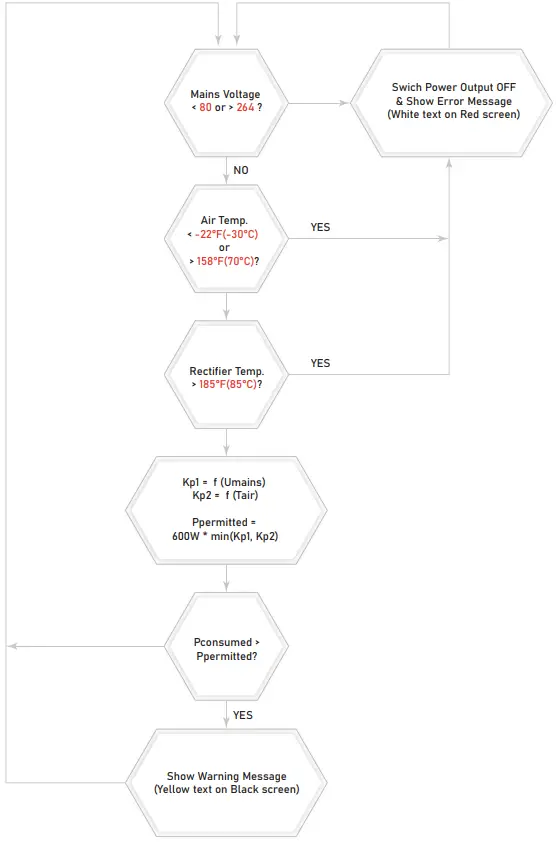
The intelligent protection system is a state machine that, depending on the parameters of the load, the mains, and the air temperature, provides power consumption control and, in case of adverse conditions, warns the user that power consumption should be limited to avoid damage of the Power Supply.
The power supply delivers maximun rated power if the input voltage is in the range from 115 to 260 Volts and the room temperature is not higher than 104 °F (40 °C). We consider this wide enough range of voltages and temperatures to be ideal operating conditions. In all others cases, the maximum permissible value of power consumption is less than the nominal value and depends on the conditions. Therefore, if the current conditions are not ideal and power consumption is close to the maximum, the protection system will gently notify you about this and ask you to reduce consumption.
For example, with a mains voltage of 80 Volts and at +70 °C air temperature in the room of +70 °C, the maximum output power will be limited to 300 W, and the user will be warned about it.
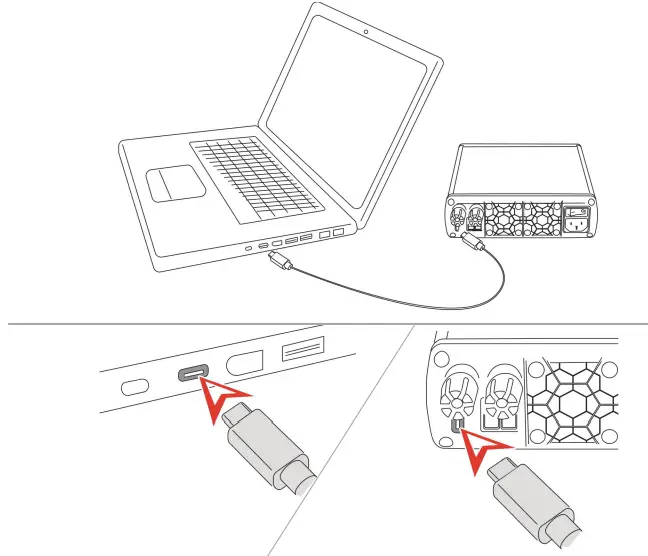
The power supply has an interface with a computer, that provides you with
additional capabilities of device control and its condition monitoring,
namely:
The special companion PC software to log consumption and auxiliary data both
for USB and Anderson Powerpole® Connectors during the operation of the power
supply. USB interface to log consumption data and update firmware.
The following automatic functions can be controlled by the software:
- automatic power-off if inactivity is longer then determined of inactivity;
- automatic ON/OF switching at the determined time set;
- automatic switching back ON in case of mains failure.
The RigExpert REAMP software can be used to adjust and tune the display.
Installing REAMP Logger software
The RigExpert REAMP Logger software enables you to control the Power 600 power
supply remotely via USB interface. This instrument enables you to record all
aspects of the operation of the Power 600 supply over a long period of time
and subsequently analyze the accumulated data.
To get software please use link
https://rigexpert.com/products/reamp-logger/reampsw/
The setup program installs the REAMP Logger software on PC’s running Windows,
MacOS and Ubuntu 21.10 operation systems. To install the software, download
the latest software installer from the REAMP Logger product homepage
https://rigexpert.com/products/reamp-logger/reampsw/
Service Functions
Connecting the Power 600 to the PC
To connect Power 600 to your PC please use the cable delivered with the
device. You can also use any high-speed USB cable with a USB A connector on
one side and USB Type-C on the other side.
REAMP Logger screen layout
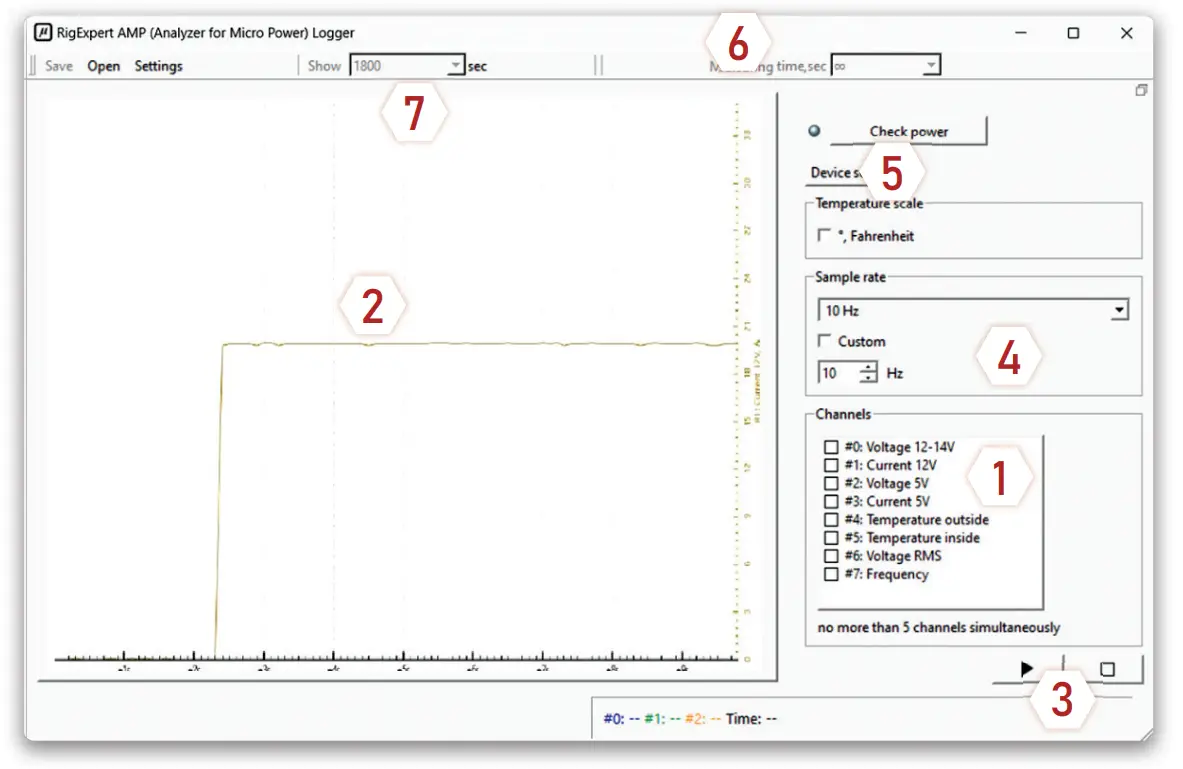
- Recordable Parameters measured by the device
- Sampled Data Representation
- Start / Stop Logging controls
- Sample Rate Controls
- Device Configuration Tools
- Logging interval
- Display interval
(Display window width in seconds)
Logging Process
When REAMP Logger software communicates with the Power 600 power supply the software is in measurement mode. The measurement mode (logging) is the operating mode which dispays instantaneous sampling of the measured value digitized and shown in the form of a graph on the screen and saves data to a log file.
Several parameters can be recorded and displayed simultaneously using the contro- ls. You can also set lenght of hte period when these parameters will be recorded and the sample rate. Please remember that after the parameters have been changed, you must restart the measurements by clicking Stop and Play buttons sequentially. In this case, the previous measurement results will be saved in a separate tab in the «Sampled Data Representation» window.
Better to see it once
-
Let’s try to register the parameters of the power supply unit together. As an example, we record data about the amount of current consumed by your mobile phone when it is charged.
-
The next step is to choose the specific parameter to be monitored. As we agreed at the beginning, we take a current consumption at 5V line.
-
Click on the corresponding box in the Channels window. We are almost done. All you have to do is to click the Play button.
-
Connect your phone to one of the USB outputs on the front panel. Immediately afterwards, you will see that the phone is consuming current. And the consumption is intermittent.
-
Very interesting.
-
It’s time to examine the operation of your transceiver. To do this, just stop logging, select a measurement in the Channels window, for example, the value of current consumption along a 12V line, and start logging again.
-
To stop logging press the Stop button.
-
To see the accumulated data that is outside the screen, use the mouse to drag the time arrow in the desired direction.
-
Please remember that although the internal measurement circuits of the power supply have good accuracy, this device is not a laboratory meter. The main task of the logger is to show you the nature of the load that you connect to the power supply, as well as to identify short-term anomalies in operation of that load which cannot be noticed by the unaided eye.
-
By the way, if you need to measure currents less than 100 µA, use our other product – the REAMP laboratory logger.
Customizing device settings
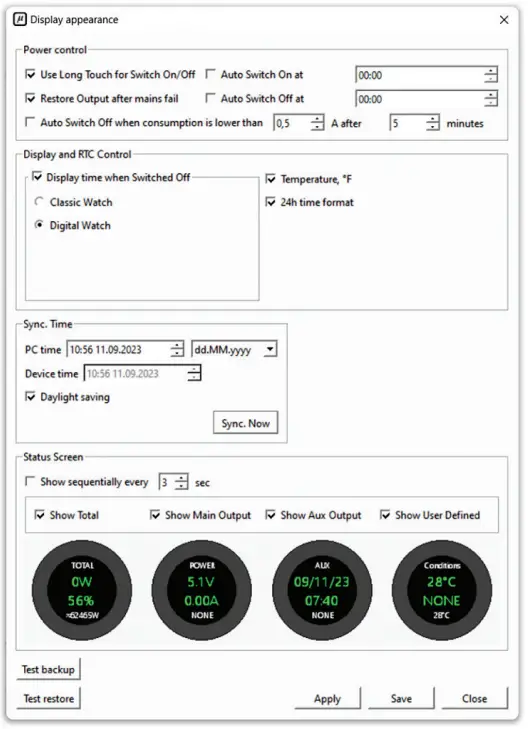
The REAMP companion software allows you to configure the device to make it convenient for you to work with it. To go to customization mode, click the Device Settings button.
In the settings window that opens you can set the following parameters:
-
Whether to use a special gesture to quickly turn the device on or off, what to do after the mains failure, do Power 600 need to turn off if it is not used for a long time. As the power supply has a built-in ultra-precise real-time clock,
you can set the power supply to turn on and off depending on the time of day. -
Whether it is necessary to show the clock on the device display when it is turned off.
-
Which information screens should be shown and what information should be displayed on each of them. You can enable sequential display of all configured screens to see everything that is happening in the equipment connected to the power supply.
-
The new settings will take effect immediately after you click the Save or Apply button:
Remote control
- To control the power supply from third-party software or via the Internet, you can use a special script written in Python. first of all, download the hid_switch_power_on.py and hid_switch_power_off.py files from the Power 600 product page.
- To switch Power 600 on just run hid_switch_power_on.py script. To turn off the power supply, use the hid_switch_power_off.py script.

Precautions
Danger
-
NEVER ALLOW ANYONE, ESPECIALLY CHILDREN, to push anything into the case holes or to otherwise touch the power supply or its connecting cables.
There is grave danger of fatal electrical shock -
Do not plug/unplug the power supply with wet hands.
It may easily cause electric shock. -
Do not use the power supply where there may be flammable gas.
This may cause fire and explosion.
Caution
-
DO NOT OBSTRUCT AIR INTAKE or EXHAUST areas of the power supply. Keep a minimum distance of 20cm (8 inches) clear of the rear panel air exhaust opening.
-
Note that your grounding system may have to handle a current of more than 15 Amperes. This requires an adequately sized and well-maintained conductor of at least 4 mm2 (AWG 11 or AWG 13). If this is not the case at your operating location, you should make the necessary changes using a licensed electrician.
-
Do not undertake or perform any repair or adjustment of your power supply yourself, including any attempt to change hardware.
-
Doing so creates a potentially fatal shock hazard and may damage the power supply or equipment connected to it. RigExpert is not responsi-ble for any such personal injury or equipment damage, whether caused by accident or as a result of good faith efforts of repair or adjustment.
-
Make sure that devices that are to be connected to the power supply meet its specifications, otherwise it may cause damage to the product.
-
Always hold the plug when plugging/unplugging the power supply.
Never unplug the power supply by pulling the cable as it may cause fire, shock and damage to the power supply. -
Unplug the power supply immediately if anything unusual happens, such as smoke and or strange odors coming from it.
Contact the authorized service centers immediately for service. -
Do not use the power supply for devices that require high current input at the start, such as motorized equipment and tools.
Do not charge the car battery. This may trigger the overcurrent protec-tion circuit or even may cause damage to the power supply.
EU DECLARATION OF CONFORMITY
- Manufacturer’s Name : Rig Expert Ukraine Ltd.
- Manufacturer’s Address : # 918, Solomyanska Square, 2, 03035, Kyiv, Ukraine.
Declares that the product specified below:
- Product Name : Power Supply RigExpert
- Model Number : shackmaster Power 600
Сonforms to the requirement of:
- EMC Directive : 2014/30/EU
- Low Voltage Directive : 2014/35/EU
- Electrical Compatibility (EMC):
- Electrical Safety:
- EN IEC 61000-6-3 :2021
- EN IEC 61000-6-1: 2019
- EN 62368-1:2014+A11:2017
RoHS: EN IEC 63000: 2020
Director_____Ashot Andreev, 01 April 2024
European Contact : TESTSVYAZ IT LTD. Loutrakiou 5, Off. 101, Chara
Venezia Build., 2027 Nicosia, Cyprus
For private households:
Information on Disposal for Users of WEEE
This symbol on the product(s) and / or accompanying documents means that used
electrical and electronic equipment (WEEE) should not be mixed with general
household waste. For proper treatment, recovery and recycling, please take
this product(s) to designated collection points where it will be accepted free
of charge. Alternatively, in some countries, you may be able to return your
products to your local retailer upon purchase of an equivalent new product.
Disposing of this product correctly will help save valuable resources and prevent any potential negative effects on human health and the environment, which could otherwise arise from inap-propriate waste handling. Please contact your local authority for further details of your nearest designated collection point. Penalties may be applicable for incorrect disposal of this waste, in accordance with your national legislation.
For professional users in the European Union
If you wish to discard electrical and electronic equipment (EEE), please
contact your dealer or supplier for further information.
For disposal in countries outside of the European Union
This symbol is only valid in the European Union (EU). If you wish to discard
this product, please contact your local authorities or dealer and ask for the
correct method of dis-posal.
www.rigexpert.com
Copyright© 2020-2023 Rig Expert Ukraine Ltd. «RigExpert» is a registered
trademark of Rig Expert Ukraine Ltd.
Doc. date: 16-July-2023
Frequently Asked Questions
How do I register my product for benefits?
To register your product and enjoy benefits such as an additional warranty and software updates, use the RigExpert Club card included in the box and follow the registration process.
Can I adjust the output voltage of the power supply?
Yes, the output voltage of the ShackmasterTM Power 600 can be adjusted within the specified range using the software controls.
What are the key features of this power supply?
The power supply features a space-saving design, low acoustic noise, wide mains voltage range, intelligent protection system, and customizable screen among other features.
What safety precautions should I follow when using the power supply?
Avoid overloading the power supply, ensure proper ventilation, and always adhere to the specified input voltage and current requirements.
References
Read User Manual Online (PDF format)
Read User Manual Online (PDF format) >>