
MedlinePlus KT21 BT Blood Beta-Ketone Monitoring User Manual
- June 5, 2024
- MedlinePlus
Table of Contents
- Introduction
- IMPORTANT SAFETY INFORMATION
- About the KT21 BT blood Beta-ketone monitoring system
- Settings
- Control Solution Testing
- Testing Your Blood Beta-Ketone
- Understanding Your Blood Beta-Ketone Test Results
- Displaying Stored Test Results
- Downloading Your Test Results to a PC
- Pairing Your Meter
- Cleaning Your Meter
- Screen Messages and Troubleshooting
- Troubleshooting
- System Specifications
- Symbols
- Disposing of the Meter
- Additional Supplies
- Product Warranty
- Read User Manual Online (PDF format)
- Download This Manual (PDF format)

KT21 BT Blood Beta-Ketone Monitoring
System User Manual
Introduction
Thank you for choosing the KT21 BT blood Beta-ketone monitoring system to help
monitor your blood Betaketone levels. The KT21 BT blood Betaketone monitoring
system is designed to be accurate and easy to use. This user manual contains
all the information needed to use and maintain the KT21 BT blood Betaketone
monitoring system. Please read this User Manual carefully before you start the
test and do a quality control test. If you have questions about the control
test, please consult with your healthcare professional. Please confirm the
measuring unit on the display is correct with every test result.
If you need assistance, please contact Customer Service. If you have questions
or need assistance outside the days and hours of operation, please contact
your health care professional.
IMPORTANT SAFETY INFORMATION
- Meters that come into contact with blood present a potential risk of transmitting infectious diseases. To prevent infections and/or cross-contamination, maintain good hand hygiene and clean your KT21 BT blood β-ketone meter as well as the corresponding accessories regularly.
- Healthcare Professionals performing blood Beta-ketone tests with this system on multiple patients must always wear gloves and should follow the infection control policies and procedures approved by their facility.
- The meter and lancing device are for single-patient use only. Do NOT share them with anyone including family members.
- NEVER use lancets that have been used by someone else.
- Do NOT leave the lancets in the lancing device after use. Be sure to dispose of it according to instructions from your healthcare professional. Do NOT reuse a lancet.
- If you have taken the cap off the lancet and the lancet has fallen to the ground, do NOT use it. Make sure you dispose of it and replace it with a new lancet.
CAUTION
- Keep the test strip, meter, lancing device, lancets and control solution away from all children and pets. Batteries and test strips may be a choking hazard.
- The control solution contains agents that may be harmful if swallowed or applied to the skin or eyes. Do NOT drink the control solution, as it is meant to be used on the test strips only.
Sign of Trouble
If you encounter any issues including the ones mentioned below, see the
troubleshooting. If problems persist, do NOT use and contact Customer Service.
- The meter does NOT power on when the new test strip is inserted into the meter.
- The meter does NOT power on when you replace the batteries.
- The meter does NOT show the test result after the test is completed.
- The LCD does NOT display correctly or is distorted after changing the batteries.
Intended Use
The KT21 BT blood Beta-ketone monitoring system is intended to be used for
the quantitative measurement of Beta-ketone (beta-hydroxybutyrate) in fresh
capillary whole blood samples from the fingertips. Venous whole blood testing
is limited to healthcare professionals’ use only. It is intended for self-
testing outside of the body (in vitro diagnostic use only) by people with
diabetes at home and healthcare professionals in a clinical setting as an aid
to monitor diabetes control. This system is NOT for use in the diagnosis of or
screening for diabetes, or for neonatal use.
Test Principle
Beta-Ketone in the blood sample reacts with enzyme (beta-hydroxybutyrate
dehydrogenase) on the test strip respectively. This reaction produces a
harmless current and the KT21 BT blood Beta-ketone meter measures the
current, and calculates the Beta-ketone level and displays the result. The
strength of the current is dependent on the amount of Beta-ketone in the blood
sample.
Important Information for the System
-
Before using the KT21 BT blood Beta-ketone monitoring system, please read this manual carefully.
-
Use this system only for blood Beta-ketone test.
-
The KT21 BT blood Beta-ketone meter should be used with the MediKeto 81 blood Beta–ketone test strips.
-
If your test result does NOT match how you feel, call your physician or healthcare professional.
-
NEVER ignore symptoms of high blood Beta-ketone.
-
If you see “HI” displayed, your blood Beta–ketone level may be above 8.0 mmol/L, repeat the blood Beta-ketone test using a new test strip. If the meter persists same results, contact your physician or healthcare professional.
-
This system could support your healthcare program but NEVER make major changes in your diabetes treatment program without consulting your physician.
-
The results of this system should NOT be used for diabetic treatment or medications without consulting your doctor.
-
Be sure to check the blood Beta-ketone measurement unit on the meter before the test. Use of the wrong blood Beta-ketone measurement unit may cause you to misinterpret the test results and result in incorrect treatment. Consult your healthcare professional if you have any questions about your blood Beta-ketone measurement units.
-
Before the test you must make sure that the code number displayed on the meter matches the code number on the test strip vial or foil packet.
-
If alcohol wipes are used to disinfect the fingertip, make sure the fingertip is completely dry before obtaining the blood sample.
-
Before sampling blood, gently massage the hand and finger toward the puncture site to form a drop of blood.
Do NOT squeeze excessively around the puncture site when you produce a drop of blood. -
Do NOT hold or shake the meter while it is testing.
Important Information for the Test Strip
-
NEVER reuse a test strip that is either applied with blood or control solution. The test strips are for single
use only. -
Before using, please check the test strip expiration date on the box, vial or the foil packet.
-
Do NOT use test strips that have expired as it may cause inaccurate test results.
-
Do NOT touch sampling end of the test strip.
-
Do NOT smear the blood with sampling end of the test strip.
-
Do NOT drop the blood directly on the sampling end of the test strip.
-
Do NOT insert the test strip with force into the meter.
-
Do NOT use wet, bent, scratched or visibly damaged test strips.
-
You should use your test strip immediately after retrieving it from its vial or foil packet.
-
Always keep the test strip vial closed immediately after retrieving the test strip.
-
Do NOT use the test strip if the foil packet has a puncture or tear in it.
Important Information for the Control Solution
- Use only the MediKeto Ketone Control Solution. Other brands of control solutions will produce inaccurate results.
- Shake the control solution well before using.
- Always check the expiration date of the control solution. Do NOT use expired control solution.
- Do NOT apply control solution to the test strip directly from the vial.
- Do NOT add or apply a second drop of blood or control solution. This may cause a false result.
- Replace the cap of the control solution immediately after use.
- If the control test result falls outside of the range provided, it indicates that the system may NOT be functioning properly. Do NOT use the meter and please contact Customer Service.
- The range printed on the test strip vial or box is for the control solution only. It has nothing to do with your blood Beta-ketone levels.
- The results obtained from control testing do NOT reflect your personal blood Beta-ketone levels in any way.
Limitation
- This system is only for in vitro diagnostics use and for self-testing.
- This system is NOT designed for use with arterial, serum or plasma samples. You should use fresh capillary, venous whole blood only.
- Do NOT put urine on the test strip.
- This system is NOT designed for use with neonatal.
- This system is NOT for screening or diagnosis of diabetes mellitus.
- Blood Beta-ketone testing must NOT use the forearm or palm site. Only use the fingertip for blood Betaketone testing.
- Hematocrit is the percentage of red blood cells in the blood. Testing outside of the Hematocrit level range of 20~60% may cause the inaccurate result. If you do NOT know your hematocrit level, consult with your healthcare professional.
- Inaccurate results may occur if used at altitudes above 3,500m.
- This system is NOT for use on patients who are in shock or dehydrated.
- Inaccurate results may occur in severely hypotensive individuals.
- This system is NOT for use on critically ill patients.
Storage and Handling of the System
- Keep this system dry and keep away from the heat and direct sunlight.
- Avoid leaving the meter or test strips in extremely hot or cold places, such as near a heat source or in an extremely hot or cold car.
- Do NOT store or use the meter or test strips at high humidity levels, such as in the bathroom or kitchen.
- Store the test strips in the original vial between 4 ~ 30℃, at indoor area. Do NOT freeze.
- The test strip may be stored in a refrigerator between 4 ~ 8℃. But it must be brought to room temperature before using.
- When properly stored, unopened test strips are stable until the expiration date printed on the vial or the foil packet.
- The test strips in the vial are good three (3) months after first opening date or until the expiration date, whichever comes first.
- Record the discard date on the test strip vial and discard any unused test strip after that date.
- The meter and the test strips are designed to be used within a temperature range of 10 ~ 40℃. Please keep the system operating temperature at a range between 10 ~ 40℃ for more than twenty (20) minutes before testing.
- Do NOT test if there is condensation (water build-up) on your meter and the test strip vial or the foil packet. Move your meter or a test strip vial or a foil packet to a cool, dry spot. Wait for the meter and a test strip vial or a foil packet surface to dry before testing.
- The meter, test strips, and control solution should be handled at the same temperature.
- Do NOT handle the test strips with wet or dirty hands.
- For accurate results, make sure your hands are clean and dry before retrieving test strip from its vial or foil packet.
- Do NOT allow dirt or dust in the test strip slot in order to avoid affecting the system’s performance.
- Dispose of used test strips, lancets according to instructions from your healthcare professional.
- Dispose of used batteries according to local regulations.
- Do NOT destroy, repair or transform the system at any time. If the equipment is used in a manner NOT specified by the manufacturer, the protection provided may be impaired.
- Handle the meter with care – severe shock, such as dropping the meter, could damage the electronics.
- The Applicable Pollution Degree of the intended environment for this system is Pollution Degree 2.
Storage and Handling of the Control Solution
- The control solution should be stored at indoor area between 4 ~ 30℃. Do NOT freeze.
- The control solution may be stored in a refrigerator between 4 ~ 8℃. But it must be brought to room temperature before using.
- The control solution is good three (3) months after first opening date or until the expiration date, whichever comes first.
- Record the discard date on the control solution vial and discard remained control solution after that date.
- The control solution test is recommended to be done at room temperature (20 ~ 25℃).
Important Information for Caring the Meter
- Clean your KT21 BT blood Beta–ketone meter once per week at a minimum.
- Do NOT get water inside the meter. NEVER immerse the meter or hold it under running water or spray any cleaning solution directly onto the meter.
- Do NOT try to get moisture on the test strip, test strip slot or serial port.
- Do NOT use glass cleaners or household cleaners or corrosive liquid (e.g. Benzene, Acetone) on the meter.
- Please use a soft cotton cloth to wipe the system.
- Squeeze the excess liquid from the cloth before you wipe the meter.
- The meter must be turned off when you clean the meter.
About the KT21 BT blood Beta-ketone monitoring system
█ Contents of Kit
The KT21 BT blood Beta-ketone monitoring system includes the following items:
- KT21 BT blood Beta-ketone meter
- MediKeto 81 blood Beta-ketone test strips (10
- Tests) Lancing Device
- Lancets
- Battery (CR2032)
- Carrying Bag
- User Manual
NOTE:
- The MediKeto 81 blood Beta-ketone test strips (for 10, 25 Tests or 50 Tests), the MediKeto Check Strip, and the MediKeto Ketone Control Solution are required but NOT included and must be purchased separately. For additional information of other accessories, please contact your supplier, pharmacist, healthcare professional, or Customer Service.
- The Test Strip may be provided with a foil packet for each or a vial for 10 , 25 or 50 test strips.
█ KT21 BT Blood Beta-Ketone Meter

█ Meter Display Screen
1|
| Appears when the meter detects low battery power
---|---|---
2|
| Appears when the sound is set to OFF
3| SET| Segments to display the Set-up mode
4|
| Symbol to mark the control solution test results
5|
| Appears when Bluetooth is activated and the meter pairs with a mobile device
6|
| Appears if the meter is out of operating temperature range
7| KET| Appears when the test strip is inserted
8|
| Segments to display test results or error messages
9|
| Appears when the meter is ready for application of blood or
control solution.
10|
| Appears when test results stored in memory are displayed
11|
| Segments to display date and average day
12|

| Segments to display the unit of measurement
13|
| Appears when the test strip is inserted.
Blinks, when the test strip is removed during the meter, are on.
14|
| Segments to display hours and minutes of tests
IMPORTANT
Be sure to check the blood Beta ketone measurement unit on the meter before
the test. Use of the wrong blood Beta ketone measurement unit may cause you to
misinterpret the test results and result in incorrect treatment. Consult your
healthcare professional if you have any questions about your blood Beta ketone
measurement units.
█ MediKeto 81 Blood Beta-Ketone Test Strip
|
|
---|---|---
MediKeto 81 Blood BetaKetone Test Strip Vial| MediKeto 81 Blood Beta Ketone
Test Strip Foil Packet| MediKeto 81 Blood Beta- Ketone Test Strip
- The expiration date of the MediKeto 81 blood Beta ketone test strip can be found on the vial or the foil packet.
IMPORTANT
-
The KT21 BT blood Beta-ketone meter should be used with the MediKeto 81 blood Beta-ketone test strips.
-
Before using, please check the test strip expiration date on the box, vial or foil packet.
-
The test strips in the vial are good three (3) months after the first opening date or until the expiration date, whichever comes first.
-
Record the discard date on the test strip vial and discard any unused test strip after that date.
-
You should use your test strip immediately after retrieving it from its vial or foil packet.
-
Always keep the test strip vial closed immediately after retrieving the test strip.
-
Store the test strips in the original vial between 4 ~ and 30℃, in an indoor area.
-
Keep the test strip away from the heat and direct sunlight. Do NOT freeze.
-
The test strip may be stored in a refrigerator between 4 ~ and 8℃. But it must be brought to room temperature before use.
-
Do NOT test if there is condensation (water build-up) on your meter and the test strip vial or the foil packet.
Move your meter or a test strip vial or a foil packet to a cool, dry spot. Wait for the meter and a test strip vial or a foil packet surface to dry before testing. -
Do NOT handle the test strips with wet or dirty hands.
█ MediKeto Ketone Control Solution
The MediKeto Ketone Control Solution is the standard blood Beta ketone
concentration solution required to perform a control test (See Control
Solution Testing).
The MediKeto Ketone Control Solution helps to validate the performance of the
system. Run the control test to make sure the meter and test strips are
working properly together, to practice the testing procedure, and when using a
new package of the MediKeto 81 blood Beta-ketone test strips.
█ MediKeto Check Strip
The MediKeto Check Strip verifies whether the KT21 BT blood Beta-ketone meter
is working properly.
Settings
█ Inserting (or Replacing) the Batteries
The batteries need to be inserted before using your KT21 BT blood glucose
meter for the first time or when the batteries are low. When the batteries are
low the screen will display and blink the on the screen. Change the batteries
immediately when this occurs.
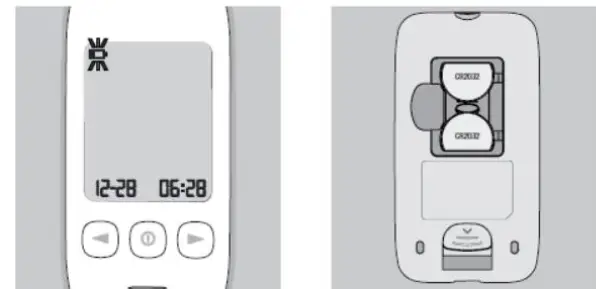
- Open the battery compartment cover on the back of the meter.
- Insert new batteries, with the (+) side facing up.
- Replace the compartment cover back onto the meter.
CAUTION
- Risk of explosion if the battery is replaced by an incorrect type.
- Small items such as the battery cover and batteries are choking hazards.
IMPORTANT
- Dispose of used batteries according to local regulations.
- If the meter is NOT to be used for a long time, remove the battery to eliminate the risk of battery leakage.
NOTE:
- The meter can also be used with a single battery. If you install two (2) batteries, you can use it for a longer period.
- Whenever replacing the batteries, you need to reset the current date and time. However, test results stored will NOT be deleted.
█ Change Settings
To change the device’s settings, press the button and hold for more than 3
seconds until the symbol is displayed.
When adjusting the settings, SET is continuously shown on the main
display. Use the button to switch between the setting options.
The following pages show the setting options of your blood Beta-ketone meter.
NOTE: You can exit the device’s settings mode at any time by holding the button for longer than 3 seconds.
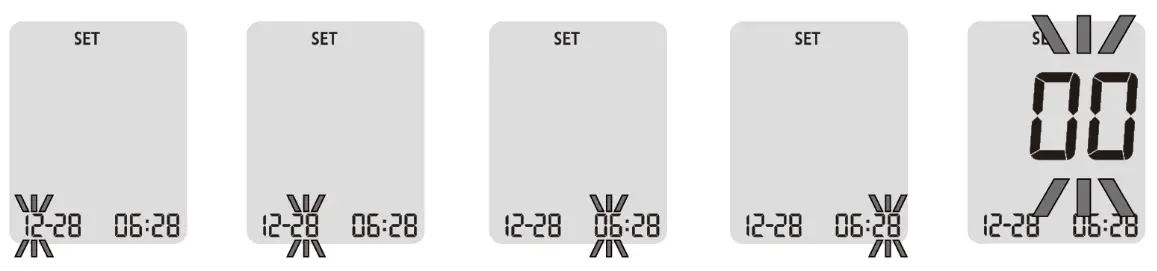
█ Time and Date
Press the button to set the hours, minutes, year, month, and day one after
another. With the left or right button, you can change the flashing value.
█ Acoustic Signal
Acoustic signals ( ) are activated by default. If you want to deactivate the
acoustic signals, press the left or right button to change the status from ON
(activated) to OFF (deactivated). Confirm your choice with the button.
NOTE: Turning the beep sound on or off do NOT affect your blood glucose
measurements.
█ Delete Your Test Results
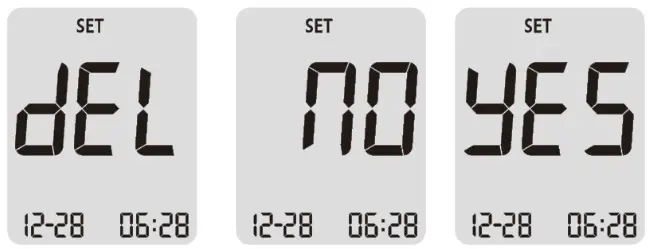
When you enter the Delete Mode by press the button, the meter shows “dEL” on the display then, “no” message will be prompted shortly after. You can toggle the message “no” and “yes” by pressing the left or right button. If you want to keep your all test results, press the button while “no” message on the display. On the other hand, when you press the button while “yes” message on the display, then all the test results will be deleted from the meter.
Control Solution Testing
The purpose of the control solution testing is to validate that the KT21 BT blood Beta-ketone meter is working properly with the test strips. The control solution may NOT be included in the kit. Please contact your pharmacist or healthcare professional or Customer Service to purchase the MediKeto Ketone Control Solution.
You should perform a control solution test when:
- Using the meter for the first time.
- You open a new packing box of test strips.
- You want to check the meter and test strips.
- At least once per week to verify that the meter and test strips are working properly together.
- Your test strips were stored in extreme temperature or humidity where is out of the specified storage conditions.
- The test strip vial is left open.
- The meter was dropped or damaged or gotten wet.
- You suspect the meter and test strips are NOT working properly together.
- Your test results do NOT agree with how you feel.
- You want to practice your test technique.
- Your test results appear to be abnormally high or low.
CAUTION
The control solution contains agents that may be harmful if swallowed or
applied to the skin or eyes. Do NOT drink the control solution, as it is meant
to be used on the test strips only.
IMPORTANT
- Use only the MediKeto Ketone Control Solution. Other brands of control solutions will produce inaccurate results.
- Always check the expiration date of the control solution. Do NOT use an expired control solution.
- The control solution is good three (3) months after the first opening date or until the expiration date, whichever comes first.
- Record the discard date on the control solution vial and discard remained control solution after that date.
- The control solution should be stored in an indoor area between 4 ~ and 30℃. Do NOT freeze.
- The control solution may be stored in a refrigerator between 4 ~ and 8℃. But it must be brought to room temperature before use.
- Do NOT add or apply a second drop of control solution. This may cause a false result.
- Make sure the control solution vial is closed when NOT in use.
- If the control test result falls outside of the range provided, it indicates that the system may NOT be functioning properly. Do NOT use the meter and please contact Customer Service.
- The control solution test is recommended to be done at room temperature (20 ~ 25℃).
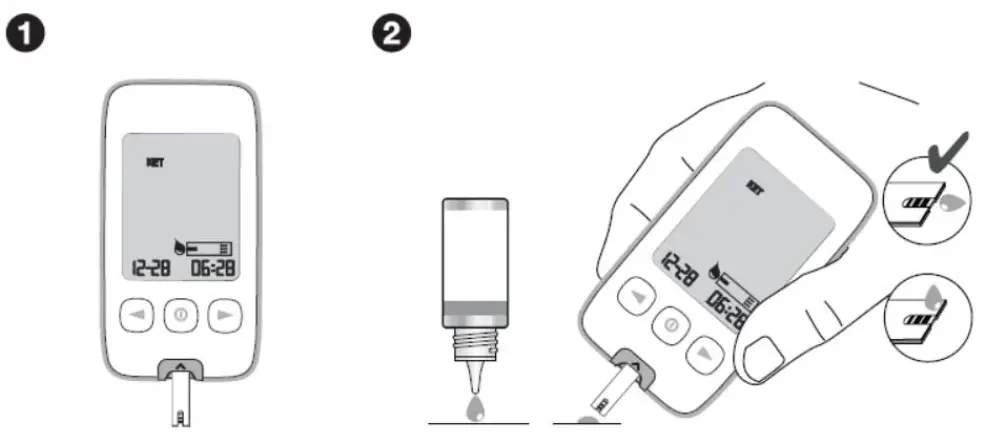
█ Performing a Control Solution Test
|

---|---
NOTE: The control solution test range on the picture above is for the example only. The test range can be different for each test strip batch.
-
Insert the test strip with black lines facing upwards and pointing towards the test strip port. Make sure to firmly and completely insert the test strip into the meter. The meter will turn on automatically and the code number will appear on the screen. Verify that the code number displayed matches the code number on the vial of the test strips. If the two code numbers do NOT match, contact Customer Service. When the blood drop symbol appears on the screen, shake the control solution vial well.
-
Remove the control solution cap. Squeeze the vial, discard the first drop and wipe off the dispenser tip with a clean tissue to ensure an accurate result. If large bubbles appear at the tip of the vial, wipe the bubbles off before applying a drop of control solution to the test strip. Then squeeze the vial again to receive a drop. Apply this drop of control solution to a clean and non-absorbent base. Close the lid of the control solution vial immediately after use.
Bring the test strip gently to the drop of the control solution so the sampling end of the test strip touches the control solution. The drop of the control solution will be drawn in automatically by the test strip.
IMPORTANT
• Replace the cap of the control solution immediately after use.
• Do NOT apply a control solution to the test strip directly from the vial. -
When the test strip measurement chamber is full, the meter will beep. The meter will count down from
eight (8) seconds and then show the control test result. Make sure the test result on the screen is between
the ranges printed on your test strip box or vial. -
You can flag the control solution symbol by pressing the left or right button with the test result on the display and the test strip still in the meter.
-
Press the button to permanently save the selected marker and the device automatically switches off.
-
Eject the test strip into a proper waste container.
NOTE: Mark all control solution tests with the control solution symbol to distinguish them from blood Beta-ketone results in the meter memory.
IMPORTANT
- The range printed on the test strip vial or box is for the control solution only. It has nothing to do with your blood Beta ketone levels.
- The results obtained from control testing do NOT reflect your personal blood Beta ketone levels in any way.
- If the control solution test result falls outside of the range provided, do the following:
- Do NOT test your blood Beta ketone.
- Make sure you are using the MediKeto Ketone Control Solution.
- Make sure the testing environment is between 10 ~ 40℃.
- Make sure the MediKeto Ketone Control Solution and test strips have NOT expired.
- Repeat the test with a new test strip.
- If the problem persists, contact Customer Service. If you have questions or need assistance outside the operational days and times, please contact your health care professional.
█ Performing the Check Strip Test
The MediKeto Check Strip verifies whether the meter is working properly.
Insert the check strip into the meter.
The meter switches on automatically.
If the “OK” Message is NOT displayed on the screen after inserting the
MediKeto Check Strip, please contact Customer Service.
Testing Your Blood Beta-Ketone
IMPORTANT SAFETY INFORMATION
- Meters that come into contact with blood present a potential risk of transmitting infectious diseases. To prevent infections and/or cross-contamination, maintain good hand hygiene and clean your KT21 BT blood Beta-ketone meter as well as the corresponding accessories regularly.
- Healthcare Professionals performing blood Betaketone tests with this system on multiple patients must always wear gloves and should follow the infection control policies and procedures approved by their facility.
- The meter and lancing device are for single-patient use only. Do NOT share them with anyone including family members.
- NEVER use lancets that have been used by someone else.
CAUTION
Keep the test strip, meter, lancing device, lancets, and control solution away
from all children and pets. Test strips may be a choking hazard.
█ Preparing the Test
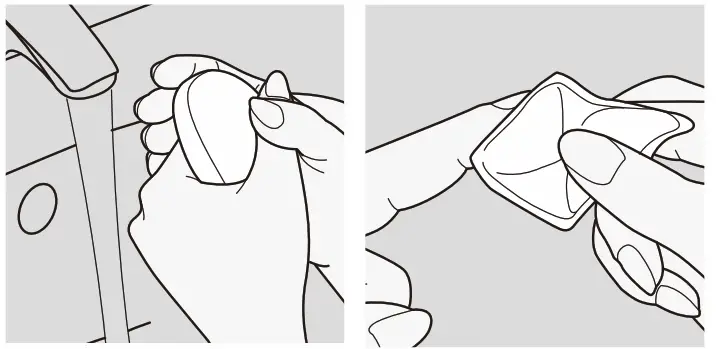
- The easiest way to collect a drop of blood is to wash your hands with warm water and soap first. This promotes blood circulation in the fingertips. Then dry your hands properly. The puncture site can alternatively be wiped with an alcohol-soaked swab. Please ensure that the site is completely dry before collecting the blood sample.

- Prepare the lancing device and Turn the cap counterclockwise to remove it.
- Insert the lancet into the lancet holder and push down firmly until it is fully seated. Do NOT twist the lancet.
- Twist the protective disk until it separates from the lancet. Replace the lancing device cap. Turn it clockwise until it is snug fit.
NOTE: If you have your lancing device already, please read the information in your lancing device instruction for use.
█ Inserting the MediKeto 81 Blood Beta-Ketone Test Strip

NOTE: The code number on the picture above is for the example only. The code number can be different for each test strip batch.
- Insert a test strip to turn on the meter automatically. Make sure it is inserted completely without bending the test strip KET will appear on screen if the MediKeto 81 blood Betaketone test strip is inserted.
- The meter identifies the code number automatically. Compare the code number displayed on the LCD with the code number shown on the vial or the foil packet. If they do NOT match, try again with another test strip. If the problem persists, please contact Customer Service.
- When the blood symbol appears, it indicates that the meter is ready for blood Betaketone testing.
IMPORTANT
Before the test you must make sure that the code number displayed on the meter
matches the code number on the test strip vial or foil packet.
█ Obtaining a Blood Drop
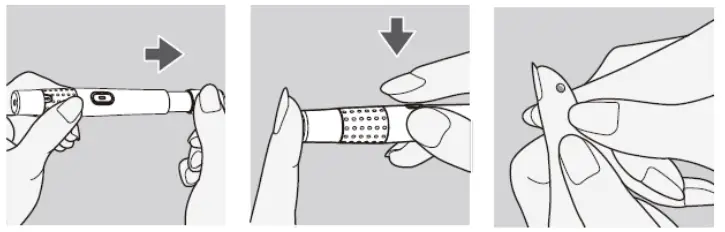
- Adjust the puncture depth setting if necessary, by turning the lancing device cap, number 1 is the shallowest depth while number 5 is the deepest. Slide the ejection/cocking control barrel back until it clicks. If it does NOT click, the lancing device may have been cocked when the lancet was inserted.
- Hold the lancing device firmly against the side of your fingertip and lance the finger by pressing the release button of the lancing device.
- Gently massage your finger towards the puncture site to produce a drop of blood.
NOTE: Prick the side of fingertip to avoid soreness. To avoid calluses, choose a different testing site each time. If you have your own lancing device, please follow your lancing device instruction for use.
IMPORTANT SAFETY INFORMATION
If you have taken the cap off the lancet and the lancet has fallen to the
ground, do NOT use it. Make sure you dispose of it and replace it with a new
lancet.
IMPORTANT
- Do NOT squeeze excessively around the puncture site when you produce a drop of blood.
- If alcohol wipes are used to disinfect the fingertip, make sure the fingertip is completely dry before obtaining the blood sample.
- Blood Betaketone testing must NOT use the forearm or palm site. Only use the fingertip for blood Betaketone testing.
█ Applying Blood
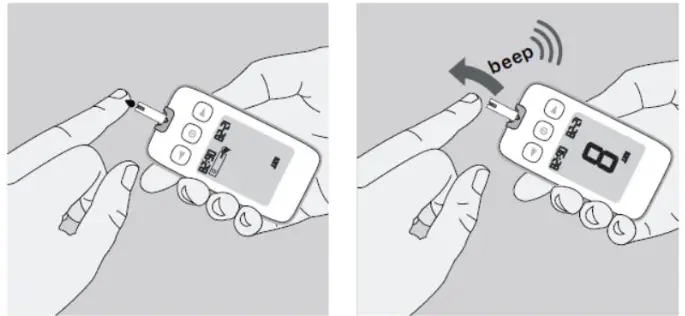
Place your finger on the tip of the test strip. Ensure that the blood is NOT
applied from above.
The measurement chamber of the test strip draws the blood of your finger
automatically. Your finger should remain still until the measuring chamber is
completely filled and you hear the “beep” sound.

IMPORTANT
- The sample channel at the end of the test strip should show full. When you hear the beep sound, you have enough blood in the test strip.
- Do NOT put urine on the test strip.
- Do NOT touch sampling end of the test strip.
- Do NOT smear the blood with sampling end of the test strip.
- Do NOT drop the blood directly on the sampling end of the test strip.
- Do NOT add or apply a second drop of blood. This may cause a false result.
- Do NOT hold or shake the meter while it is testing.
█ Measuring Process

After eight (8) seconds you will hear a second beep sound and your test result
will be displayed on the LCD screen.
The Test result will be stored in meter memory automatically (See Display of
Test Results).
NOTE: The meter will display “0.0 mmol/L” when blood β-ketone test result
is less than 0.1 mmol/L.
█ Marker function and display
After testing, press the left or right button to select one of the following markers.
Test was performed with a control solution.
Press the button to permanently save the selected marker and the device
automatically switches off.
NOTE:
- If you press the left or right button and don’t confirm your selection within 10 seconds, it will be confirmed automatically.
- Marking control solution tests with this marker is important since otherwise your average values and statistical evaluations would be compromised.
█ Disposing of Used Test Strips and Lancets
Use a Strip Ejecting Button located on the right side of the meter to remove
the used test strip.
Used test strips should be safely discarded properly according to instructions
from your healthcare professional.
Wash your hands thoroughly with soap and water after handling the meter,
lancing device or test strips.
IMPORTANT SAFETY INFORMATION
Do NOT leave the lancets in the lancing device after use, be sure to dispose
of it according to instructions from your healthcare professional. Do NOT
reuse the lancet.
Understanding Your Blood Beta-Ketone Test Results
█ Blood BetaKetone Results Interpretation
If your Betaketone result is between 1.5 and 3.0 mmol/L may indicate the
development of a problem that could require medical assistance. Follow your
healthcare professional’s instructions. If your Betaketone result is higher
than 3.0 mmol/L, contact your healthcare professional promptly for the
assistance you may be at risk of diabetic ketoacidosis (DKA).
NOTE: Consult with your healthcare professional for the blood Betaketone range
that is appropriate for you.
Reference:
Rewers A. Current controversies in treatment and prevention of diabetic
ketoacidosis. Adv Pediatr. 2010;57(1):247-267.
IMPORTANT
- If your test result does NOT match how you feel, call your physician or healthcare professional.
- NEVER ignore symptoms of high blood Betaketone.
- If you see “HI” displayed, your blood Betaketone level may be above 8.0 mmol/L, repeat the blood Betaketone test using a new test strip. If the meter persists same results, contact your physician or healthcare professional.
- NEVER change any treatment without first consulting with your physician or healthcare professional.
- Hematocrit is the percentage of red blood cells in the blood. Testing outside of the Hematocrit level range of 20~60% may cause the inaccurate result. If you do NOT know your hematocrit level, consult with your healthcare professional.
- This system is NOT for use on patients who are in shock or dehydrated.
- Inaccurate results may occur in severely hypotensive individuals.
- This system is NOT for use on critically ill patients.
Displaying Stored Test Results
The KT21 BT blood Beta-ketone meter automatically stores up to five hundred (500) β-ketone test results together with the date and time. The time and date must be set in order to use the memory function (See Set Date and Time).
█ Display of Test Results
- Begin with the meter turned off. Press the button, you will hear a beep sound and the meter will turn on.
- The screen will display the date and time. After two (2) seconds, the latest test result is displayed first.
- Each time you continue to press the > button, the screen will show the test result from the most recent to the oldest. Use the < or > button to switch stored results.
- Press button to turn off the meter.
- The meter will automatically turn off after two (2) minutes of non-use.
NOTE:
- After five hundred (500) data entries, every new test results replaces the oldest (first in, first out).
- Meter memory test results will NOT be erased when battery is removed.
Downloading Your Test Results to a PC
You can transfer test results from the KT21 BT blood Beta-ketone meter
to a computer. The program can help you to make a report with graphs and
tables. To use this feature, you need the Medisign Link Diabetes Management
Software and the Medisign Link Cable. For more information, please contact
Customer Service.
Before you download the test result data from the meter to your PC, you have
to connect the meter to your PC according to the following steps:
- Make sure that you have installed Medisign Link Software on your computer.
- Make sure that your meter is turned off.
- Insert the rectangular cable end into your computer’s USB port.
- Insert the round cable end into the meter data port, located at the bottom of the meter.
- When the meter is turn on, “PC” will be shown on the meter. The communication between the meter and your PC is ready.
NOTE: While the meter is connected to the PC, you are unable to perform a blood Beta-ketone test.
Pairing Your Meter
█ Before Pairing Your Meter
Pairing must be completed between the KT21 BT blood Betaketone meter and your
Bluetooth mobile device before your meter can communicate with your mobile
device. Both devices must be within ten meters (10 M) range apart from each
other in order to sync properly. The meter can be paired with only one smart
device at a time.
To avoid malfunctions when transferring data, please remove the meter from the
list of paired devices before setting up any new pairing.
The KT21 BT blood Betaketone meter is compatible with:
- Android device (requires OS 4.3 or higher)
- Apple iOS device (requires iOS 8.0 or higher)
- Mobile devices compatible with Bluetooth 4.0
█ How to Pair Your Meter
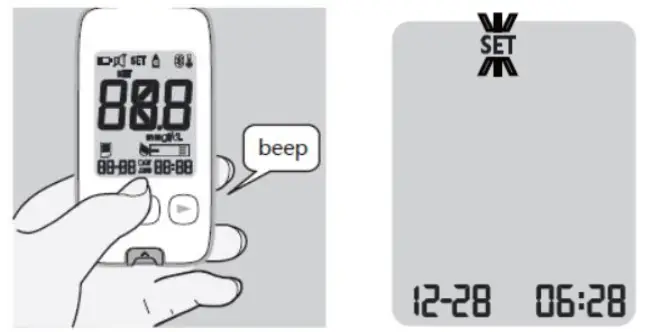
- Press the button to turn on the meter.
- If your mobile device is set to search for other devices, you can find the KT21 BT blood Betaketone meter name along with the serial number displayed.
- Select or tap the name of the meter displayed you wish to connect.
- If your mobile device and the meter are successfully connected, the will be shown on the meter display.
- If you are prompted to pair your mobile device after connecting, you may need to enter the pairing password on the display. The pairing password is “000000” (six zeros).
Cleaning Your Meter
Wash and dry your hands before use to prevent damage of the meter and test strips. The meter should be cleaned with a soft cloth or paper towel slightly dampened with one of these cleaning solutions:
- 70% isopropyl alcohol
- Mild dishwashing liquid mixed with water
- 10% household bleach solution made on the day
After cleaning, allow the meter to dry completely in a cool place away from direct sunlight.
IMPORTANT
- The meter must be turned off when you clean the meter.
- Clean your KT21 BT blood Betaketone meter once per week at a minimum.
- Do NOT get water inside the meter. NEVER immerse the meter or hold it under running water or spray any cleaning solution directly onto the meter.
- Do NOT use glass cleaners or household cleaners or corrosive liquid (e.g. Benzene, Acetone) on the meter.
- Do NOT try to get moisture on the test strip, test strip slot or serial port.
- Do NOT destroy, repair or transform the system at any time. If the equipment is used in a manner NOT specified by the manufacturer, the protection provided may be impaired.
- Handle the meter with care – severe shock, such as dropping the meter, could damage the electronics.
- Squeeze the excess liquid from the cloth before you wipe the meter.
Sign of Deterioration
The list of things you should look for as signs of deterioration after
cleaning include:
- Control Solution results is out of the range
- Clouding of the LCD display
- Corroding of the plastic housing or buttons
- Malfunction of any meter function
If these signs of deterioration are noted, do NOT use the meter and contact Customer Service.
Screen Messages and Troubleshooting
█ Screen Messages
This section explains the display screen messages and error messages you may
encounter when using your KT21 BT blood Beta-ketone meter and test strips. If
your meter is still NOT working after you have followed the troubleshooting
instructions, contact Customer Service.
| What you see | What it means | What you should do |
|---|
| The test strip was used or applying sample to the test strip before inserting it into the meter or the test strip is damaged.| Repeat the test with a new test strip.
| The sample was applied before the meter was ready to test.| Remove and discard the test strip and insert a new one. Apply blood to the test strip after the blood symbol appear on the screen.
| The ambient temperature is too high or low to test.| The temperature should be 10 ~ 40℃. Move the meter and test strip to an area that is within the temperature range to perform the test. Wait about twenty (20) minutes or until the meter has reached the proper range and retest. Do NOT raise or lower the meter temperature artificially.
| The error could be caused by one of the following:
- Not enough sample was applied into the test strip.
- The sample was improperly applied.
- The test strip was moved during the test.
| Repeat the test with a new test strip using enough samples. Please do not touch the test strip during the test. If error persists, please contact Customer Service.
| The wrong test strip has been inserted into the meter.| Make sure you are using the MediKeto 81 blood Beta- ketone test strip and repeat the test.
| There is a problem with the meter.| Please contact Customer Service.
| Blood Betaketone test result is higher than 8.0 mmol/L.| Repeat the test with a new test strip. If the result is still “HI”, contact your physician or healthcare professional.
Troubleshooting
| What is happening | What you should do |
|---|---|
| The meter does NOT work after the blood is applied. |
- Make sure that the test strip is inserted into the test strip slot completely.
- See if the test strip is covered in debris or lint.
- Make sure the blood is applied to the test strip correctly.
- Make sure the test strip is inserted correctly and repeat the test.
The test result is abnormal.|
- See if the test strip is covered in debris or lint.
- Check if the test strip is within the validity period.
- Make sure the test strip has NOT been stored out of its vial.
- Make sure the test strip has NOT been used before.
- Make sure the code on the meter display matches with the test strip code.
The thermometer symbol appears on the screen.|
- Put the meter and test strips in a location within the operating temperature range (10 ~ 40℃) for at least twenty (20) minutes and repeat the test. Do NOT raise or lower the meter temperature artificially.
- If the thermometer symbol is constantly showing, contact Customer Service.
The meter does NOT work after the test strip is inserted.|
- Make sure the test strip is completely inserted into the test strip port.
- Make sure the batteries are inserted correctly, with the + sign facing upwards.
System Specifications
| Measuring Range | 0.0 ~ 8.0 mmol/L |
|---|---|
| Measuring Time | 8 seconds |
| Memory capacity | 500 test results (include date and time) |
| Sample Type | Fresh capillary(only fingertip) and venous whole blood |
| Operating condition | 10 ~ 40℃ |
| Sample volume | 0.5 ㎕ |
| Screen type | LCD (Backlight optional) |
| Dimensions (mm) | 103 (L) x 55 (W) x 16.5 (H) |
| Weight | Approximately 72g (with batteries) |
| Power supply | DC 3V (CR2032) Lithium Battery |
| Data Output | Bluetooth, USB Data Transfer Cable |
| Wireless Frequency | 2.4 GHz Band |
Symbols
| Keep away from sunlight
---|---
| Biological risks
| Manufacturer
| LOT number
| Temperature limitation
| Catalogue number
| Authorized Representative in the European Community
| Use by
| In vitro diagnostic medical device
| Consult instructions for use
| Date of manufacturer
| Do no reuse
| Serial number
| Direct current
| Sufficient for
| Caution, refer to safety-related notes in the instructions for use
accompanying this product
Disposing of the Meter
IMPORTANT SAFETY INFORMATION
Objects (e. g. the meter) that had been in contact with blood potentially bear
the risk for infectious diseases. Please dispose of these materials according
to local regulations for the disposal of contaminated medical devices.
Please dispose of the contaminated meter – after removing the battery – according to the regulations applicable to your country. For information about correct disposal, please contact your local council or authority. The meter falls within the scope of European Directive 2012/19/EU (Directive on waste electrical and electronic equipment (WEEE)).
Additional Supplies
The following supplies and accessories are available from your supplier, for more information contact Customer Service.
- MediKeto 81 blood Beta-ketone test strips
- MediKeto Ketone Control Solution
- MediKeto Check Strip
- Redesign Link Cable
- Redesign Link Diabetes Management Software
Product Warranty
The KT21 BT blood Beta-ketone meter is warranted to be free of defects in workmanship and materials for a period of three (3) years from the date of purchase. The manufacturer’s liability for warranty claims is limited to repair or replacement, and in no event shall the manufacturer be liable for indirect or consequential damages, or for any loss arising from misuse, improper use, abuse, neglect, unauthorized repair, or modification.
This warranty is void and of no force and effect in the event of product misuse, improper use, abuse, neglect, unauthorized repair or modification. This warranty specifically excludes the MediKeto 81 blood Beta-ketone test strip and the MediKeto Ketone Control Solution.
THIS WARRANTY IS THE SOLE AND EXCLUSIVE WARRANTY TO THE EXCLUSION OF ALL OTHER
WARRANTIES, EXPRESS OR IMPLIED, ALL OF WHICH ARE WAIVED AND DISCLAIMED.
All warranty claims must be directed to Customer Service. This warranty is
extended only to the original purchaser of the meter.
References
- Rewers A. Current controversies in treatment and prevention of diabetic ketoacidosis. Adv Pediatr.
2010;57(1):247-267.
Tianjin Empecs Medical Device Co., Ltd.
No.35 and 37, Yingcheng Street, Hangu, Binhai New Area, Tianjin, China
Phone: +86-22-2569-6839 Fax: +86-22-2569-1103
Shanghai International Holding Corp. GmbH(Europe)
Eiffestrasse 80, 20537 Hamburg, Germany
Phone: +49-40-2513175 Fax: +49-40-255726
Rev.06.08.21
FCC Information to User
This equipment has been tested and found to comply with the limits for a Class
B digital device, pursuant to Part 15 of the FCC Rules. These limits are
designed to provide reasonable protection against harmful interference in a
residential installation. This equipment generates, uses, and can radiate
radio frequency energy and, if not installed and used in accordance with the
instructions, may cause harmful interference to radio communications. However,
there is no guarantee that interference will not occur in a particular
installation. If this equipment does cause harmful interference to radio or
television reception, which can be determined by turning the equipment off and
on, the user is encouraged to try to correct the interference by one of the
following measures:
- Reorient or relocate the receiving antenna
- Increase the separation between the equipment and receiver
- Connect the equipment into an outlet on a circuit different from that to which the receiver i connected.
- Consult the dealer or an experienced radio/TV technician for help
Caution
Modifications not expressly approved by the party responsible for compliance
could void the user’s authority to operate the equipment.
FCC Compliance Information : This device complies with Part 15 of the FCC
Rules. Operation is subject to the following two conditions: (1) This device
may not cause harmful interference, and (2) this device must accept any
interference received, including interference that may cause undesired
operation.
This equipment complies with FCC radiation exposure limits set forth for an
uncontrolled environment.
Product Description
Operating Frequency: 2402-2480 MHz
RF Output power: -1.59 dBm
Antenna Type/Gain: PCB Antenna / -4.34 dBi
Rated Supply Voltage: DC 3.0V
Read User Manual Online (PDF format)
Read User Manual Online (PDF format) >>