
naneos Partector 2 Aerosol Dosimeter User Manual
- June 15, 2024
- naneos
Table of Contents
- naneos Partector 2 Aerosol Dosimeter
- Product Information
- Product Usage Instructions
- Legal Information
- Abbreviations
- Safety information
- Instrument specifications
- Technical specifications
- Getting started
- Keypad functions & symbols
- Extended information
- Error messages
- Maintenance
- FCC STATEMENT
- Customer service & contact
- References
- Read User Manual Online (PDF format)
- Download This Manual (PDF format)
naneos Partector 2 Aerosol Dosimeter
Product Information
Specifications
- Device Types: Partector 2, Partector 2 Light, Partector 2 Pro
- Measurement Uncertainty: Determined by the unknown shape of the particle size distribution
- Calibration: Calibrated for lognormal particle size distributions with a geometric standard deviation of 1.9
- Note: Not suitable for measuring monodisperse particles
FAQ
- Q: Can the Partector 2 be used for measuring monodisperse particles?
- A: No, the Partector 2 is not suitable for measuring monodisperse particles. Please contact naneos for alternative options.
Product Usage Instructions
Safety Information
Please read the following safety information before using the Partector 2:
- Read the operation manual completely before use.
- Incorrect use or handling may damage the device or endanger personnel.
- The manufacturer is not liable for any damages resulting from incorrect use and handling.
Device Types
The Partector 2 is available in different versions:
- Partector 2 Light: Measures LDSA (Lung Deposited Surface Area)
- Partector 2: Measures LDSA, N (Number Concentration), d (Average Particle Diameter), S (Total Surface Area), and PM0.3 (Mass of particles smaller than 0.3µm)
- Partector 2 Pro: Measures LDSA, N, d, S, PM0.3, and offers the ability to measure an 8-channel size distribution
Measurements and Accuracy
The Partector 2 measures the following values based on the device type:
- Light: LDSA
- Std.: LDSA, N, d
- Pro: LDSA, N, d, S
The measurement accuracy varies depending on the device type and the assumed standard deviation of the particle size distribution.
Legal Information
Notice
- Naneos particle solutions reserves the right to make modifications on print errors or update specifications in this guide without prior notice. For the latest version visit www.naneos.ch.
Disclaimer
- Naneos particle solutions expressly disclaims any liability for faults and damages caused by unauthorized modifications of the software or hardware.
Trademarks
- Partector is a trademark of naneos particle solutions.
Document information
© naneos particle solutions gmbh, 2022
- Related device versions: v 1.0 standard pump, silent pump, OEM
- Related firmware versions: ≥ 265
- Older firmware may not offer all features described in this manual
- Document Date: 2023-03-27
- Document Revision: ZA
Abbreviations
- DC: Diffusion charging, diffusion charger
- HV: High voltage
- LED: Light-emitting diode
- LDSA: Lung deposited surface area
- N: Number concentration
- d: Average particle diameter
- S: Total surface area
- PM0.3: Mass of particles smaller than 0.3 µm
- µSD: Micro secure digital memory card
Safety information
General notes and warnings
- This operation manual must be read completely before using the Partector 2. Incorrect use or handling and any consequences arising from this may damage the device or endanger personnel.
- The manufacturer declines all liability resulting from incorrect use and handling.
Safety notes
- Never operate the instrument at condensing conditions.
- Clean the inlet from time to time, see chapter maintenance!
- Do not blow into the instrument.
- Do not open the Partector 2 as you may damage it.
- The Partector 2 is a sensitive instrument made for measuring nanoparticles. Sampling too much coarse dust will eventually lead to deteriorating instrument performance. Use a cyclone when measuring in environments where large numbers of microparticles might be present.
- Do not operate the Partector 2 in an explosive atmosphere or in the presence of flammable gases or fumes.
- Have your instrument recalibrated once a year.
- Use only the original USB power supply and USB cable.
Instrument specifications
Device types
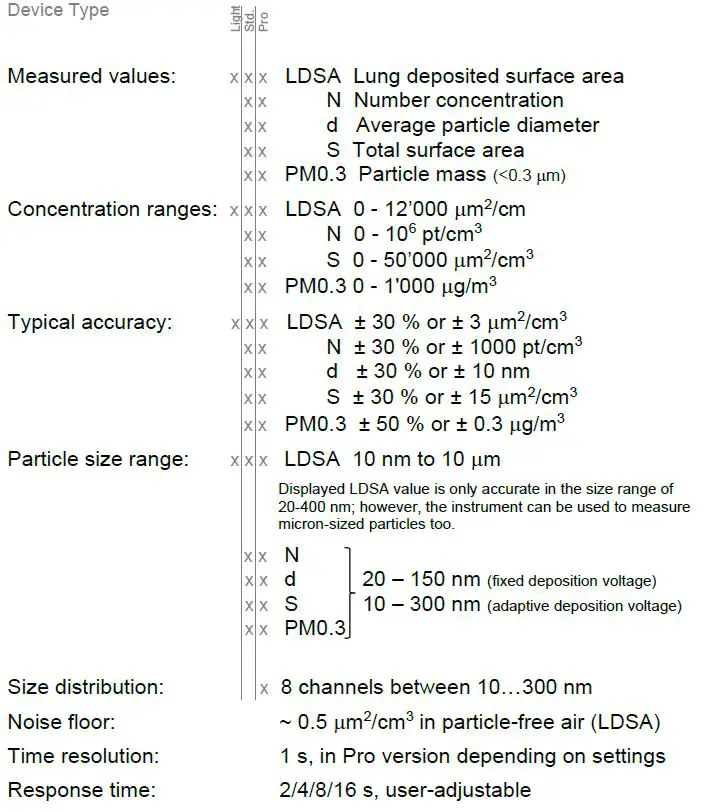
Beside the standard version of the Partector 2 that measures LDSA, N, d, S, and PM0.3, there is also a Partector 2 Light version that only measures LDSA. The Partector 2 Pro furthermore has also the ability to measure an 8-channel size distribution. All three versions can be equipped with a silent pump or are available as OEM.
Versions and order codes:
Product codes / Version name:
- 160: Partector 2 Light
- 161: Partector 2 Light silent
- 162: Partector 2 Light OEM
- 150: Partector 2
- 151: Partector 2 silent
- 152: Partector 2 OEM
- 170: Partector 2 Pro
- 171: Partector 2 Pro silent
- 172: Partector 2 Pro OEM
Specifications & device types
The measurement uncertainty of the Partector 2 standard version is largely determined by the unknown shape of the particle size distribution. It is calibrated for lognormal particle size distributions with a geometric standard deviation of 1.9, which is a reasonable assumption for many environments.
Note: if you measure particles of only a specific diameter (monodisperse particles), the Partector 2 diameter determination will be inaccurate, as will number, surface and mass determination. Contact naneos if you want to use the device for monodisperse particles.
The partector 2 Pro applies multiple deposition voltages and can therefore identify and indicate the particle size distribution of an aerosol of interest. The measurement is therefore more accurate for size distributions that do not have the assumed standard deviation of 1.9.
Measurements and accuracy
Time resolution in Pro version
The scanning through the different particle sizes needs some time based on the response time that is set in the menu. If you select a response time of 2s, you get a measurement point every 4s in the datafile. If you select 4s as response time you get a datapoint every 6s, if you select 8s you get a datapoint every 10s. etc.
Technical specifications
- Inlet flow: 0.5 l/min
- Operating Temperature: 0 – 40 °C
- Storage Temperature: -10 – 50 °C
- Relative Humidity: 10 % to 90%, non-condensing
- Operating height: 0 – 3000m above sea level
- Battery: Rechargeable Li-Ion, 12Wh
- Battery lifetime: ~ 24h (with a new battery; aging will occur; low power mode enabled, ~20h with silent pump)
- Battery Charging: via USB, 5V / 1.5A
- Data storage: µSD-card
- PC Interface: USB/serial by virtual COM-Port Serial port adapter for SD card available
- BT wireless range: 3 – 30 m, depending on obstacles
- BT frequency: 2.404 GHz – 2.480 GHz
- BT output power: 0 dBm
- Noise: ~ 35dB in 1m distance (standard pump) inaudible (silent pump)
- Dimensions: 8.8 x 14.2 x 3.4 cm
- Weight: 415 g (400 g with silent pump)
- Pollution degree: 2, or with cyclone at inlet 3.
Checking the shipment contents
When unpacking the device, verify that you have received the following items. If any of the components are missing or damaged, contact naneos.
| Type | Items |
|---|---|
| Standard | Partector 2 device |
| USB cable, 1.2m | |
| mSD-card 8 GB | |
| mSD/SD-card adapter or mSD/USB-adapter | |
| Carrying sleeve | |
| USB charger | |
| 12 cm Tygon tubing | |
| Peli case |
Storage and transport
- To avoid damage during storage and transport, please use original packaging.
- Avoid locations with high/low temperatures and high humid conditions or places that can get wet.
- Do not store the device with an empty battery.
- Do not store the device in direct sunlight.
- For longer storage, mount the inlet protection cap.
Getting started
Instrument description
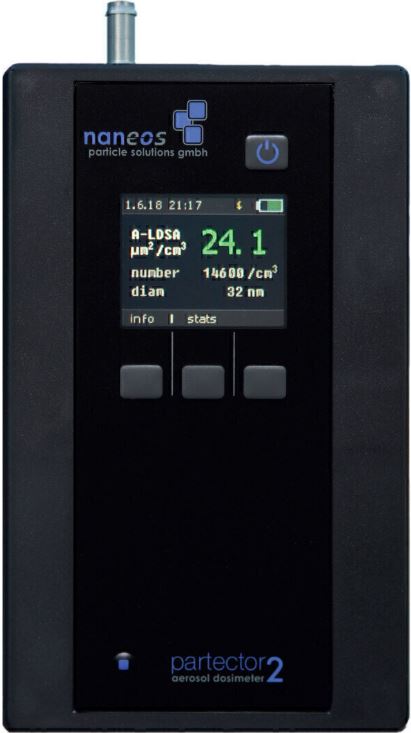
The Partector 2 is a hand-held, battery powered instrument to measure the lung deposited surface area (LDSA), the number concentration and the average particle diameter of nanoparticles. It displays the measured data on a graphical display and stores it on a µSD card. A user-defined LDSA alarm level can be set. If the alarm level is exceeded, the instrument’s internal buzzer is turned on to produce an audible warning. The device can communicate with Android smartphones or computers that support BT low energy.
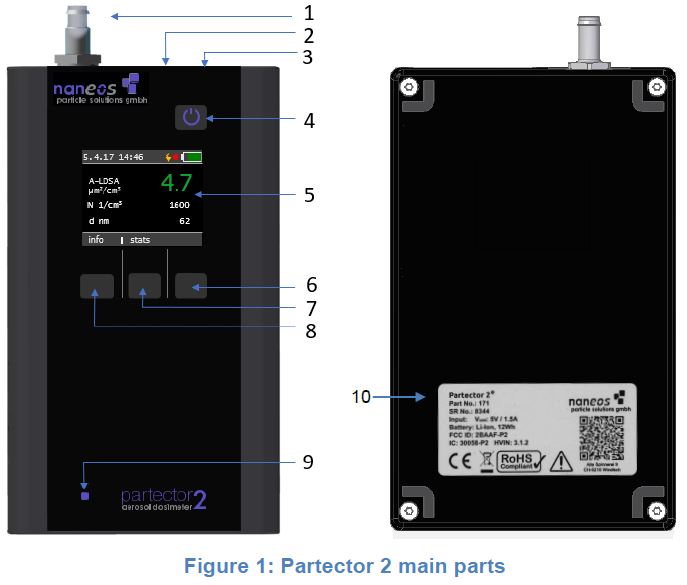
- aerosol inlet
- USB Port
- µSD card slot
- power button
- display
- right soft key
- middle soft key
- left soft key
- charge LED
- serial plate
Aerosol inlet and outlet
The aerosol inlet is located at the top of the instrument. The internal pump provides a regulated air flow of about 0.5 l/min. The standard aerosol inlet has a 6-mm barb for tubing connection and contains a coarse wire mesh to keep coarse dirt and small insects out of the instrument. The air exits the device via the slits in the right-hand side of the housing. Note that the air is not filtered internally, so do not connect the instrument to hazardous nanoparticle sources!
Tubing
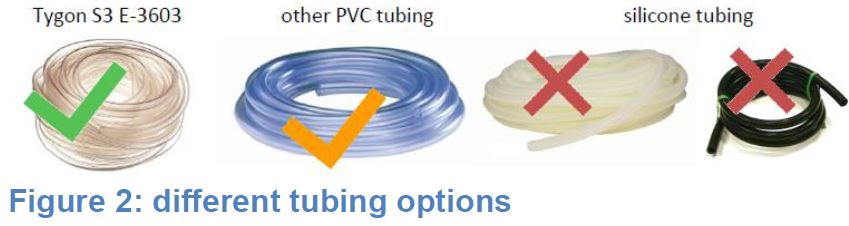
When using the Partector 2 with tubing make sure not to use conductive silicone tubing. It releases silanes which lead to rapid fouling of the Partector’s corona wire. We recommend using PVC tubing instead – a nice flexible version is Tygon S3 E-3603, a sample of which is included in the Partector 2 case. If in doubt about using tubing, please contact us. In any case, tubing should only be as long as necessary to prevent particle losses in the tubing.
Supplying power
To charge the Partector 2 or to operate it for periods longer than the battery lifetime, connect the Partector 2 USB port to a PC, Laptop or to a USB-charger or to a mobile power bank to charge the device. While charging, the blue charge LED on the front panel lights up. When the Partector 2 is fully charged, the LED turns off. The Partector 2 supports fast charging (1.5A charging current). For optimum charging, use the original USB power supply and USB cable. Some PC’s and USB power supplies only provide 0.5A charging current, which will prolong the charging duration.
Turning the device on and off
- To switch on the device, press the power button.
- To turn it off, press and hold the power button for two seconds and release it when the goodbye message appears.
Insert / remove µSD-card
- To store data on the microSD-card, insert it in the Partector 2 as shown in Figure 3 till it snaps in.
- To remove the µSD-card, press on the inserted card which will force the release. To insert the card in your SD-card slot on a PC you need to insert the card first in the SD/SD-card adapter or SD/USB adapter provided.
Recording measurements on the µSD-card
If a µSD-card is inserted in the Partector 2 before startup, the device automatically starts recording on the µSD-card when the device is turned on. It automatically generates a filename depending on start date, time and device serial. For more information about this, read the “Partector 2 data file” section. If you insert the µSD-card while the device is running, the data logging will start automatically. The Partector 2 will complain that the SD card is missing if it is not in the slot at startup. When the Partector 2 is recording data, you can see a blinking red dot in the status bar of the main screen.
Keypad functions & symbols
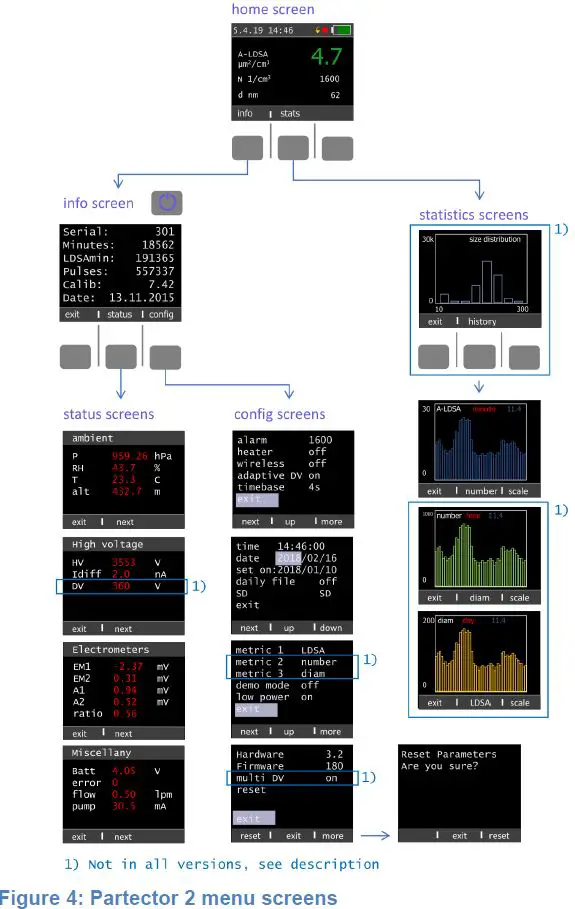
In the picture below, you can see the Partector 2 display screens:
Home screen
On the home screen you can see the LDSA, the number concentration, the average particle diameter, date and time and the charge state of the battery. If no key is pressed for more than one minute and the low power option is activated in the configuration, the display goes dark to prolong battery life. By pressing any key, the display turns on again.
- The lightning symbol indicates that the high voltage in the charger is on and working properly.
- The blinking red dot indicates that data is being written on µSD-Card.
- The exclamation mark indicates that an error occurred at some point during the current measurement.
Color coding of LDSA values
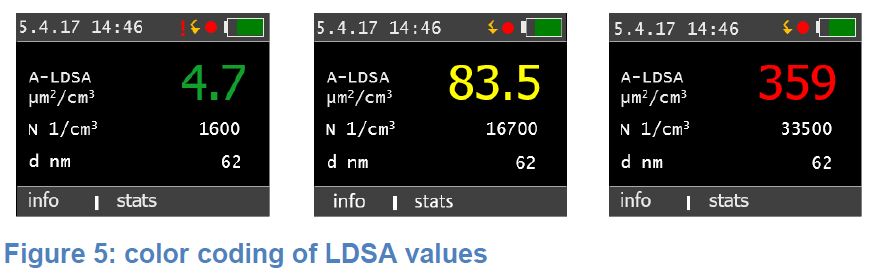
- The LDSA display is color-coded to provide a quick assessment of air quality.
- LDSA values below 50 µm2/cm3 are displayed in green, values above 250 µm2/cm3 in red, and values in between in yellow.
Info screen
The info screen displays device specific system information:
- Serial: serial number of the device
- Minutes: total operating time in minutes
- LDSAmin: LDSA value integrated over time
- Pulses: number of high voltage charging pulses
- Calib: calibration factor for LDSA
- Date: date of calibration
Pressing the “status” soft button brings you to the status screens. Pressing the “config” soft button brings you to the config screen.
Status screens
The status screens show the most important device data. You can switch between the individual status screens by pressing “next”.
Ambient
- p: air pressure [hPa]
- RH: internal relative humidity [%]
- T: internal temperature [°C]
- alt: calculated height above sea level [m]
Note: Altitude is calculated for average pressure. It may be off by several 100 meters if ambient air pressure is very high or low due to a high or low pressure zone passing through.
High voltage
- HV: charger corona voltage [V]
- Idiff: charger diffusion current [nA]
- DV: deposition voltage [V]
- (not in “Light” version)
Electrometers
- EM1: signal of electrometer 1 [mV]
- EM2: signal of electrometer 2 [mV]
- (not in “Light” version)
- A1: electrometer 1 amplitude [mV]
- A2: electrometer 2 amplitude [mV]
- (not in “Light” version)
- Ratio: Ratio A2 / A1
- (not in “Light” version)
Miscellany
- Batt: battery voltage [V]
- error: displays the current error status (0 = no error)
- flow: approximate flow through device [lpm]
- pump: pump current [mA]
Config screens
In the config screens, you can change some settings of the Partector 2.
- Alarm: use the “up” and “down” soft key to change the alarm level to the desired value. When the measurement value exceeds the alarm level, the internal buzzer of the Partector 2 will produce an audible warning.
- Heater: The Partector 2 can use the built-in buzzer for the alarm to heat the device slightly. This can only increase the temperature of the device by about 2°C compared to not using the heater; but this is sufficient to reduce the internal relative humidity by 5-10% depending on ambient conditions. If you are operating the Partector 2 in a very humid environment (e.g. in the tropics) the heater may help to avoid issues with high humidity. Please note that the heating power is low, so it will take several minutes to make a noticeable difference. Please also note that “wasting” power for heating the device will reduce battery life. For all normal conditions, it is recommended to keep the heater off. The heater will also turn on automatically if a relative humidity > 80% is detected.
- Wireless: The Partector 2 has a built-in wireless communication module. This allows other devices, like smartphones with BT low energy support, to receive data from the Partector 2 via wireless communication.
- Adaptive DV (not available in the “Light” version): The Partector 2 can either operate with a fixed voltage on the internal precipitator, and measure particles in the size range of 20-150nm, or it can switch to lower/higher deposition voltages if the particles are very small or very large – this is called the “adaptive DV” mode. In this mode, the Partector 2 can measure particle diameters from 10 – 300nm. However, there may be small jumps in the measured values at the times when it switches its internal precipitation voltage.
- Timebase: Here you can choose over which interval the Partector 2 should integrate its signals to calculate its readings. You can choose between 2, 4, 8 and 16 seconds. Shorter integration times give a faster response at the cost of higher noise levels.
- Time and Date: the internal clock of the Partector 2 has an accuracy of about 1s per day. It does not change to daylight saving time and back automatically. Therefore, you may need to set the clock from time to time. Press the “next” soft button until you are on the field you want to modify, then use the “up” and “down” soft buttons to change the field’s value.
- Daily file: If this is set to “on”, the partector 2 generates a measurement fil for each day. If it is set to “off”, the data will be stored in one single file till the measurement is finished by pressing the device turn off button.
- SD: The SD card of the Partector 2 can be used as a serial port if you need a serial connection to the device. Naneos offers an SD-to-serial adapter piece that you can use for this purpose. To use the SD card as a serial port, change the setting from SD to UART. You need to restart the Partector 2 for the change to become effective. In the UART mode, you can no longer use an SD-card, and the Partector 2 will no longer write data files to SD-cards! If you want to use this feature (e.g. to integrate the Partector 2 in a data acquisition system) please contact naneos for details.
- Metrics (metric 1, metric 2, metric 3) (not available in the “Light” version): The Partector 2 main screen is configurable – you can choose which metric you would like to have displayed as main information (large, metric 1), and which 2 additional metrics you would like to have displayed additionally (smaller, metrics 2 and 3). By default, metric 1 is LDSA, metric 2 is particle number, and metric 3 is average particle diameter. You can choose to change the order of these, and you can also choose to display calculated total surface area (instead of the lung-deposited fraction of the surface area), or calculated particle mass (PM0.3). Please note that the calculation of particle surface area and in particular of particle mass depend on a number of assumptions (particle density, morphology, shape of the particle size distribution) and are inherently less accurate than the standard metrics that are shown as default.
- Demo mode: In the demo mode, the entire screen of the Partector 2 changes to the color corresponding to the LDSA value, and only the LDSA value is shown in white. This mode can be helpful to demonstrate air quality changes.
- Low power mode: you can choose whether the device should operate in low-power mode or not. In low power mode, the display turns darker automatically after a minute of inactivity to increase battery lifetime, and turns off completely after 10 minutes of inactivity. Pressing any button (also the power button) will turn on the display again. The display will also turn on automatically if an error message is displayed.
- Hardware: shows hardware version of the device, only for information
- Firmware: shows firmware version of the device, only for information multi DV (only available in the “Pro” version): enables the 8-channel size distribution measurement. The “partector 2 Pro” iterates through different deposition voltages and performs a data inversion to measure a size distribution.
- Reset: Reset some of the device parameters to factory settings. This should not be used in normal operation.
Statistics screen
The statistics screen allows you to view the time series of the measured data over a recent time interval. Press the central soft button to change the displayed metric (LDSA, number concentration, average particle diameter). Press the “scale” soft button to change the time scale (last minute, last hour, last day). Please note that in the “Partector 2 Light” version only the LDSA history screen is available, and the size distribution screen is only available in the “Partector 2 Pro” version.
Extended information
Different inlet options
The Partector 2 comes with a standard inlet – a 6mm tube fitting with a steel mesh. You can use either this or you can add a cyclone in front of the tube inlet to remove coarse particles. The internal pump cannot support high pressure drops, so you should not use an impactor.
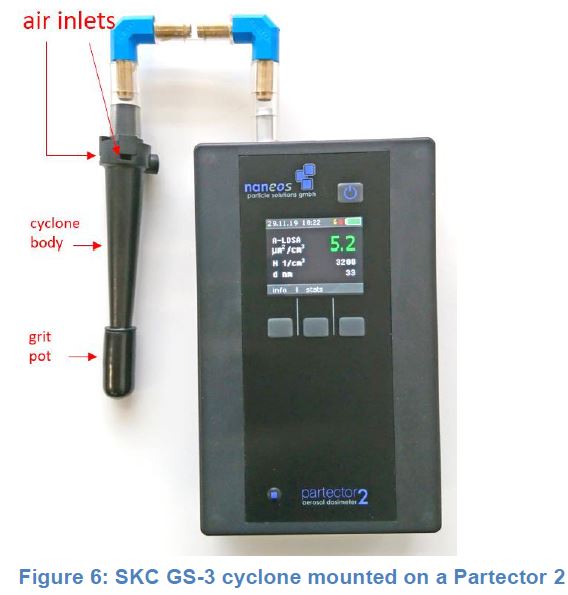
The Partector 2 is a miniature instrument with extremely sensitive internal electrometers. Fibers or dust particles which are larger than about 1 mm in size can produce short circuits in the instrument. Therefore, the tube inlet has a steel mesh to prevent coarse dust particles or small insects from entering the instrument. If you do not use the inlet, you risk aspirating coarse dust that may result in a deteriorated instrument performance. We recommend the use of a cyclone if you are measuring in dusty environments where a large number of coarse particles are present. For example, the SKC GS-3 cyclone would be useful for this purpose. https://www.skcinc.com/products/gs-3-respirable-dust-cyclone- conductive-25-mm
A possible assembly of the cyclone is shown in Figure 6.
- If you are certain that you have no coarse particles in your air (which is normally the case in ambient air), then you can also use the standard tube inlet.
- In normal ambient and indoor air measurements, no cyclone is necessary.
The Partector 2 data file
To view the measured and stored Partector 2 data, remove the SD and insert it in your PC as described in a previous section. Now you either download the Partector 2 data analysis tool from the naneos website to view the data or you open the data file with your favourite data analysis program (Excel, Origin, Igor etc). The data file is a simple tab-delimited text file. File names encode the recording time and device serial no. For example, if you start recording a file on 2nd August 2017 at 12:35:44 with a device with the serial no. 8019, the file will be stored in the folder 2018_08_02 with the file name 8019_123544.txt.
The Partector data analysis tool allows you to quickly view graphs of all instrument parameters, to average data in different intervals, and to combine measured data with a GPS signal and plot it in Google Earth. Read the separate quick guide on our website for more information.
Wireless communication
The Partector 2 supports wireless communication. It works in the advertising mode, i.e. it continuously sends out small data packets that can be read by nearby BT low energy (BLE) receivers. An Android app and an IoT solution are available. Visit our website for more information. If you wish to develop your own application to listen for the Partector 2 advertisments, this is fairly easy by scanning for nearby devices, filtering by the name “P2”, and reading the advertisment custom data. Contact naneos for details on the data format if you are interested in developing your own application.
Error messages
Error conditions
Whenever an operation parameter of the Partector 2 is outside of its normal range, a warning message appears on the Partector 2 screen. The warning shows up in red on the home screen:
There are different reasons for warnings to appear, and a click on the “show” soft button will display details on the warning. Some error conditions may disappear again by themselves (particularly such related to high humidity), upon which the warning message will also disappear again. However, it can be important to know that an error occurred, and therefore, a red exclamation mark remains in the title bar as a reminder that an error occurred at some point:
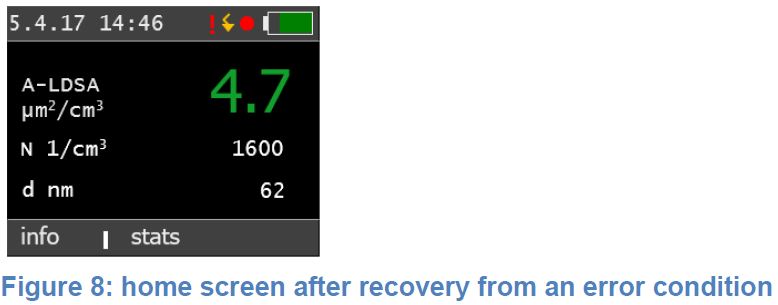
The following table gives an overview over the possible error conditions and on what to do to remove them.
| message | possible cause | what to do |
|---|---|---|
| SD card error: “Card missing?” “FS init” | – no SD card inserted |
– SD card initialisation problem
– bad card format
| – insert SD card
– reboot device
– format SD card
– try a different SD card
Pulse low error| – too high relative humidity
– device contamination
| – try measurement with lower humidity
– contact naneos
Pulse high error| – diffusion current does not reach setpoint| – contact
naneos for customer self-repair
Pulse unstable error| | – contact naneos
Ucor low| – high voltage module broken| – contact naneos for customer self-
repair
Dep volt. Low| – high voltage module broken| – contact naneos for customer
self-repair
Buffer overflow| – software loop time delayed.| – report error to naneos. You
can still measure with the device if it only appears infrequently.
RH high| – relative humidity is very high and may affect measurement| – if
possible, measure at lower RH (use a dryer at inlet or turn on heater)
EM 0 x.y mV| – high RH
– device contamination
| – if possible, measure at lower RH (use a dryer at inlet or turn on heater)
EM overflow| – extremely high aerosol concentration| – use a diluter for the
measurement as the instrument will age quickly
| | and readings will be inaccurate
---|---|---
EM1 gain error EM 2 gain error| – electrometer defective| – contact naneos
Flow error or pump current error| – pump defective
– clogged Inlet
| – check flow with a flowmeter
– clean the inlet
– contact naneos
Selftest error| | – contact naneos and report error code on display
Calib error| | – contact naneos
Some of the error conditions are rather harmless (e.g. high electrometer zero offset, high RH error), whereas others like the pulse errors or broken high voltage modules will interfere with a correct measurement. If you experience frequent errors, please contact us by email, and send us a description of the error message, what you were doing when it occurred, and the data file of that measurement. A data file helps us a lot in diagnosing the problem. In the datafile, errors are coded bitwise and summed up to a single number. For decoding these numbers see the reference in section “related documents”.
Multi DV errors in “partector 2 Pro”
| message | possible cause | what to do |
|---|---|---|
| Multi DV fail file missing | – Data inversion file inversion.txt on the uSD- | |
| card is missing | – Copy the device specific file inversion.txt onto |
the uSD-Card that will be used with the device.
– If you lost this file, contact naneos.
Multi DV fail file corrupt| – Data inversion file is present on the uSD- Card but is incorrect| – Contact naneos for the correct file
Maintenance
- High voltage is present in the device – do not open! unless you have received other instructions from naneos.
Clean the device
- Use a soft, slightly damp cloth to clean the housing surface.
Clean the inlet
- The inlet has a small grid to prevent insects and large fibers from entering the device.
- It is unavoidable that dirt and fibers accumulate there, which will also influence the measurement after a certain time.
- This grid must therefore be cleaned from time to time.
- From firmware 257 onwards, there is a reminder on the display every 1000h that the inlet should be cleaned.
To clean the inlet, remove it by turning it counterclockwise with a 14mm open- end wrench, then blow out the grid from the inside with a compressed air gun. Alternatively clean the inlet with water, in an ultrasonic bath. Dry the inlet thoroughly because the remaining water could damage the device. Make sure the grid is fully cleaned by looking through it. The inlet must then be screwed back on until a noticeable resistance confirms that it is properly seated.
Disposal
- The device contains a lithium-ion battery and must be disposed of accordingly.
- Under no circumstances should it be disposed of with domestic refuse, nor crushed or burnt. Naneos offers to take products back for correct disposal.
Standards and approvals
- Hereby, naneos particle solutions GmbH declares that the radio equipment type Partector 2 is in compliance with the directive 2014/53/EU.
- The full text of the EU declaration of conformity is available at the following internet address: www.naneos.ch/pdf/partector2-DoC.pdf
FCC STATEMENT
Statements FCC
Changes or modifications not expressly approved by the party responsible for compliance could void the user’s authority to operate the equipment. This device complies with part 15 of the FCC Rules. Operation is subject to the following two conditions:
- This device may not cause harmful interference.
- This device must accept any interference received, including interference that may cause undesired operation.
This equipment has been tested and found to comply with the limits for a Class B digital device, pursuant to part 15 of the FCC Rules. These limits are designed to provide reasonable protection against harmful interference in a residential installation. This equipment generates, uses and can radiate radio frequency energy and, if not installed and used in accordance with the instructions, may cause harmful interference to radio communications. However, there is no guarantee that interference will not occur in a particular installation. If this equipment does cause harmful interference to radio or television reception, which can be determined by turning the equipment off and on, the user is encouraged to try to correct the interference by one or more of the following measures:
- Reorient or relocate the receiving antenna.
- Increase the separation between the equipment and receiver.
- Connect the equipment into an outlet on a circuit different from that to which the receiver is connected.
- Consult the dealer or an experienced radio/TV technician for help.
IC interference statement
This device complies with Industry Canada license-exempt RSS standard(s). Operation is subject to the following two conditions:
- this device may not cause interference.
- this device must accept any interference, including interference that may cause undesired operation of the device.
Related documents
- Partector 2 quick start guide: www.naneos.ch/pdf/partector2_quick_guide.pdf
- Partector 2 data analysis tool quick start guide:
- In-depth explanation of lung-deposited surface are (LDSA)
- Error codes and decoding in the data file
Customer service & contact
naneos particle solutions gmbh
- Alte Spinnerei 9
- 5210 Windisch Switzerland
- Mail: info@naneos.ch
- Phone: +41 56 560 20 70
- www.naneos.ch
References
- naneos - miniature nanoparticle detectors made in Switzerland
- naneos - miniature nanoparticle detectors made in Switzerland
- GS-3 Respirable Dust Cyclone, Conductive, 25 mm | Order High-Quality GS-3 Respirable Dust Cyclone, Conductive, 25 mm Products at SKC, Inc.
Read User Manual Online (PDF format)
Read User Manual Online (PDF format) >>